Power / Batteries & Chargers
User Guide for Goal Zero Yeti 12V Car Charging Cable
Quick guide for the Goal Zero Yeti 12V Car Charging Cable. Learn how to connect, use the 5A/10A switch, troubleshoot red indicator lights, and replace the 15A fuse.
Table of contents
Quick Guide from the Manual
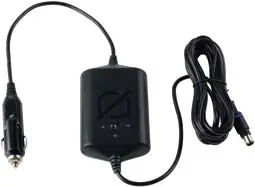
The Goal Zero Yeti 12V Car Charging Cable is designed to safely and efficiently charge Sherpa 100AC and Yeti Power Stations from a 12V vehicle outlet. The cable features a built-in 5A/10A switch to accommodate different vehicle power outputs and includes a user-replaceable 15A fuse for protection.
Safety Instructions
- Do not use outdoors: Keep the charger away from wet or damp conditions to prevent electric shock.
- Handle with care: Do not abuse the cord or charger. Ensure the cord is not stepped on, tripped over, or subjected to sharp edges.
- Low Voltage Protection: The charger has built-in protection to prevent draining your car battery when the vehicle is turned off.
- Battery Compatibility: Charge only one lithium-ion rechargeable battery at a time.
- Prohibited Use: Do not use this cable with Goal Zero Yeti Lead-Acid 400 or 1250 power stations.
How It Works
- Connect the 12V male cigarette end of the cable into your vehicle's 12V cigarette lighter socket.
- Connect the other end (8mm connector) to the input port of your Sherpa 100AC or Yeti Power Station.
- The LED indicator light will glow solid green when charging. The input indicator on the power station will also illuminate.
- For optimal performance, use the charger while the vehicle engine is running.
- If the indicator light turns red, try switching the setting from 10A to 5A or test a different 12V outlet in the vehicle.
Troubleshooting
Indicator Light is Red:
- Switch Settings: Change the switch from 10A to 5A. Some vehicles cannot maintain a 10A output.
- Check Outlets: Test other 12V outlets in your vehicle to see if they support the 10A setting.
- Replace Fuse: If the cable is not functioning and the light remains red on all outlets, the fuse may be blown.
How to Replace the Fuse:
- Unscrew the tip of the male 12V cigarette plug.
- Carefully remove the 15A tube fuse inside.
- Inspect the fuse to see if it is blown.
- Replace with a new 15A tube fuse (commonly available at auto parts stores).
Technical Specifications
- Input: 12V Male Cigarette Plug
- Output: 8.0mm (12V, up to 10A)
- Switch: 12V 5A / 12V 10A
- Fuse: 15A glass tube fuse
- Cable Dimensions: 120 x 2.5 x 1 in (304.8 x 6.35 x 2.54 cm)
Manufacturer information
Goal Zero
Practical help
Common problems
Indicator light turns red
Switch the setting from 10A to 5A, try a different 12V outlet in the vehicle, or check if the fuse is blown.
Cable not functioning
Unscrew the tip of the 12V plug, inspect the 15A tube fuse, and replace it if it is blown.
Before use
- Ensure the vehicle engine is running for optimal charging performance.
- Verify that your power station is compatible (Sherpa 100AC and Yeti Power Stations).
- Check that the 12V outlet is functional.
- Ensure the 5A/10A switch is set correctly for your vehicle's capability.
Specs in practice
- 5A/10A Switch
- Allows you to limit current draw if the vehicle's 12V outlet cannot handle 10A.
Images and diagrams
- The cable consists of a 12V male plug (containing a 15A fuse), a control box with an LED indicator and a 5A/10A switch, and an 8mm output connector.
Model compatibility
- Compatible with Sherpa 100AC and Yeti Power Stations.
- Do not use with Goal Zero Yeti Lead-Acid 400 or 1250 models.

Manual page author
David Miller
Documentation analyst
Organizes user manual content into clear summaries, with attention to model details, product context, and everyday usability.