Power / Batteries & Chargers
User Manual for GoGEN PB 200008 S Power Bank
Comprehensive user guide for the GoGEN PB 200008 S power bank. Learn how to charge your devices, recharge the power bank, check battery capacity, and follow essential safety guidelines.
Quick answers from the manual
Quick answer
- The GoGEN PB 200008 S is a 20,000 mAh power bank. It charges devices automatically when connected and features an LCD display for capacity status. p. 8, 9
Key actions
- Charge the power bank p. 9
- Check battery capacity p. 9
First start
- Fully charge the power bank before first use. p. 9
Show 3 more answers Show less
Maintenance and reset
- Perform a full charge every three months. p. 9
Technical specifications
| Parameter | Value | Meaning | Pages |
|---|---|---|---|
| Battery type | Li-pol | Lithium-polymer battery | p. 9 |
| Capacity | 20 000 mAh | Total energy storage | p. 9 |
Where to find it in the PDF
- Device Layout p. 8
- Technical Specifications p. 9
Table of contents
Quick guide from the manual
The GoGEN PB 200008 S is a 20,000 mAh power bank designed to charge mobile devices. It features an automatic power-on function when a device is connected and turns off automatically 20 seconds after disconnection. You can check the remaining battery capacity by pressing the main button.
Device Layout
The power bank includes the following components:
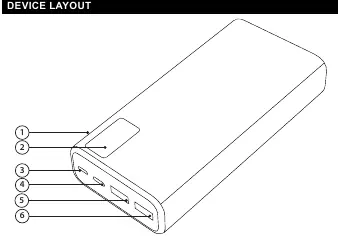
- ON button: Used to check capacity or wake the device.
- LCD display: Shows the current battery charge percentage.
- Micro USB input: For charging the power bank.
- USB-C input/output: Supports charging the power bank and charging devices (supports Power Delivery).
- USB 1 & 2 outputs: Standard USB ports for charging mobile devices.
Charging mobile devices
To charge your mobile device, connect a charging cable to one of the USB outputs or the USB-C output on the power bank and the other end to your mobile device. Charging starts automatically. To utilize the Power Delivery (PD) function, ensure you are using a compatible charging cable (not included).
Charging the power bank
Connect the power bank to a power source with a minimum output of 5V/2A using a charging cable. You can use either the Micro USB or the USB-C input port on the device.
Safety and Maintenance
- First use: Fully charge the power bank before using it for the first time.
- Maintenance: Perform a full charge every three months to maintain battery health.
- Temperature: It is normal for the casing to become warm during charging; it will cool down after charging is complete.
- Restrictions: Do not disassemble, drop, or expose the device to water, high humidity, heat sources, or open flames.
- Storage: Keep out of reach of children. Do not leave the device in a car where it may be exposed to high temperatures and direct sunlight.
- Supervision: Never charge the battery unattended.
Practical help
Common problems
Device not charging
Ensure you are using a compatible charging cable and that the power bank has sufficient charge.
Power bank casing is warm
It is normal for the casing to become warm during charging; it will gradually cool down to room temperature after charging is complete.
Before use
- Fully charge the power bank before the first use.
- Use a standard, compatible charging cable.
- Ensure the device voltage is 5V before charging.
- Keep the device away from water and damp environments.
Show more Show less
Specs in practice
- PD (Power Delivery)
- Requires a compatible cable (not included) for fast charging capabilities.
Images and diagrams
- 2. LCD display
- 3. Micro USB input
- 4. USB-C input/output
- 5. USB 1 output
- 6. USB 2 output
Model compatibility
- Requires a compatible cable for Power Delivery (PD) function.
- Input source must provide at least 5V/2A.

Manual page author
Emily Carter
User documentation editor