Power / Power Banks
User Manual for Comsol 2200mAh Power Bank CP22 Series
Quick guide for the Comsol 2200mAh Power Bank (CP22 Series). Learn how to charge the power bank, charge your devices, check battery capacity, and follow safety guidelines.
Quick answers from the manual
Quick answer
- To charge the power bank, connect it to a wall charger using the included micro USB cable. To charge a device, connect it to the USB output port using your device's charging cable. p. 3
Key actions
- Fully charge the power bank for 7 to 8 hours before first use. p. 4
- Charge and discharge the power bank once every three months if not in use. p. 4
First start
- Charge the power bank for 7 to 8 hours before the first use. p. 4
Show 3 more answers Show less
Maintenance and reset
- Charge and discharge the power bank once every three months if stored for long periods. p. 4
Technical specifications
| Parameter | Value | Meaning | Pages |
|---|---|---|---|
| Capacity | 2200mAh | Total battery capacity | p. 2 |
| Input | DC 5V 1A | Charging input requirement | p. 2 |
| Output | DC 5V 1A | Charging output capability | p. 2 |
Where to find it in the PDF
- Layout and Features p. 2
- Charging Instructions p. 3
- Capacity and Safety p. 4
Table of contents
Manual images
Click an image to enlargeQuick guide from the manual
To ensure optimal performance, fully charge the power bank for 7 to 8 hours before its first use. The device is designed to charge smartphones, smartwatches, and other USB-powered devices. If the power bank is not used for long periods, charge and discharge it once every three months to maintain battery health.
Device Layout
The power bank features three main components:
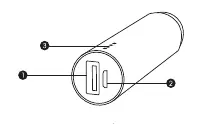
- USB Output (1): Used to connect and charge your mobile device.
- Micro USB Input (2): Used to charge the power bank itself.
- Capacity LED indicators (3): Displays the remaining battery level.
To Charge Power Bank
Follow these steps to recharge the power bank:
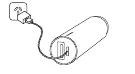
- Use the included micro USB cable.
- Connect the larger USB-A connector to a USB wall charger.
- Connect the smaller micro USB connector to the input port on the power bank.
- The LED indicators will flash to show charging status.
- When charging is complete, all four LED indicators will remain on.
To Charge Phone or USB Device
Follow these steps to charge your device using the power bank:
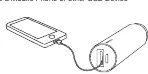
- Connect your device's charging cable to the USB-A output connector on the power bank.
- Connect the other end of the cable to your device.
- Charging should commence automatically.
- If your device uses a standard micro USB Type B connector, you can use the included cable.
- The power bank will automatically turn itself off when your device is fully charged.
To Check Remaining Capacity
To view the remaining battery level, connect your phone or device to the power bank. The LEDs will indicate the capacity and turn off automatically after about 5 seconds.
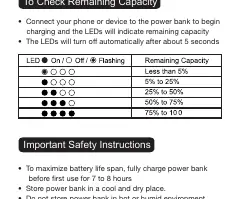
- 4 LEDs on: 75% to 100%
- 3 LEDs on: 50% to 75%
- 2 LEDs on: 25% to 50%
- 1 LED on: 5% to 25%
- Flashing LED: Less than 5%
Safety Instructions
- Store the power bank in a cool and dry place.
- Do not store in hot or humid environments.
- Operating temperature should be between -10°C and 45°C.
- The power bank may feel warm during charging; this is a normal operating condition.
- Do not dispose of the power bank in heat or fire.
- Do not clean with harmful chemicals or detergents.
- Avoid dropping or applying excessive force to the device.
Technical Specifications
- Capacity: 2200mAh
- Input: DC 5V 1A
- Output: DC 5V 1A
- Charging Time: 4 to 5 hours
- Watt Hour Rating: 8.1Wh
- Size: 102mm (L) x 23mm (W) x 23mm (H)
- Weight: 62g
Practical help
Common problems
Power bank feels warm during charging
This is a normal operating condition and is not a cause for concern.
LEDs turn off quickly
The LEDs turn off automatically after about 5 seconds when checking capacity.
Before use
- Fully charge the power bank for 7 to 8 hours before first use.
- Ensure you have the included micro USB cable.
- Verify your device is compatible with USB charging (5V 1A).
- Check that the environment is cool and dry.
Show more Show less
Specs in practice
- Charging Time
- 4 to 5 hours to fully recharge the power bank.
Images and diagrams
- Port 1 is the USB Output for charging your devices.
- Port 2 is the Micro USB Input for charging the power bank.
- Indicator 3 shows the battery level via LED lights.
Model compatibility
- Compatible with iPhone/iPod.
- Compatible with most smartphones (Samsung, LG, Sony, HTC, Nokia, Microsoft, Huawei, Motorola, Google, OnePlus, Oppo).
- Compatible with smartwatches, fitness trackers, digital cameras, portable gaming consoles, eReaders, drones, and Bluetooth devices.

Manual page author
Emily Carter
User documentation editor