Toys / RC Models & Drones
User Guide for HyperJuice 245W USB-C Battery Pack
Quick guide for the HyperJuice 245W USB-C Battery Pack. Learn how to connect devices, recharge the battery, understand power distribution, and view safety instructions.
Quick answers from the manual
Quick answer
- The HyperJuice 245W USB-C Battery Pack is a 27000mAh portable power bank with 4 USB-C ports, capable of delivering a total of 245W. It supports passthrough charging and features an OLED display for status monitoring. p. 3, 10, 12
Key actions
- Connect devices to the USB-C ports to begin charging. p. 5
- Recharge the battery pack using a 100W USB-C PD charger. p. 6, 8
First start
- Fully charge the external battery before using it for the first time. p. 7
Show 3 more answers Show less
Problems and fixes
Product is hot, emitting odor, or deformed
Stop using and contact manufacturer.
p. 7Technical specifications
| Parameter | Value | Meaning | Pages |
|---|---|---|---|
| Capacity | 27000mAh / 100Wh | Total energy storage | p. 10 |
| Max Output | 245W | Total power delivery capacity | p. 10 |
| Dimensions | 191 x 81 x 28 mm | Physical size | p. 10 |
Where to find it in the PDF
- Product Overview p. 4
- Specifications p. 10
Table of contents
Manual images
Click an image to enlargeQuick guide from the manual
The HyperJuice 245W USB-C Battery Pack is a high-capacity portable charger designed for multiple devices. It features a 27000mAh capacity, 100Wh rating, and a total output of 245W. It is designed to be airline-safe and portable.
Product Overview
The device features an OLED display and four USB-C ports:
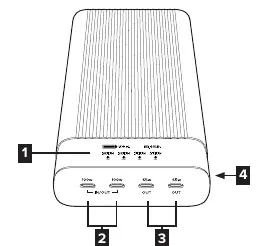
- OLED Display: Shows battery power and charging status.
- USB-C Port (100W Max): Used for connecting devices or recharging the battery pack with a USB-C PD power adapter.
- USB-C Port (65W Max): Used for connecting devices.
- OLED Display On/Off Button: Toggles the display.
How to Connect
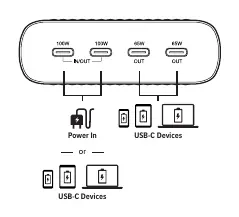
Connect your USB-C devices to the appropriate ports based on their power requirements. Ports 1 and 2 support up to 100W, while ports 3 and 4 support up to 65W. The battery pack can charge multiple devices simultaneously.
Recharging the Battery Pack
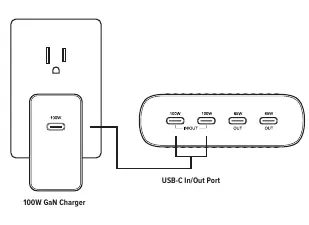
To recharge the HyperJuice battery pack, use a USB-C PD charger. A 100W USB-C PD charger is recommended for the fastest recharging speed. The manufacturer suggests using the HyperJuice 100W GaN Charger or the HyperJuice 245W GaN Desktop Charger.
OLED Display
The OLED display provides real-time information, including:

- Battery status (percentage).
- Time to fully charge.
- Input/Output mode.
- Power input/output wattage.
Press the On/Off button to turn the display on or off.
Power Distribution
The battery pack intelligently distributes power based on the number of devices connected. The total output capacity is 245W. Charging rates may vary depending on the devices being charged and the number of ports in use.
Safety Instructions
Follow these safety guidelines to ensure proper operation:
- Store in a cool, dry place.
- Recommended storage temperature: -20°C to 45°C (< 3 months) or -20°C to 25°C (< 12 months).
- Operating temperature: 0°C to 30°C.
- Do not disassemble, modify, or attempt to re-purpose the product.
- Do not operate in enclosed or unventilated environments (e.g., carrying bags, pockets) to prevent overheating.
- Fully charge the battery before first use.
- Avoid drops, bumps, and impacts.
- Do not clean with harmful chemicals or detergents.
- Use only original or certified cables.
- Keep away from moisture and do not submerge in liquid.
- Keep away from children under 3 years old.
Specifications
- Power Capacity: 100Wh / 27000mAh
- Battery Cell: Lithium Ion
- Power Input: Max 100W USB-C Power Delivery
- Max Total Power Output: 245W
- Ports: 4 x USB-C
- Dimensions: 191 mm x 81 mm x 28 mm
- Weight: 765g
- Protection: Over-current, Over-voltage, Over-temperature, Short-circuit protection
Manufacturer information
Hyper Bicycles, Inc.
Practical help
Common problems
Product is excessively hot, emitting odor, or deformed
Stop using the product immediately and contact the manufacturer.
Slow recharging of the battery pack
Ensure you are using a 100W USB-C PD charger for fast recharging.
Before use
- Fully charge the battery pack before using it for the first time.
- Ensure you are using certified USB-C cables.
- Check that the operating environment is not enclosed or unventilated.
- Verify the device is within the operating temperature range (0°C to 30°C).
Show more Show less
Specs in practice
- Power Capacity
- 27000mAh / 100Wh, which is airline-safe.
- Max Total Output
- 245W, distributed across 4 USB-C ports.
- Passthrough Charging
- Allows you to recharge the battery pack and connected devices at the same time.
Images and diagrams
- The OLED display shows battery percentage, time to full charge, and individual port power output.
- Ports 1 and 2 are capable of 100W output/input.
- Ports 3 and 4 are capable of 65W output.
Model compatibility
- Supports PD2.0/3.0, PPS, QC2.0/3.0/4.0+, Apple 2.4A, BC1.2, AFC, and FCP protocols.

Manual page author
David Miller
Documentation analyst