Power / Power Banks
User Manual for Pisen Sunny Power 22.5W 10000mAh Mini Power Bank
Quick guide for the Pisen Sunny Power 22.5W 10000mAh Mini Power Bank (TP-D096). Learn how to use the built-in cables, operate the power button, activate low current mode, and follow safety precautions.
Quick answers from the manual
Quick answer
- The Pisen Sunny Power 22.5W 10000mAh Mini Power Bank (TP-D096) features built-in Type-C and Lightning cables, a USB-A output, and a Type-C input/output port. It supports 22.5W fast charging and a low current mode for smaller devices. p. 1
Key actions
- Start charging p. 1
- Enter low current mode p. 1
Technical specifications
| Parameter | Value | Meaning | Pages |
|---|---|---|---|
| Capacity | 10000mAh | Total battery capacity | p. 1 |
| Max Power | 22.5W | Maximum output power | p. 1 |
Show 1 more answers Show less
Where to find it in the PDF
- Specifications and Operation p. 1
Table of contents
Important Information
The Pisen Sunny Power 22.5W 10000mAh Mini Power Bank (TP-D096) is designed for charging mobile devices. It features built-in Type-C and Lightning cables, a USB-A output, and a Type-C input/output port. Always ensure the device is used within the specified temperature range of 0°C to 35°C.
Product Interface
The device includes the following interface elements:
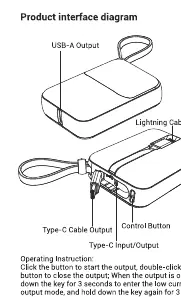
- USB-A Output
- Lightning Cable
- Type-C Cable
- Type-C Input/Output Port
- Control Button
Operation
Starting Output: Click the control button to start the power output.
Low Current Mode: To charge small devices that require low current, double-click the button for 3 seconds to enter low current mode. To exit this mode, hold the button for 3 seconds.
Safety Precautions
- Do not place the product on flammable surfaces such as carpets or quilts.
- Do not disassemble, squeeze, or pierce the product.
- Keep the product away from fire, water, and corrosive liquids.
- Do not use the power bank if it is wet.
- Keep the operating temperature between 0°C and 35°C.
- Stop using the product immediately if it swells or malfunctions.
Technical Specifications
- Battery Capacity: 10000mAh / 3.7V 37Wh
- Rated Capacity: 5500mAh (2A)
- Maximum Power: 22.5W
- Dimensions: 85 x 61 x 27mm
- Weight: Approx. 193.5g
Manufacturer information
Guangdong Pisen Electronics Co., Ltd.
Practical help
Common problems
Device not charging
Ensure the power bank is turned on by clicking the control button.
Small device (e.g., earbuds) not charging
Double-click the button for 3 seconds to enter low current mode.
Before use
- Check the battery level
- Ensure the ambient temperature is between 0°C and 35°C
- Verify the charging cable is connected properly
- Ensure the device is not placed on a flammable surface like a carpet
Show more Show less
Specs in practice
- Rated Capacity
- 5500mAh(2A) - The actual usable capacity of the battery at a 2A output.
Images and diagrams
- The interface diagram illustrates the location of the USB-A output, Lightning cable, Type-C cable, and the control button.
Model compatibility
- Compatible with devices requiring DC input.
- Supports fast charging up to 22.5W.

Manual page author
Emily Carter
User documentation editor