Power / Power Banks
User Manual for Comsol 2200mAh Power Bank AP22 Series
Quick guide for the Comsol 2200mAh Power Bank (AP22 Series). Learn how to charge the power bank, charge your devices, and follow safety guidelines for optimal battery life.
Quick answers from the manual
Quick answer
- To charge the power bank, connect the included micro USB cable to a USB wall charger and the power bank's input port. To charge a device, connect your device's charging cable to the power bank's USB output port. p. 1
Key actions
- Fully charge the power bank for 7-8 hours before first use. p. 1
- Charge and discharge the power bank once every three months if not in use. p. 1
First start
- Charge the power bank for 7-8 hours before first use. p. 1
Show 3 more answers Show less
Maintenance and reset
- Charge and discharge the power bank once every three months if stored for long periods. p. 1
Technical specifications
| Parameter | Value | Meaning | Pages |
|---|---|---|---|
| Capacity | 2200mAh | Battery storage capacity | p. 1 |
| Input | 5V 1A | Charging power required for the bank | p. 1 |
| Output | 5V 1A | Power delivered to devices | p. 1 |
Where to find it in the PDF
- User Manual p. 1
Table of contents
Manual images
Click an image to enlargeQuick guide from the manual
The Comsol 2200mAh Power Bank is designed to provide portable power for smartphones and other USB-powered devices. Before first use, it is essential to fully charge the power bank for 7 to 8 hours. The device features a Micro USB input for charging the power bank itself and a standard USB output for charging your mobile devices.
Product Layout
The power bank consists of the following components:
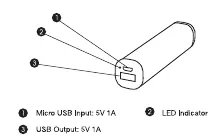
- Micro USB Input (5V 1A): Used to charge the power bank.
- USB Output (5V 1A): Used to charge your mobile device.
- LED Indicator: Displays charging status.
Charging the Power Bank
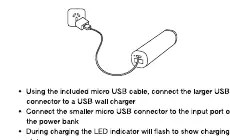
- Connect the larger USB-A connector of the included micro USB cable to a USB wall charger.
- Connect the smaller micro USB connector to the input port on the power bank.
- During charging, the LED indicator will flash.
- When charging is complete, the LED indicator will remain on.
Charging your device
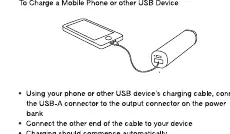
- Connect your device's charging cable to the USB output connector on the power bank.
- Connect the other end of the cable to your device.
- Charging should commence automatically.
- If your device uses a standard micro USB Type B connector, you can use the included cable.
- The power bank will automatically turn off when your device is fully charged.
Safety Instructions
- To maximize battery life, fully charge the power bank before first use (7-8 hours).
- Store in a cool and dry place.
- Do not store in hot or humid environments.
- Operating temperature should be between -10°C and 45°C.
- If not used for long periods, charge and discharge the power bank once every three months.
- The power bank may feel warm during operation; this is normal.
- Do not dispose of in fire or heat.
- Do not clean with harmful chemicals or detergents.
- Avoid dropping or applying excessive force.
Technical Specifications
- Capacity: 2200mAh
- Watt Hour Rating: 8.1Wh
- Input: DC 5V 1A
- Output: DC 5V 1A
- Charging Time: 4 to 5 hours
- Weight: 88g
- Dimensions: 91mm (L) x 21mm (W) x 21mm (H)
Practical help
Common problems
Power bank feels warm during use
This is a normal operating condition and should not be a cause for concern.
LED indicator not flashing during charge
Ensure the USB wall charger is working and the cable is securely connected to both the wall charger and the power bank input port.
Before use
- Charge the power bank fully for 7 to 8 hours before the first use.
- Ensure you have a compatible USB wall charger (5V 1A).
- Verify the charging cable is in good condition.
Show more Show less
Specs in practice
- 5V 1A Input/Output
- Standard power rating for charging the bank and outputting power to devices.
- Operating Temperature
- Must be kept between -10°C and 45°C for safe operation.
Images and diagrams
- The layout diagram identifies the Micro USB input port, the USB output port, and the LED indicator location.
- The charging diagrams illustrate the correct cable orientation for charging the power bank versus charging a mobile device.
Model compatibility
- Compatible with most smartphones (Samsung, LG, Sony, HTC, Nokia, Microsoft, Huawei, Motorola, Google, OnePlus, Oppo).
- Suitable for fitness trackers, digital cameras, portable gaming consoles, eReaders, drones, and Bluetooth devices.

Manual page author
David Miller
Documentation analyst