Home Appliances / Vacuum Cleaners
Operating Instructions for Goldair 132cm DC Ceiling Fan GPCF300B/W
Quick guide for the Goldair 132cm DC Ceiling Fan (GPCF300B/W). Includes installation steps, remote control pairing, safety precautions, and troubleshooting tips.
Table of contents
Manual images
Jump to the sectionQuick guide from the manual
This document provides essential installation and operating instructions for the Goldair 132cm DC Ceiling Fan (Model GPCF300B/W). The fan must be installed by a qualified professional. Ensure a minimum clearance of 2.1m from the floor and 1.5m from walls to the blades. If you observe unusual oscillating movement, stop using the fan immediately and contact support.
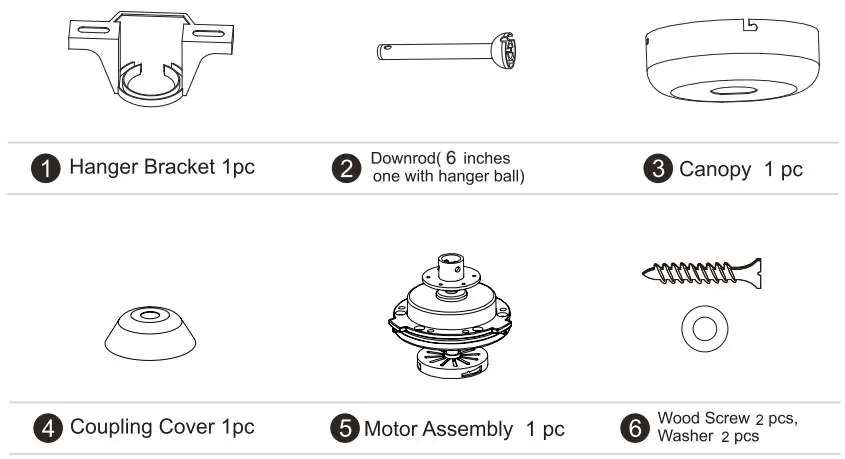
Safety Precautions
- Installation must be performed by a qualified installer.
- Turn off power before any assembly or disassembly.
- Ensure all screws are tightened during installation.
- Do not connect the fan to a dimmer switch or regulator.
- Keep the fan away from flammable areas, oily environments, wet/humid areas (like bathrooms), and areas exposed to continuous wind.
- Ensure hands are dry when handling the plug or unit.
- Keep objects at least 1 meter away from the fan.
Installation
The installation process involves several key steps:
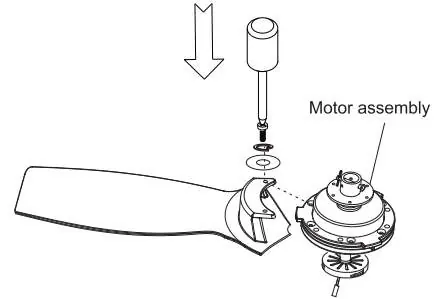
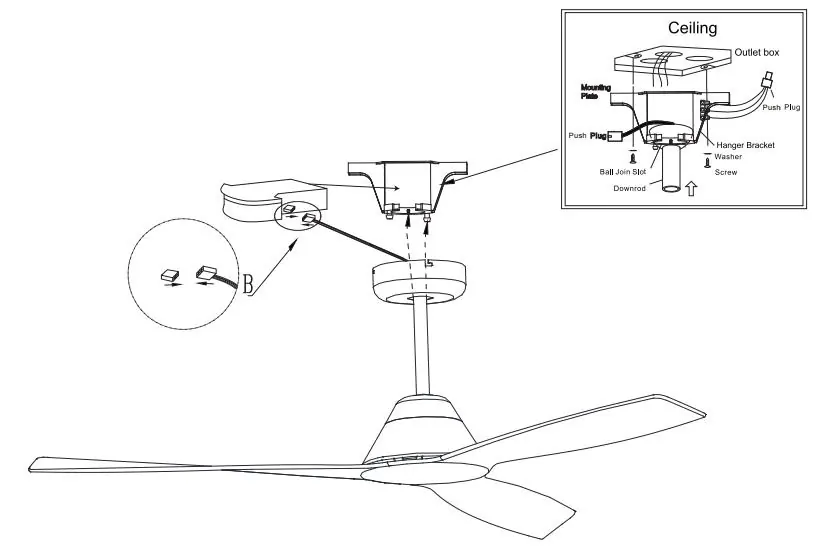
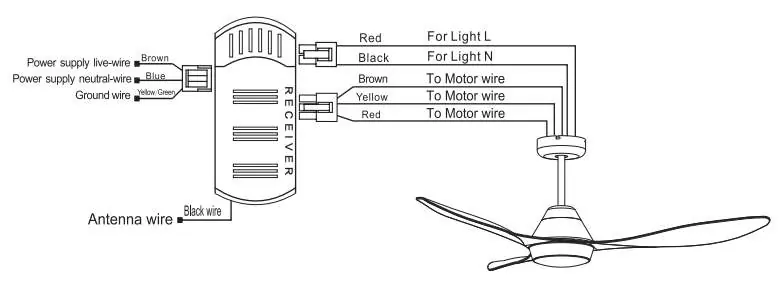
- Fixing the Hanging Bracket: Secure the bracket to a wooden beam (GIB ceilings) or use expansion plugs for concrete ceilings.
- Assembling the Blade: Attach the 3 blades to the upper aligning plate using the provided screws and washers.
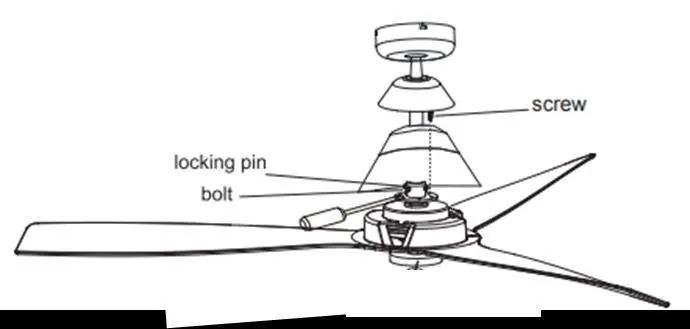
- Motor and Down Rod Assembly: Secure the motor housing, thread wiring through the down rod, and attach the canopy and hanger ball.
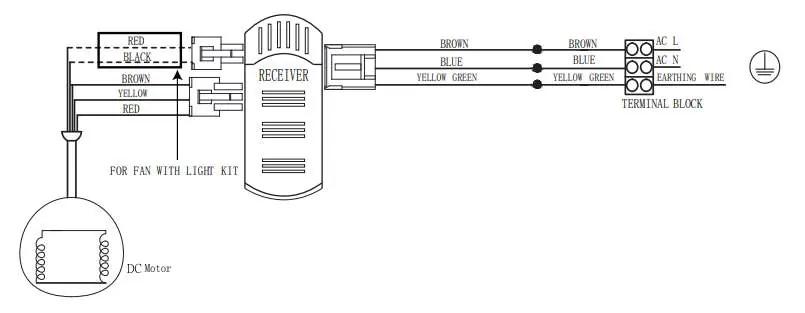
- Wiring: Use the quick-connect system to join male and female couplings between the fan, receiver, and power supply.
- Mounting: Place the hanger ball into the bracket, ensuring the groove aligns with the lugs. Secure the canopy to the mounting bracket.
Remote Control Operation
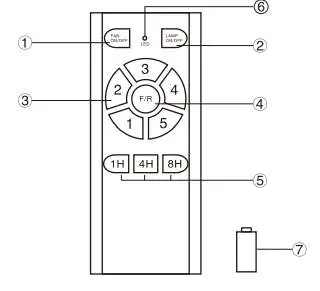
The remote controls fan speed (1-5), light (if applicable), timer, and summer/winter mode. To pair a new remote: turn on the wall power switch, and within 30 seconds, press the FAN ON/OFF button for 5 seconds until a long beep is heard.
Cleaning and Maintenance
Clean periodically with a soft, lint-free cloth. Do not use water, as it may damage the motor or cause electric shock. The motor features permanently lubricated bearings and does not require oiling.
Troubleshooting
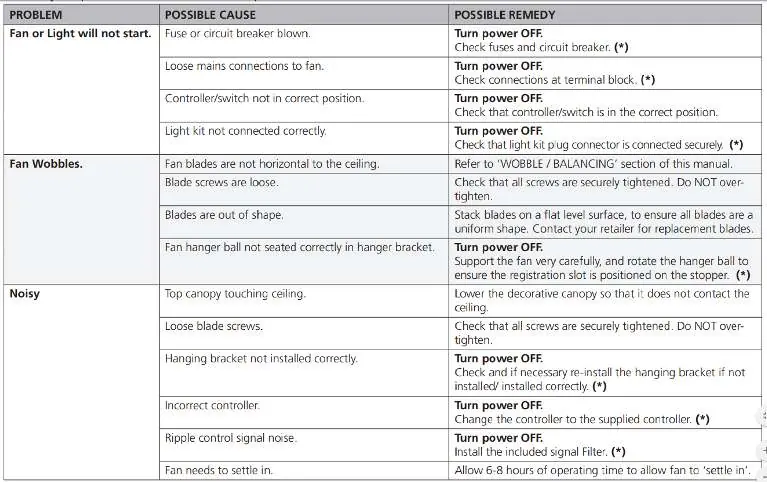
If the fan does not start, check fuses, circuit breakers, and terminal block connections. If the fan wobbles, ensure blade brackets are tight and blades are level. If the fan is noisy, ensure the canopy is not touching the ceiling and all screws are secure.
Manufacturer information
Goldair
Practical help
Common problems
Fan or light will not start
Check fuses/circuit breakers, ensure terminal block connections are secure, and verify the controller/switch is in the correct position.
Fan wobbles
Check that all blade brackets are tight, ensure blades are level, and verify the hanger ball is seated correctly in the bracket.
Noisy operation
Ensure the top canopy is not touching the ceiling, check for loose blade screws, and verify the hanging bracket is installed correctly.
Before use
- Ensure the fan is ceiling mounted with at least 2.1m floor clearance.
- Verify that the installation surface complies with building regulations.
- Ensure all screws are tightened securely.
- Check that blades are not obstructed and can turn freely.
- Confirm the electrical supply includes an isolation switch.
- Ensure the remote control has the included A23 battery installed.
Images and diagrams
- The manual includes detailed diagrams for the hanging bracket installation on different ceiling types.
- Wiring diagrams illustrate the quick-connect system for the receiver and motor.
- Remote control layout identifies buttons for speed, timer, and light functions.
Model compatibility
- Not compatible with dimmer switches or regulators.
- Intended for household use only; not for commercial or industrial environments.
- Not suitable for outdoor use or areas with high humidity/moisture.

Manual page author
Emily Carter
User documentation editor
Prepares concise manual descriptions and highlights the most useful setup, operation, and maintenance information for readers.