Hvac / Heat Pumps
Goldair 10L Dehumidifier (GSD185) Operating Instructions
Comprehensive operating instructions for the Goldair 10L Dehumidifier (Model GSD185), covering safety guidelines, setup, control panel operation, maintenance, and troubleshooting.
Table of contents
Manual images
Jump to the sectionProduct Overview
The Goldair 10L Dehumidifier (Model GSD185) is a portable household appliance designed to reduce humidity levels in indoor environments. It features an adjustable humidity setting, fan speed control, and a built-in timer. The unit is equipped with a water tank that collects moisture, and it includes a sensor to automatically stop operation when the tank is full.
Safety Precautions
Your safety is paramount. This appliance uses R290 flammable refrigerant. It must be installed, operated, and stored in a room with a floor area larger than 4 square metres. Never cover the dehumidifier, as this poses a fire risk and will permanently disable the unit. Keep all objects at least 1 metre away from the front, sides, and rear of the appliance. Do not use the unit in small rooms occupied by persons unable to leave on their own without supervision. The appliance must not be connected to external timers or switching devices.
Operating Instructions
Before first use, allow the unit to stand upright for one hour after transport to let the refrigerant settle. Ensure the unit is on a flat, stable, heat-resistant surface. Use the control panel to set the desired humidity level between 40% and 80% in 5% increments. The compressor will stop when the ambient humidity is 2% lower than the set level and restart when it is 2% higher. The timer can be programmed from 0 to 24 hours. Always ensure windows and doors are closed for optimal performance.
Maintenance and Care
Regular maintenance is essential for efficiency. Unplug the unit before cleaning. Use a damp cloth to wipe the exterior; never use abrasive cleaners, benzene, or thinners. The air filter should be cleaned regularly using a vacuum or water; ensure it is completely dry before reinstallation. Never operate the unit without the air filter. If you require permanent drainage, a tube (not supplied) can be connected to the drain spout, ensuring the hose end is lower than the drain opening to prevent flooding.
Troubleshooting and Support
If the unit fails to operate, check the power connection and ensure the water tank is correctly positioned. If the unit is not extracting water, verify that the air filter is clean and that the room temperature or humidity is not too low. For further assistance, contact Goldair New Zealand at 0800 232 633 or [email protected], or Goldair Australia at 1300 465 324 or [email protected].
Manufacturer information
Goldair
Practical help
Common problems
Unit will not turn on
Ensure the power plug is securely connected to the mains supply.
Unit is not extracting water
Check if the water tank is full or incorrectly positioned; clean the air filter if clogged; ensure ambient temperature/humidity is not too low.
Unit reduces humidity only by small amounts
The room may be too large for the unit's capacity, there may be too many humidity sources, or excessive ventilation (open windows/doors).
Before use
- Ensure all packaging materials are removed.
- Place the unit on a flat, stable, heat-resistant surface.
- Allow the unit to stand upright for one hour after transport.
- Ensure the water tank is correctly inserted.
- Close all external windows and doors in the room.
- Verify the room size is at least 4 square metres.
Specs in practice
- Humidity Setting
- Adjustable from 40% to 80% in 5% increments.
Images and diagrams
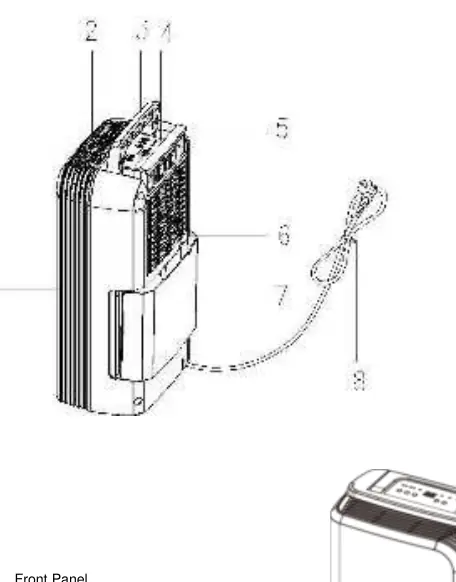
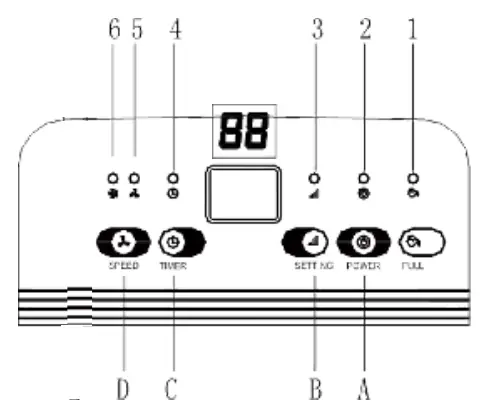
- The control panel features buttons for Power, Humidity Setting, Timer, and Fan Speed.
- LED indicators show status for Water Full, Power, Setting, Timer, and Fan Speed levels.
- The water tank is located at the rear of the unit and must be properly seated for operation.
Model compatibility
- Not for use with external timers or remote-control switching devices.
- Not recommended for use in ambient temperatures exceeding 35°C or below 5°C.
- Requires a drainage tube (not supplied) for permanent drainage.

Manual page author
Emily Carter
User documentation editor
Prepares concise manual descriptions and highlights the most useful setup, operation, and maintenance information for readers.