Electronics / Routers
Goldair Platinum 107cm Tower Fan with WiFi
Operating instructions for the Goldair Platinum 107cm Tower Fan with WiFi (Model GPTF470), covering assembly, safety, operation, and smart app connectivity.
Table of contents
Manual images
Jump to the sectionProduct Overview
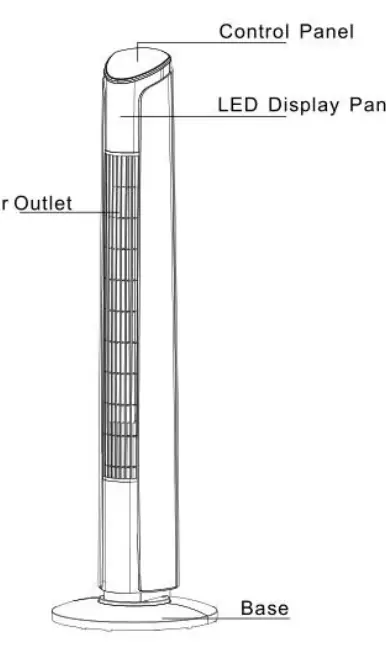
The Goldair Platinum 107cm Tower Fan with WiFi (Model GPTF470) is a high-quality, portable cooling appliance designed for household use. It features multiple speed settings, oscillation, and various operating modes to ensure comfort. The unit is equipped with smart functionality, allowing control via a dedicated mobile application.
Safety Guidelines
Safety is paramount when operating this appliance. Always keep objects at least 1 meter away from the front, sides, and rear of the fan. The unit is not intended for use by children or persons with reduced physical or mental capabilities without supervision. Never operate the fan if the power cord is damaged, and ensure it is plugged directly into a wall socket. Do not use the fan in areas where flammable liquids are stored, near water, or outdoors. Always unplug the appliance when not in use and before cleaning.
Assembly
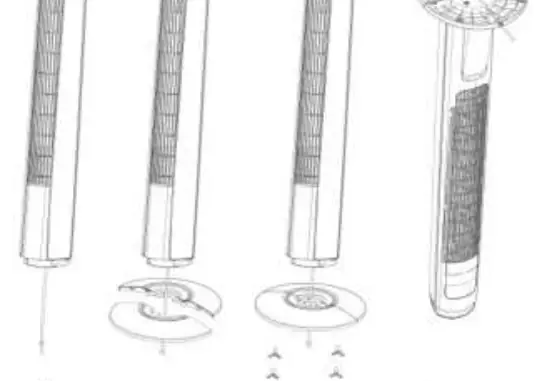
The tower fan requires simple assembly before first use. The base consists of two parts that fit around the oscillation base. Align the front half with the screw holes, lead the power cord through the center, and snap the back half into place. Secure the base using the four provided screws and thread the power cord through the designated cut-outs at the bottom.
Operating Instructions
The fan can be operated via the top control panel or the included remote control. Users can adjust fan speeds (low, medium, high) and select from four modes: Normal, Natural, Sleep, and Child mode. The unit also includes a timer (1 to 12 hours) and an oscillation function. The fan head can be tilted backward for directional airflow.
WiFi Connectivity
This fan supports 2.4GHz WiFi networks. To use the smart features, download the Goldair mobile app from the App Store or Google Play. Register an account, follow the in-app instructions to pair the device, and ensure your smartphone is connected to a 2.4GHz network during the setup process.
Maintenance and Cleaning
Regular maintenance ensures trouble-free operation. Always switch off and unplug the fan before cleaning. Use a damp cloth to wipe the exterior and a vacuum cleaner to remove dust and fluff from the air vents and grills. Do not attempt to dismantle the unit, as there are no user-serviceable parts inside.
Manufacturer information
Goldair
Practical help
Common problems
Fan does not work or is not working properly
Contact the place of purchase. Do not attempt repairs yourself.
Overheating
Ensure air vents and grills are free of dust and fluff; clean regularly with a vacuum.
Remote control not working
Ensure the CR2025 battery is correctly installed and not depleted.
Before use
- Ensure all packaging is removed from the unit.
- Check for transport damage upon unpacking.
- Verify all parts are present.
- Ensure the fan is fully assembled before plugging in.
- Place on a dry, level, and sturdy surface.
- Ensure the power cord is fully unrolled.
- Check that the fan switch is in the off position before plugging into the wall.
Specs in practice
- Battery Type
- CR2025 coin type battery for remote control
Images and diagrams
- The base assembly involves two parts that snap together around the oscillation base and are secured with four screws.
- The power cord must be threaded through the center hole and the bottom cut-outs of the base.
- The fan head can be adjusted by pulling the top backward.
Model compatibility
- The WiFi feature is only supported on 2.4GHz WiFi channels.
- The device does not operate on 3G or 4G internet connections.

Manual page author
Emily Carter
User documentation editor
Prepares concise manual descriptions and highlights the most useful setup, operation, and maintenance information for readers.