Hvac / Heat Pumps
Goldair Platinum 100cm Multi Season 3n1 Bladeless Tower Heater & Fan (GPTF480)
Comprehensive operating instructions for the Goldair Platinum 100cm 3n1 Bladeless Tower Heater, Fan, and Air Purifier with Wi-Fi connectivity.
Table of contents
Product Overview
The Goldair Platinum 100cm Multi Season 3n1 Bladeless Tower Heater & Fan (GPTF480) is a versatile appliance designed for year-round comfort. It functions as a heater, a cooling fan, and an air purifier. The unit features a bladeless design, making it safer and easier to clean, and includes integrated Wi-Fi for smart control via the Goldair mobile app.
Safety Precautions
Your safety is paramount. Always ensure the appliance is placed on a flat, stable, and heat-resistant surface. Never cover the heater, as this poses a significant fire risk and will trigger the safety fuse, permanently disabling the unit. Maintain a minimum distance of 1 metre from the front, sides, and rear of the appliance to any flammable materials, including curtains and furniture. Do not use the device in small, confined spaces or near water sources like baths or swimming pools. Always unplug the unit when not in use and ensure it is switched off before removing the plug from the wall socket.
Operating Instructions
The appliance is operated exclusively via the included remote control or the Goldair mobile app. The remote allows you to adjust fan speeds, toggle between heating and cooling modes, set oscillation, and activate the air purification function. In heating mode, the unit offers 7 heat settings, while cooling mode provides 12 fan speeds. Note that in heating mode, the unit will run continuously for 6 hours before requiring a manual reset. The air purification mode utilizes a HEPA filter and UV lights to remove allergens from the air.
Wi-Fi and App Setup
To use the smart features, download the Goldair app from the App Store or Google Play. The device requires a 2.4GHz Wi-Fi network. To enter pairing mode, ensure the device is in stand-by mode, then press and hold the power button for approximately 5 seconds until the Wi-Fi icon flashes. Use the app's 'Auto Scan' feature to connect the device to your home network.
Maintenance and Safety Features
The unit is equipped with a tilt switch that automatically turns it off if it is not in the correct operating position. It also features a resettable thermal link and a non-resettable thermal fuse to prevent overheating. Regular maintenance is essential; unplug the unit and use a vacuum cleaner to remove dust and fluff from the air vents and grills. The HEPA filter should be replaced after 600 hours of use. Never use abrasive cleaning agents or immerse the unit in liquid.
Manufacturer information
Goldair
Practical help
Common problems
Unit does not turn on
Ensure it is plugged in, switched on at the wall, and not in stand-by mode. Check if the tilt switch has been activated.
Overheating
Unplug the unit, allow it to cool for 10 minutes, and clean the air vents and grills of any dust or fluff.
Wi-Fi pairing fails
Ensure your phone is on a 2.4GHz network and the device is in pairing mode (flashing Wi-Fi icon).
Heating mode stops after 6 hours
This is a safety feature. Switch the unit off and back on to reset.
Before use
- Remove all packaging from the unit.
- Place on a flat, stable, heat-resistant surface.
- Ensure hands are dry before handling the plug.
- Check that the cord is not damaged or coiled.
- Ensure the unit is at least 1 metre away from flammable materials.
- Verify the appliance is fully assembled.
Specs in practice
- Heating Mode Wattage
- 2000W power consumption for heating.
- Cooling Mode Wattage
- 33W power consumption for fan operation.
Images and diagrams
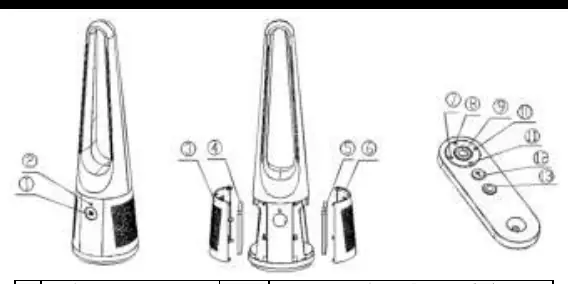
- The remote control features buttons for power, mode, oscillation, timer, and speed adjustments.
- The display provides visual feedback on settings.
- The magnetic holder on the back of the unit is for storing the remote control.
- The air grill and filter housing are located on the unit for air intake and purification.
Model compatibility
- Requires 2.4GHz Wi-Fi network for app connectivity.
- Not compatible with 3G or 4G internet connections for setup.
- Remote control uses a CR2032 coin battery.

Manual page author
Michael Turner
Technical manual editor
Reviews PDF manuals for structure, safety notes, and practical product details so readers can find the right information quickly.