Hvac / Heat Pumps
Goldair 10L Dehumidifier with WiFi
Comprehensive operating instructions for the Goldair 10L Dehumidifier with WiFi (Model GPDH480), covering safety, setup, app connectivity, and maintenance.
Table of contents
Manual images
Jump to the sectionProduct Overview
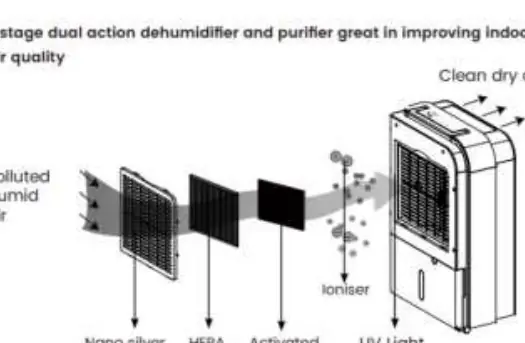
The Goldair 10L Dehumidifier with WiFi (Model GPDH480) is a versatile 5-stage dual-action appliance designed to improve indoor air quality. It features a built-in UV-C lamp, ioniser, and a multi-stage filtration system including a nano-silver coated pre-filter, HEPA filter, and activated carbon filter. This unit is intended for household use only and provides efficient moisture removal alongside air purification capabilities.
Safety Precautions
Your safety is paramount. Always operate the unit on a flat, stable, and heat-resistant surface. Keep all objects at least 200mm away from all sides of the appliance to ensure proper airflow. Never cover the unit, as this poses a fire risk and will trigger the safety fuse. Do not use the dehumidifier in small rooms occupied by individuals unable to leave on their own without supervision. The unit contains a UV-C lamp; do not attempt to open the housing or replace the lamp yourself, as exposure to UV-C radiation can be harmful to skin and eyes.
Operating Modes
The dehumidifier offers several modes to suit your environment: Smart mode maintains a target humidity of 50%RH automatically. Heater mode provides a small amount of supplemental heat (16-30 degrees). Dehumidifier mode allows manual adjustment of target humidity (35-80%) and fan speed. Air Purifier mode focuses on air quality improvement without extracting moisture. The unit also includes a continuous drainage option for long-term use, requiring a 15mm inner diameter pipe.
WiFi and App Connectivity
This model is WiFi-enabled, allowing control via the Goldair mobile app. The app supports 2.4GHz WiFi networks. To pair, hold the 'MODE' button on the control panel for 5 seconds until the 'SMART' indicator flashes rapidly. The app provides advanced scheduling, remote control of all modes, and device grouping features.
Maintenance and Care
Regular maintenance is essential for optimal performance. Unplug the unit before cleaning. Vacuum the air vents and grills regularly to prevent dust buildup. Clean the air filters every two weeks; the mesh filter can be washed in warm soapy water, while the HEPA and carbon filters should be vacuumed and replaced every 3-6 months. Never operate the unit without the antibacterial mesh filter in place.
Manufacturer information
Goldair
Practical help
Common problems
Both fan and compressor are not working
Check the mains power supply and ensure the control panel is switched to 'ON'.
Not collecting water
Ensure room humidity is above the set target level and clean the air intake filter.
Unit is making loud noise
Re-position the unit on an even, stable surface.
Leaking from the unit
Check that the water tank is installed correctly or allow the unit to thaw if frozen.
Before use
- Remove all packaging from the unit.
- Place on a flat, stable, heat-resistant surface.
- Ensure all external windows and doors are closed.
- Check that the water container is positioned correctly.
- Allow the unit to stand for one hour after transport to let the refrigerant settle.
- Ensure hands are dry before handling the plug.
Specs in practice
- Unit Capacity
- Maximum moisture removal of 10L per day at 20°C and 60% relative humidity.
- Water Tank Capacity
- The internal reservoir holds 6.5L of water before requiring emptying.
- Sound Pressure Level
- The operating noise level is 45dB(A).
- Max Rated Input Power
- The unit consumes up to 710W during operation.
Images and diagrams
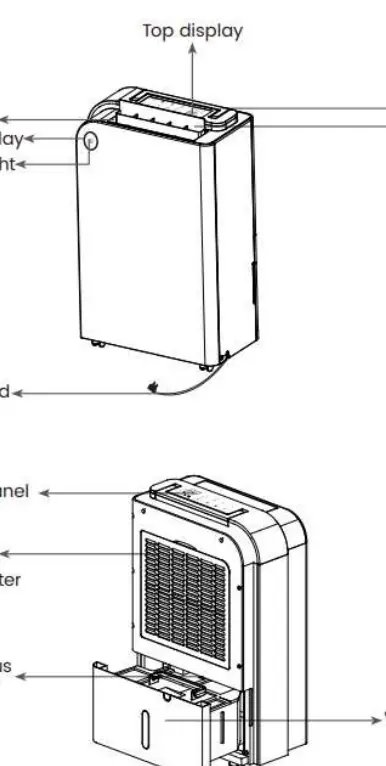
- The control panel allows selection of modes, fan speeds, timer settings, and child lock activation.
- The rear of the unit houses the air filters and the continuous drain port.
- The remote control mirrors the functionality of the main control panel.
- The 5-stage purification process involves air passing through a pre-filter, HEPA filter, carbon filter, ioniser, and UV light.
Model compatibility
- The mobile app is only supported on 2.4GHz WiFi channels.
- The unit is not compatible with external timers or smart plugs that switch power on/off automatically.
- Continuous drainage requires a plastic pipe with a 15mm inner diameter.

Manual page author
David Miller
Documentation analyst
Organizes user manual content into clear summaries, with attention to model details, product context, and everyday usability.