Home Appliances / Dehumidifiers
User Manual for Goldair 10L Dehumidifier GPDH480
Quick guide for the Goldair 10L Dehumidifier GPDH480. Learn how to operate, set up WiFi, maintain filters, and troubleshoot common issues.
Table of contents
Manual images
Click an image to enlargeImportant Information
This dehumidifier is designed for household use only. It features a 5-stage purification system, WiFi connectivity, and multiple operating modes. Always ensure the unit is placed on a flat, stable, heat-resistant surface with at least 200mm of clearance on all sides.
Safety Precautions
- Do not cover the appliance to avoid fire risk.
- Keep all objects at least 1 metre away from the air outlet.
- Do not use in small rooms occupied by persons unable to leave on their own without supervision.
- Never use the appliance to dry clothes directly; maintain a distance of at least 1.5m.
- Do not use with external timers or switching devices.
- Unplug the unit before cleaning or maintenance.
- The unit contains a UV-C lamp; do not attempt to replace it yourself.
Product Overview
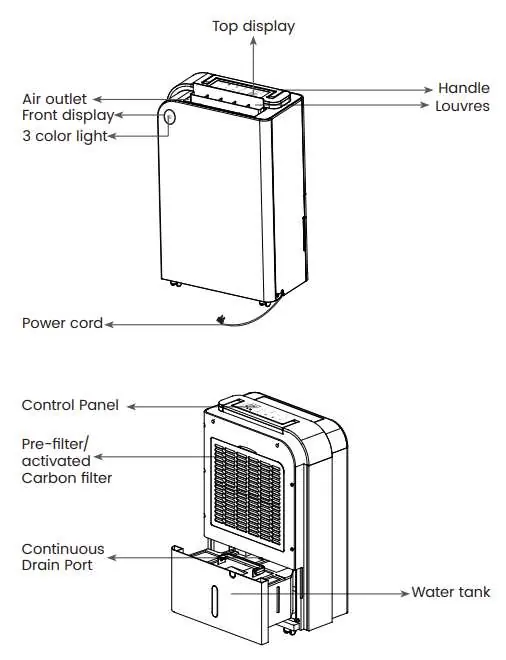
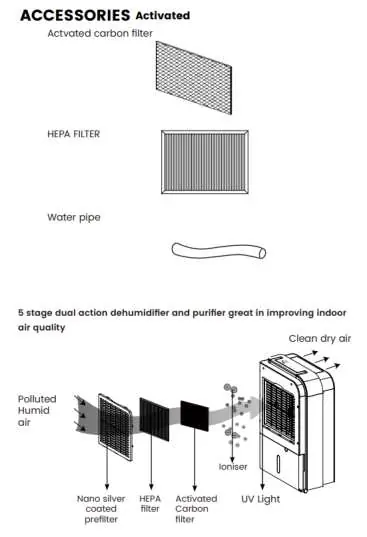
The unit features a top display, control panel, and air outlet. The rear houses the pre-filter, activated carbon filter, and continuous drain port. The 5-stage purification system includes a nano silver coated pre-filter, HEPA filter, activated carbon filter, ioniser, and UV light.
Operating Your Dehumidifier
Modes:
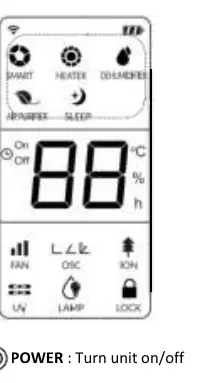
- Smart: Target humidity is fixed at 50%RH. Fan speed adjusts automatically.
- Heater: Produces a small amount of heat (16-30°C). Note: This is not a primary heater.
- Dehumidifier: Adjustable target humidity (35-80%) and fan speed.
- Air Purifier: Improves air quality using filters; no dehumidification occurs.
Functions:
- Fan Speed: Choose between Turbo, Normal, and Low.
- UV & Ion: Controlled by a single button to cycle through UV, Ion, both, or neither.
- Swing: Adjusts the louvre angle (45-90 degrees).
- Child Lock: Press and hold the Swing button to lock the control panel.
- Timer: Set ON/OFF times up to 24 hours.
WiFi and App Setup
This unit is WiFi enabled for control via the Goldair app. Ensure your phone is connected to a 2.4GHz network.
- Download the Goldair app and register an account.
- To enter pairing mode, press and hold the 'MODE' button on the control panel until the buzzer sounds and the 'SMART' indicator flashes.
- Follow the in-app instructions to 'Add Device' and connect to your WiFi.
Care and Cleaning
- Filters: Clean the pre-filter, HEPA, and carbon filters every 2 weeks using a vacuum or soft brush. Replace HEPA and carbon filters every 3-6 months. Do not wash HEPA or carbon filters.
- Water Tank: Clean every few weeks with mild detergent. Ensure it is securely seated after reinsertion.
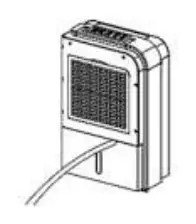
- Continuous Drainage: To set up, cut the cover on the back, connect a 15mm inner diameter pipe, and ensure it runs downward using gravity.
Troubleshooting
- Unit not working: Check power supply and ensure the control panel is ON.
- Not collecting water: Check if room humidity is already below the set level or if the filter is blocked.
- Loud noise: Ensure the unit is on a flat, stable surface.
- Leaking: Check if the water tank is installed correctly or if the unit has frozen.
Technical Specifications
- Model: GPDH480
- Supply: 220-240VAC 50Hz
- Max Rated Input Power: 710W
- Capacity: 10L/day max (at 20°C/60%RH)
- Water Tank Capacity: 6.5L
- Sound Pressure Level: 45db(A)
Manufacturer information
Goldair
Practical help
Common problems
Both fan and compressor are not working
Check the mains power supply and ensure the control panel is switched to 'ON'.
Not collecting water
The unit will not operate if room humidity is already below the set level. Also, check if the air intake filter is blocked.
Unit is making loud noise
Re-position the unit on a flat, stable surface.
Leaking from the unit
Remove the water tank and re-fit it correctly, or check if the unit has frozen (unplug and allow to warm up).
Before use
- Remove all packaging from the unit.
- Place on a flat, stable, heat-resistant surface.
- Ensure at least 200mm clearance on all sides.
- Let the unit stand for one hour after transport before connecting to power.
- Ensure all external windows and doors are closed.
- Verify the water container is positioned correctly.
Images and diagrams
- The unit features a top display, handle, louvres, and front display.
- The rear contains the pre-filter/activated carbon filter and continuous drain port.
- The 5-stage purification system includes a nano silver pre-filter, HEPA filter, activated carbon filter, ioniser, and UV light.
Model compatibility
- WiFi app requires a 2.4GHz Wi-Fi network.
- Not compatible with 3G or 4G internet connections.

Manual page author
David Miller
Documentation analyst
Organizes user manual content into clear summaries, with attention to model details, product context, and everyday usability.