Power / Solar Inverters
User Manual for GoodWe GT G1 100-150kW Grid-tied Inverter
Quick guide for the GoodWe GT G1 100-150kW grid-tied inverter. Includes installation steps, electrical connection diagrams, troubleshooting, and technical specifications.
Table of contents
Manual images
Click an image to enlargeQuick guide from the manual
This document provides essential information for the installation, electrical connection, commissioning, and maintenance of the GoodWe GT G1 100-150kW series inverters. Always follow local regulations and safety standards when working with this equipment.
Safety Precautions
Only qualified professionals should install or maintain this equipment. Always use personal protective equipment (PPE) and insulating tools. Ensure the inverter is powered off and fully discharged (wait 5 minutes) before performing any maintenance. Do not touch the product during operation due to high-temperature hazards.
Product Overview
The GT G1 series is a three-phase PV string grid-tied inverter. It features integrated AFCI protection, optional PID restoration, and various communication interfaces including RS485, WiFi, and LAN. The front panel includes indicators for Power, Running, Communication, and Fault status.
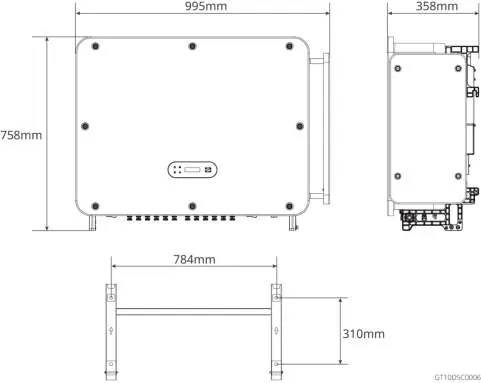
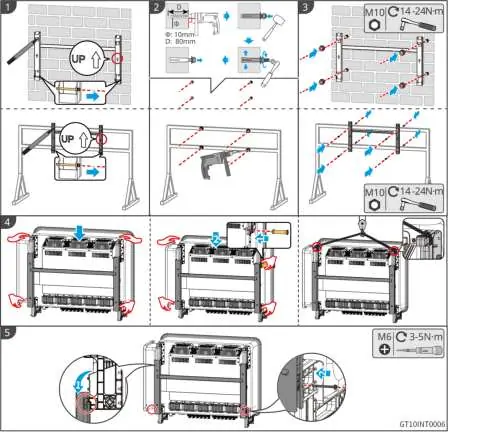
Installation
Install the inverter in a well-ventilated, sheltered location away from flammable materials. The mounting surface must be solid enough to support the weight. Install the inverter vertically or at a maximum back tilt of 15 degrees. Ensure sufficient clearance around the unit for heat dissipation.
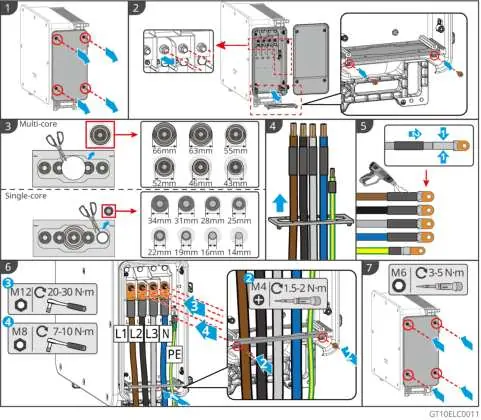
Electrical Connections
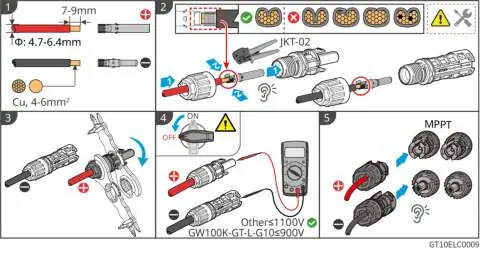
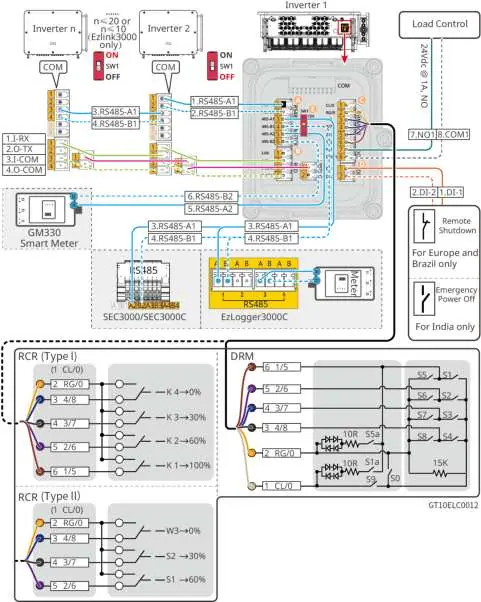
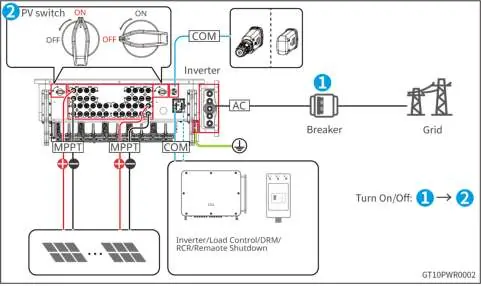
Disconnect all DC and AC switches before wiring. Ensure the PE cable is securely connected. Use the delivered DC connectors for PV strings. When connecting AC cables, ensure wires are fully matched with L1, L2, L3, N, and PE ports. For communication, ensure the wiring port definition matches the equipment and avoid interference sources.
Commissioning
Before powering on, verify that the inverter is installed securely, cables are connected correctly, and unused ports are sealed. Turn on the AC switch first, then the DC switch. Use the SolarGo App to set inverter parameters and the SEMS Portal for monitoring.
Maintenance
Perform routine maintenance including system cleaning (heat sinks and air inlets) every 6 months to a year. Check electrical connections for looseness and verify sealing of cable entry holes annually. The external fan module requires annual cleaning with a vacuum cleaner.
Troubleshooting
If a fault occurs, check the fault code on the inverter or via the app. Common issues include grid overvoltage/undervoltage, insulation resistance faults, and communication losses. For persistent faults, contact the after-sales service center with the serial number, software version, and installation details.
Technical Parameters
The GT G1 series supports a maximum input voltage of 1100V (GW150K-GT-G10) or 900V (GW100K-GT-L-G10). Both models feature an IP66 ingress protection rating and operate in temperatures ranging from -30 to +60 degrees Celsius.
Manufacturer information
GoodWe Technologies Co., Ltd.
Practical help
Common problems
Utility Grid Power Off
Check if the AC circuit or the AC breaker is disconnected.
Grid Overvoltage Protection
Check if grid voltage is within range; contact local power operator if it frequently exceeds limits.
Low Insulation Resistance
Check PV string to ground resistance; check PE cable connection; check for short circuits.
Internal Comm Loss
Disconnect AC and DC switches, wait 5 minutes, then reconnect.
Before use
- Check outer packing for damage.
- Verify inverter model matches requirements.
- Ensure installation site is well-ventilated and within temperature range.
- Confirm PV string open circuit voltage does not exceed Max. Input Voltage.
- Ensure AC output circuit switch is installed.
Specs in practice
- Max. Input Voltage
- Maximum DC voltage the inverter can handle (1100V or 900V).
- Nominal Output Power
- Rated power output (150kW or 100kW).
- Ingress Protection Rating
- IP66, suitable for indoor/outdoor installation.
- Max. Efficiency
- 99.0% or 98.8% depending on model.
Images and diagrams
- Wiring diagrams show connections for RS485, AC output, and DC input.
- Installation diagrams illustrate mounting plate positioning and inverter hanging.
Model compatibility
- Supports RS485, WiFi, LAN, Bluetooth, and PLC communication.
- Compatible with GoodWe electricity GM330 smart meter.

Manual page author
David Miller
Documentation analyst
Organizes user manual content into clear summaries, with attention to model details, product context, and everyday usability.