General / Other Manuals
Gorenje IMC 1200B Ice Maker User Manual
Quick guide for the Gorenje IMC 1200B ice maker. Learn how to set up, operate, clean, and troubleshoot your device for optimal performance.
Table of contents
Manual images
Jump to the sectionQuick guide from the manual
This document provides essential instructions for the Gorenje IMC 1200B ice maker. Key requirements include keeping the device in an upright position, ensuring a 15 cm clearance for ventilation, and waiting at least 2 hours after transport before connecting to power to allow the compressor to stabilize. Use only clean water without additives.
General description
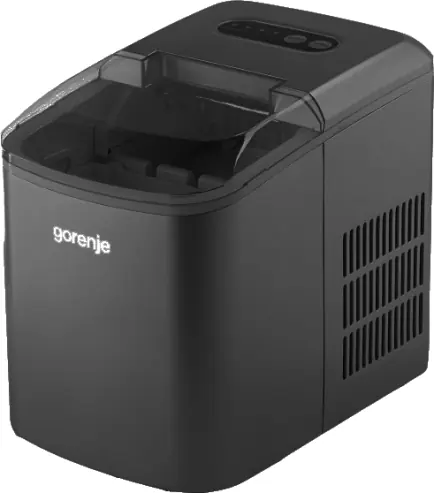
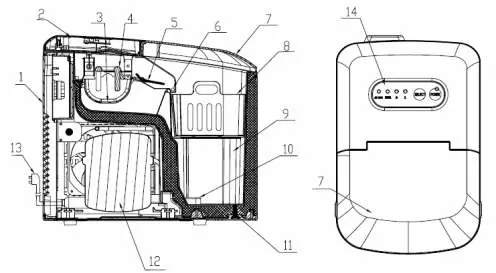
The device consists of a water tank, ice basket, evaporator, ice shovel, and control panel. Ensure all components are correctly installed before use.
Preparation for use
- Remove all packaging.
- Clean the device according to the cleaning instructions.
- Fill the water tank with clean water up to the MAX mark. Do not let the water reach the ice basket. Use water at room temperature.
Operation
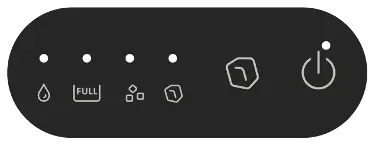
After connecting to power, the POWER indicator will flash red (standby mode). Press the button to start. It is recommended to discard the ice from the first two cycles for hygiene reasons. Use the SELECT button to choose between small (S) or large (L) ice cube sizes.
Cleaning and maintenance
Always unplug the device before cleaning. Do not use abrasive cleaners, alcohol, or solvents. Clean the interior and exterior with a soft, damp cloth or a water-vinegar solution. Clean the ice basket with warm water and detergent. Empty the water tank using the drain plug (11). Replace water at least every 24 hours and leave the lid open after use to prevent mold.
Troubleshooting
If the POWER indicator does not light up, check the power connection. If the ICE FULL indicator stays on, empty the ice basket. If the ADD WATER indicator stays on, refill the water tank. If all indicators flash, remove any ice blocking the water tank. If the ICE FULL indicator fails to light up when the basket is full, ensure the device is not exposed to strong light sources.
Manufacturer information
Gorenje
Practical help
Common problems
POWER indicator does not light up
Check power supply and connection. If it persists, contact Gorenje customer service.
ICE FULL indicator stays on
Empty the ice basket. If it persists, contact Gorenje customer service.
ADD WATER indicator stays on
Refill water to the MAX mark and press the POWER button.
All indicators flashing
Switch to standby, remove ice blocking the water tank, and restart.
Before use
- Ensure the device is in an upright position.
- Wait at least 2 hours after transport before plugging in.
- Ensure 15 cm clearance around the device for ventilation.
- Clean the device interior before first use.
- Fill with clean water up to the MAX mark.
- Discard ice from the first two cycles.
Specs in practice
- MAX water level
- Do not exceed this level; water should not reach the ice basket.
- Water temperature
- Use water at room temperature for best results.
- Standby mode
- Indicated by a flashing red POWER light; wait 3 minutes before restarting to protect the compressor.
Images and diagrams
- The control panel features indicators for ADD WATER, ICE FULL, and size selection (S/L).
- The internal diagram shows the water tank, evaporator, and ice basket positioning.
Model compatibility
- For indoor domestic use only.
- Do not use outdoors or in high-humidity rooms.
- Use only clean water; do not add chemicals or additives.

Manual page author
Emily Carter
User documentation editor
Prepares concise manual descriptions and highlights the most useful setup, operation, and maintenance information for readers.