Automotive / Car Audio
Owner's Manual for Ground Zero GZIA 2.135 Amplifier
Quick guide for the Ground Zero GZIA 2.135 2-channel amplifier. Includes installation instructions, wiring diagrams, control settings, technical specifications, and troubleshooting tips.
Quick answers from the manual
Quick answer
- The GZIA 2.135 is a 2-channel Class A/B amplifier. It features variable high/low pass filters, high-level input with auto-on, and thermal/short/overload protection. p. 1, 5
Key actions
- Mounting the amplifier p. 2, 6
- Connecting power and speakers p. 3, 7
First start
- Ensure battery is disconnected, install fuse near battery, connect power/ground/remote, and connect speakers. p. 2, 6
Problems and fixes
No audible sound
Check protection fuse, remote wire, +12V supply, ground connection, or check for speaker short/overheating if PROTECT LED is red.
p. 4, 8Maintenance and reset
- If the amplifier overheats, it will shut down and restart automatically after cooling. p. 2, 6
Technical specifications
| Parameter | Value | Meaning | Pages |
|---|---|---|---|
| RMS Power @ 4 Ohm | 2x 85 W | Power output per channel | p. 4, 8 |
| RMS Power @ 2 Ohm | 2x 135 W | Power output per channel | p. 4, 8 |
| RMS Bridged @ 4 Ohm | 260 W | Combined power output | p. 4, 8 |
Where to find it in the PDF
- Features p. 1, 5
- Mounting Instructions p. 2, 6
- Controls & Features p. 3, 7
- Technical Data p. 4, 8
Table of contents
Manual images
Click an image to enlargeQuick guide from the manual
The Ground Zero GZIA 2.135 is a 2-channel Class A/B amplifier designed for car audio systems. It features variable high-pass and low-pass filters, high-level input with auto-on functionality, and comprehensive protection circuits (thermal, short, overload). Proper installation is critical for performance and safety.
Installation and Mounting
Before beginning the installation, disconnect the vehicle battery to prevent electrical faults. Ensure the amplifier is mounted in a location with adequate airflow to prevent overheating. Do not mount the amplifier on vibrating surfaces, such as subwoofer enclosures, as this can cause internal damage.
- Power Supply: The +12V cable must be protected by a fuse within 20 cm of the battery. Use a cable with a minimum cross-section of 10 mm².
- Wiring: Keep signal and speaker cables separated from power cables to avoid interference. Never route cables over sharp edges.
- Grounding: Ensure a solid ground connection to the vehicle chassis.
- Speaker Connections: Use a minimum cable cross-section of 1.5 mm².
Controls and Features
The amplifier features several controls to adjust the audio output:
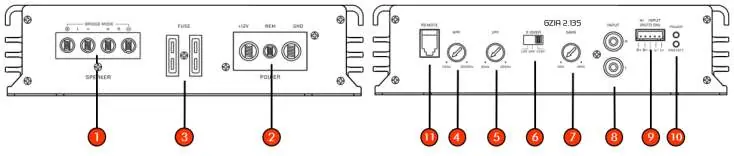
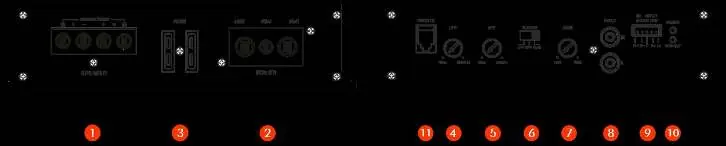
- Speaker Terminal: Connects the speakers. Minimum impedance is 2 Ohms in stereo mode and 4 Ohms in bridged mode.
- Power Terminal: Connects +12V, Remote (REM), and Ground (GND).
- High-Pass Filter: Filters frequencies below the selected point (40 Hz to 3000 Hz).
- Low-Pass Filter: Filters frequencies above the selected point (30 Hz to 250 Hz).
- Mode Switch: Selects between FLAT (full range), HPF (high-pass), and LPF (low-pass).
- Input Sensitivity: Adjusts the gain to match the head unit's output.
- Inputs: Supports RCA line inputs or high-level inputs. Important: Do not use both inputs simultaneously as this may damage the device.
Troubleshooting
If you encounter issues, check the following:
- No Sound: Verify the power fuse, remote wire connection, +12V supply, and ground connection. Check if the PROTECT LED is red, indicating a short circuit or overheating.
- Device Won't Turn On: Check the power supply and remote wire connection.
- Device Turns Off at High Volume: Ensure speaker impedance matches the amplifier's specifications and check for overheating.
Manufacturer information
Ground Zero Audio
Practical help
Common problems
No sound
Check the amplifier fuse, remote wire connection, +12V power supply, and ground connection. If the PROTECT LED is red, check for speaker shorts or overheating.
Device does not turn on
Verify the power supply connection and ensure the remote wire is receiving power from the head unit.
Device turns off at medium/high volume
Check if the speaker impedance is within the allowed range (min 2 Ohm stereo / 4 Ohm bridged) and ensure the amplifier is not overheating.
No sound on one channel
Check speaker wiring for shorts or open connections. Swap RCA inputs to verify if the signal source is the issue.
Before use
- Disconnect the vehicle battery before starting installation.
- Install a fuse within 20 cm of the battery on the +12V power cable.
- Ensure the amplifier has adequate ventilation; do not cover the heatsink.
- Do not mount the amplifier on vibrating surfaces like subwoofer enclosures.
- Use at least 10 mm² power cables and 1.5 mm² speaker cables.
- Do not use RCA and high-level inputs simultaneously.
Specs in practice
- RMS Power @ 4 Ohm
- Standard power output per channel in stereo mode (2x 85W).
- RMS Power @ 2 Ohm
- Maximum power output per channel in stereo mode (2x 135W).
- RMS Bridged @ 4 Ohm
- Combined power output for a single channel (260W).
Images and diagrams
- 1: Speaker terminal for connecting speakers.
- 2: Power terminal (+12V, REM, GND).
- 4/5: High/Low pass filter adjustment knobs.
- 6: Crossover mode switch (FLAT/HPF/LPF).
- 8/9: RCA line input or High-level input.
Model compatibility
- 2 Ohm stable in stereo mode.
- 4 Ohm stable in bridged mode.
- High-level and RCA inputs must not be used simultaneously.

Manual page author
David Miller
Documentation analyst
Organizes user manual content into clear summaries, with attention to model details, product context, and everyday usability.