Power / Energy Storage Systems
Installation Guide for Growatt ARK 2.5H-A2 High Voltage Battery
Quick installation guide for the Growatt ARK 2.5H-A2 high voltage battery system. Includes installation environment requirements, mounting procedures, wiring diagrams, and system startup instructions.
Quick answers from the manual
Quick answer
- The Growatt ARK 2.5H-A2 is a high-voltage battery system. Installation requires specific environmental conditions, proper wall or floor mounting, and correct wiring to the PCS. Ensure battery voltage differences are below 0.5V before installation. p. 1, 5
Key actions
- Powering on the system p. 6
- Wall mounting p. 3, 4
First start
- Power on sequence p. 6
Technical specifications
| Parameter | Value | Meaning | Pages |
|---|---|---|---|
| Max stack (floor) | 10 | Maximum number of batteries in floor installation | p. 2 |
| Max stack (wall) | 4 | Maximum number of batteries in wall installation | p. 3 |
Where to find it in the PDF
- Installation environment and tools p. 1
- Installation methods p. 2
- Wiring connection p. 5
- Battery system switch operation p. 6
Table of contents
Manual images
Click an image to enlargeQuick guide from the manual
This document provides essential installation and setup instructions for the Growatt ARK 2.5H-A2 high voltage battery system. Before installation, ensure the voltage difference of the battery pack is less than 0.5V. For optimal system capacity, it is recommended to select batteries with a manufacturing date difference within 3 months.
Installation environment and tools
The installation environment must meet the following criteria:
- Temperature: -10°C to +50°C
- Humidity: RH +5% to +95%
- Protection: Build a sun and rain shade to avoid direct exposure to sunlight and rain.
Required tools include a drill, a ratchet wrench, and a screwdriver.
Installation methods
The system supports both wall-mounted and floor installations:
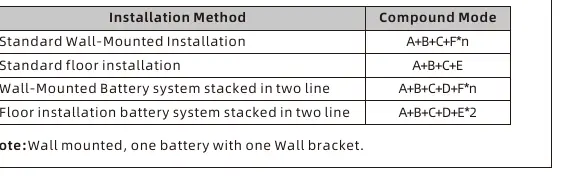
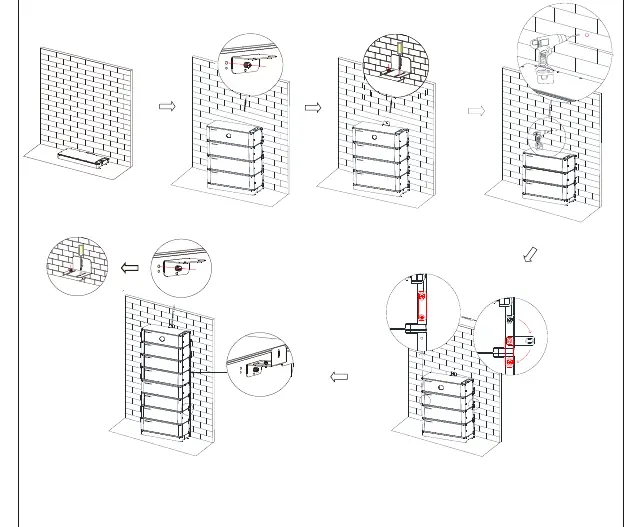
- Wall-mounted: Maximum of 4 batteries. Ensure the wall weight capacity exceeds 150kg.
- Floor installation: Maximum of 10 batteries. If the battery number is greater than 6, stacking them in two lines is recommended.
Safety Note: The safety part must be installed at the top battery. If the number of battery packs is higher than 7, an additional safety part must be installed on the middle battery.
Wiring connection
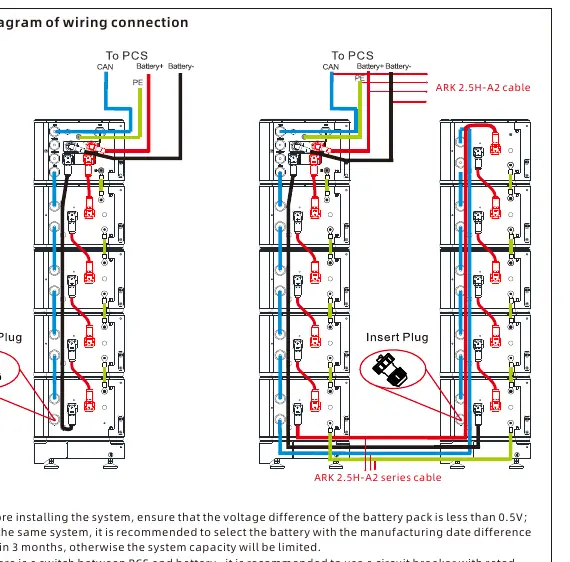
The system requires connection between the battery modules and the PCS (Power Conversion System). Ensure all cables are connected according to the wiring diagram provided in the manual. If a switch is used between the PCS and the battery, use a circuit breaker with a rated voltage greater than 750V and a rated current greater than 63A.
Battery system operation
To power on the system:
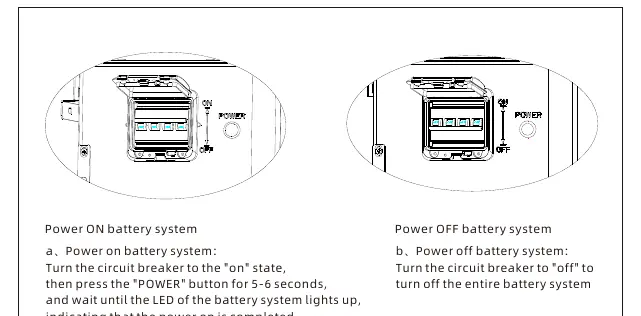
- Turn the circuit breaker to the "on" state.
- Press the "POWER" button for 5-6 seconds.
- Wait until the LED of the battery system lights up, indicating the power-on process is complete.
To power off the system, simply turn the circuit breaker to the "off" position.
Manufacturer information
Growatt New Energy
Practical help
Common problems
System capacity is limited
Ensure the manufacturing date difference between batteries in the same system is within 3 months.
Voltage difference error
Before installing the system, ensure the voltage difference of the battery pack is less than 0.5V.
Before use
- Verify installation environment temperature is between -10°C and +50°C.
- Ensure wall weight capacity exceeds 150kg for wall-mounted installations.
- Check that all components (HVC60050-C2, ARK 2.5H-A2, cables, wall bracket) are present.
- Ensure the voltage difference of the battery pack is less than 0.5V.
- Build a sun and rain shade if the unit is exposed to elements.
Specs in practice
- Max stack (floor)
- Maximum of 10 batteries allowed for floor installation.
- Max stack (wall)
- Maximum of 4 batteries allowed for wall-mounted installation.
- Operating temperature
- The system operates between -10°C and +50°C.
Images and diagrams
- Wiring diagrams illustrate the connection path between the battery modules and the PCS.
- Installation steps show the sequence for mounting the wall bracket and stacking battery units.
Model compatibility
- If using a switch between PCS and battery, use a circuit breaker with rated voltage > 750V and rated current > 63A.

Manual page author
David Miller
Documentation analyst
Organizes user manual content into clear summaries, with attention to model details, product context, and everyday usability.