Power / Batteries & Chargers
User Manual for GYS NOMAD POWER PRO 12XL / 24XL Jump Starter
Quick guide for the GYS NOMAD POWER PRO 12XL and 24XL jump starters. Includes setup, jump-starting procedures, charging instructions, safety warnings, and troubleshooting fault codes.
Table of contents
Manual images
Click an image to enlargeQuick guide from the manual
The GYS NOMAD POWER PRO 12XL and 24XL are high-performance lithium-ion jump starters designed for instant vehicle starting and as a portable power supply for electronic devices. Always recharge the unit before first use and after every use. Ensure the unit is charged to at least 50% capacity before attempting to start a vehicle.
Product Description
The device provides three main functions:
- Instant vehicle starting: PRO 12XL for 12V vehicles; PRO 24XL for 24V vehicles.
- 12V Power Supply: Power electronic devices via USB ports or cigarette lighter ports.
- Service Lighting: Built-in LED work lamp with multiple modes.
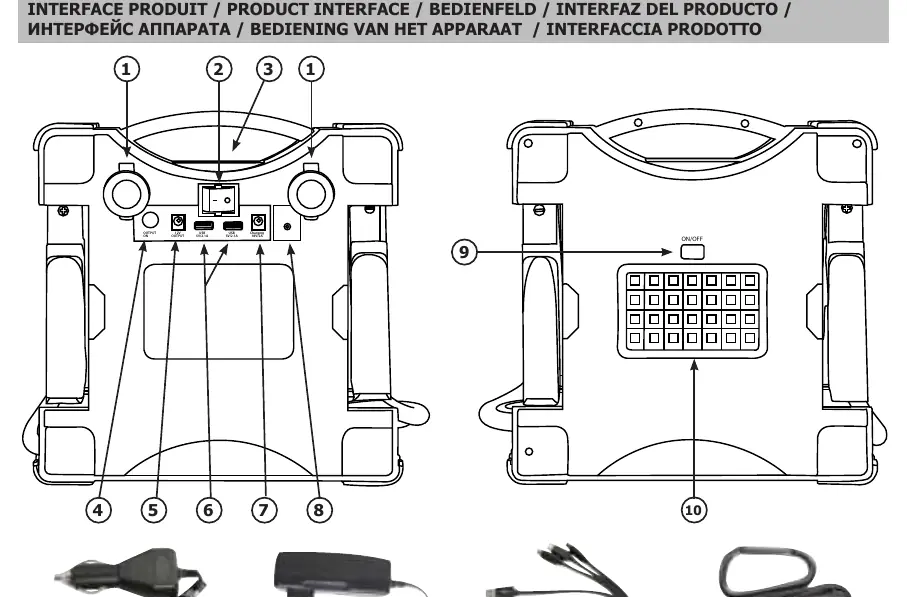
Interface
The device features a main switch, LED display, 12V output port, USB ports (5V/2.1A), 18V/2A charging port, error LED, and a work lamp button.
Charging the Internal Battery
Charge the unit at temperatures above 10°C. If below 0°C, move the unit to a temperate room for 1 hour before charging.
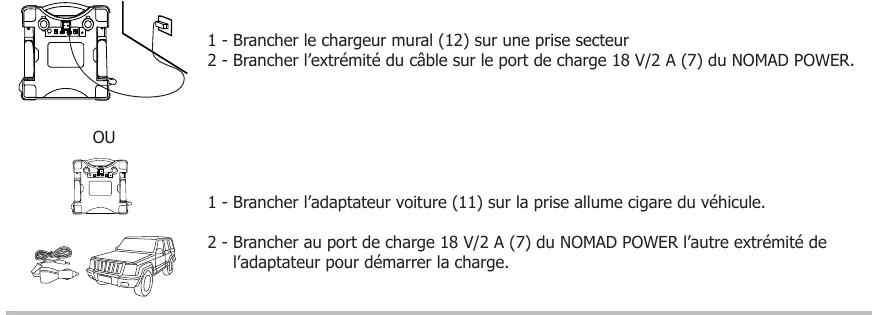
- Wall Charging: Connect the wall charger (12) to a mains socket and the other end to the 18V/2A charging port (7).
- Car Charging: Connect the car adapter (11) to the vehicle's cigarette lighter socket and the other end to the 18V/2A charging port (7).
- Storage: Do not store at 100% charge; keep between 60-80%. Perform a 100% charge every 6 months.
Jump Starting Procedure
- Switch on the booster using the main switch (2).
- Disconnect the red and black clamps from the booster. A flashing red and green "8" appears on the display.
- Connect the red clamp to the (+) battery terminal.
- Connect the black clamp as far as possible from fuel lines and as close as possible to the starter ground.
- The LED indicator will show a green "8" when the battery is detected.
- Turn the ignition key to start the engine.
- Once started, disconnect the clamps from the battery and return them to the booster. Leave the vehicle running.
- Switch off the device.
Using as a Power Supply
12V Power: Connect the supplied 12V cigarette lighter cable to one of the 12V ports (1) or use a 12V cable (not supplied) with the 12V/3.5A output port (5).
USB Power: Use the supplied 3-in-1 USB cable (13) to connect tablets or mobile phones to the USB ports (6).
Flashlight Function
Press the ON/OFF button on the LED (9) to activate. Repeated presses cycle through normal, strobe, and SOS modes.
Troubleshooting
If the screen is black, the device is in sleep mode; press the ON/OFF button or toggle the main switch. If a flashing red/green "8" appears, the booster does not detect a battery; turn on vehicle lights or radio to create a load. If a fixed red "8" appears with an alarm, check for polarity reversal or thermal protection (let the unit cool down). For PRO 12XL, refer to the specific fault codes (E0-E9) listed in the manual.
Manufacturer information
GYS
Practical help
Common problems
Screen is black and shows nothing
Device is in sleep mode. Press the ON/OFF button or toggle the main switch to OFF then ON.
Flashing red and green '8' on display
Booster does not detect a battery. Turn on vehicle lights or radio to create a current load so the booster activates.
Fixed red '8' appears with alarm
Polarity reversal detected. Check connections: red clamp to (+) and black clamp to (-).
Thermal protection active
Booster is overheated due to high ambient temperature. Wait a few minutes for it to cool down before retrying.
Before use
- Ensure the internal battery is charged to at least 50%.
- Check that the charging cable is not damaged.
- Ensure the vehicle battery is not frozen or damaged.
- Verify the correct voltage (12V or 24V) for your vehicle.
- Ensure the main switch is in the ON position.
Specs in practice
- 118.4 Wh (12XL) / 236.8 Wh (24XL)
- Internal lithium-ion battery capacity.
- 1000A (12XL) / 1400A (24XL)
- Starting current capability.
Images and diagrams
- 1: 12V cigarette lighter port
- 2: Main switch
- 3: LED display
- 4: Output ON button
- 5: 12V output port
Model compatibility
- PRO 12XL: Designed for 12V vehicles.
- PRO 24XL: Designed for 24V vehicles.

Manual page author
David Miller
Documentation analyst
Organizes user manual content into clear summaries, with attention to model details, product context, and everyday usability.