Home Appliances / Small Kitchen Appliances
User Manual for Hamilton Beach 19-in-1 Automatic Bread Maker HB8103BMW
Comprehensive user guide for the Hamilton Beach 19-in-1 Automatic Bread Maker (HB8103BMW). Includes setup, operation, 19 program settings, ingredient tips, cleaning, and troubleshooting.
Table of contents
Manual images
Click an image to enlargeQuick Guide
The Hamilton Beach 19-in-1 Automatic Bread Maker (HB8103BMW) is designed for domestic use. It features 19 preset programs for various breads, cakes, jams, and doughs. Key specifications include a 550W power rating and a capacity of 500g, 750g, or 1000g. Always ensure the bread pan is securely locked before starting and follow the specific ingredient order (liquids first, then dry, yeast last) to ensure proper rising.
Safety Precautions
- Hot Surfaces: The bread pan and heating element become extremely hot. Always use oven mitts.
- Electrical Safety: Do not immerse the power cord, plug, or appliance body in water. Ensure the appliance is properly earthed.
- Usage: Designed for indoor, household use only. Do not operate without the bread pan installed.
- Supervision: Keep children away from the appliance during operation.
Product Overview
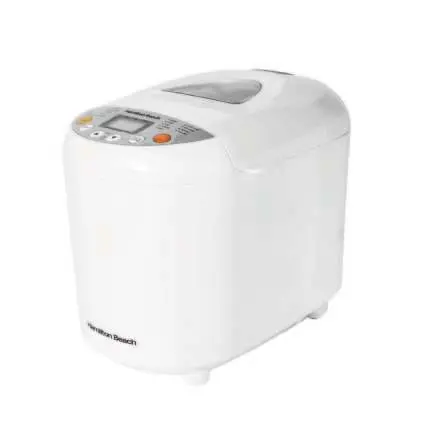
The bread maker consists of the main body, a top lid with a viewing window, a control panel, and a removable bread pan with a kneading paddle. Accessories include a measuring cup, measuring spoon, and a dough hook.

Control Panel
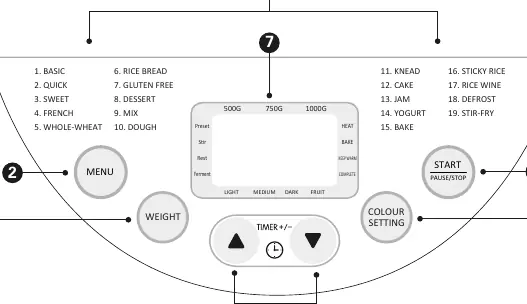
The control panel allows you to select from 19 programs, adjust loaf weight (500g, 750g, 1000g), set crust color (Light, Medium, Dark), and use the delay timer (up to 15 hours). The Start/Pause/Stop button controls the baking cycle.
Using Your Appliance
Initial Setup: Before first use, wash the bread pan and kneading paddle. Run the machine empty for 10 minutes on the bake mode to burn off manufacturing residues.
Operation Steps:
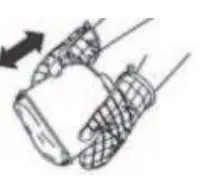
- Remove the bread pan by turning it counter-clockwise.
- Install the kneading paddle onto the drive shaft.
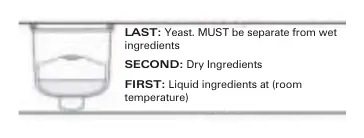
- Add ingredients in order: Liquids first, then dry ingredients, and finally yeast on top of the flour.
- Place the bread pan into the machine and lock it by turning clockwise.
- Select the desired program, weight, and crust color.
- Press Start to begin.
- If the recipe requires add-ins (fruits/nuts), the machine will beep to signal when to add them.
- Once finished, the machine will beep and enter a 1-hour Keep Warm cycle.
Ingredients Guide
For best results, use bread flour for yeast breads. Always keep yeast separate from liquids and salt before the cycle starts. Do not use dairy ingredients with the Delay Timer function.
Cleaning & Care
- Always unplug and let the appliance cool completely before cleaning.
- The bread pan and kneading paddle are dishwasher-safe.
- Wipe the housing and lid with a damp cloth. Do not immerse the main body in water.
- Avoid using abrasive cleaners or metal utensils that could damage the non-stick surface.
Troubleshooting
- HHH Error: The unit is too hot. Unplug and let cool for 15-30 minutes.
- EE0 Error: Sensor error. Contact customer service.
- Bread doesn't rise: Check yeast expiration and ensure liquids are at room temperature.
- Ingredients not blending: Ensure the kneading paddle is securely installed.
Manufacturer information
Hamilton Beach
Practical help
Common problems
HHH error on display
The unit is too hot. Unplug the appliance and allow it to cool for 15-30 minutes before restarting.
EE0 error on display
A sensor error has been detected. Unplug the appliance and contact an authorized service agent.
Bread doesn't rise
Check if yeast has expired, ensure ingredients were measured accurately, and verify liquids were at room temperature.
Ingredients not blending
Ensure the kneading paddle is securely attached to the drive shaft and ingredients were measured accurately.
Before use
- Check for any missing or damaged parts.
- Wash and dry the bread pan and kneading paddle thoroughly.
- Place the bread maker on a stable, level surface away from edges.
- Run the bread maker empty for 10 minutes to burn off manufacturing residues.
- Ensure the voltage of your wall socket matches the appliance rating.
Specs in practice
- Power Consumption
- 220-240V~, 50-60Hz
Images and diagrams
- Control Panel: Features 19 program options, weight selection, crust color settings, and delay timer.
- Ingredient Order: Liquids at the bottom, dry ingredients in the middle, yeast on top of the flour.
Model compatibility
- Do not use dairy ingredients with the Delay Timer function.
- Not suitable for outdoor or commercial use.
- Weight option is not available in programs 8-19.
- Crust color is not adjustable in programs 9-11, 13, 14, 16-19.

Manual page author
David Miller
Documentation analyst
Organizes user manual content into clear summaries, with attention to model details, product context, and everyday usability.