Home Appliances / Small Kitchen Appliances
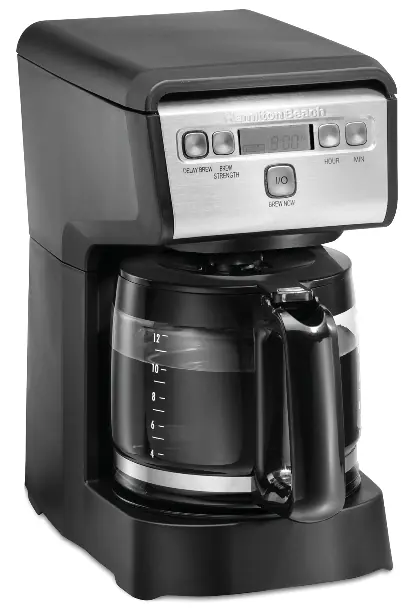
User Manual for Hamilton Beach 46200 12-Cup Programmable Coffee Maker
Quick guide for the Hamilton Beach 46200 12-Cup Programmable Coffee Maker. Includes setup, brewing instructions, delay brew programming, cleaning, and troubleshooting.
Table of contents
Manual images
Click an image to enlargeQuick guide from the manual
This coffee maker is designed for household use. Before first use, wash all removable parts in hot, soapy water, rinse, and dry. Run one brew cycle with water only and discard the water. Always ensure the carafe is placed securely on the keep-warm plate during brewing.
Parts and Features
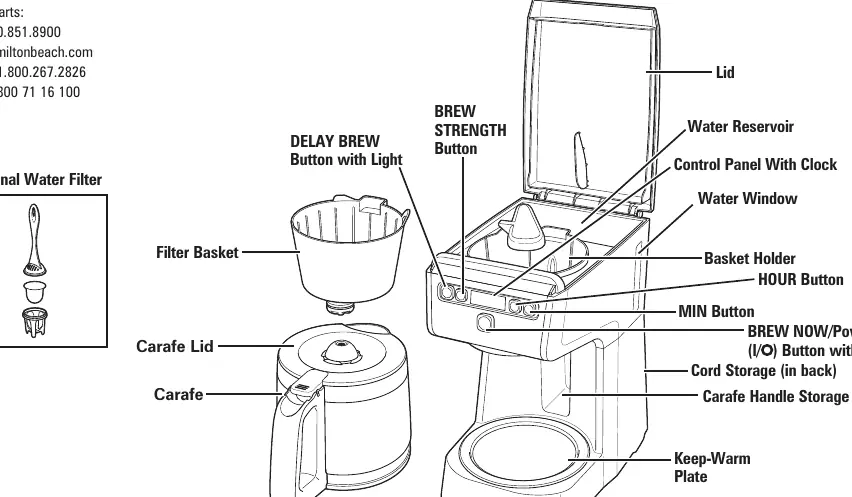
The coffee maker includes a water reservoir, filter basket, carafe, and a control panel with a clock. The control panel features buttons for Delay Brew, Brew Strength (Bold/Regular), Hour, Min, and the Brew Now/Power button.
How to Make Coffee
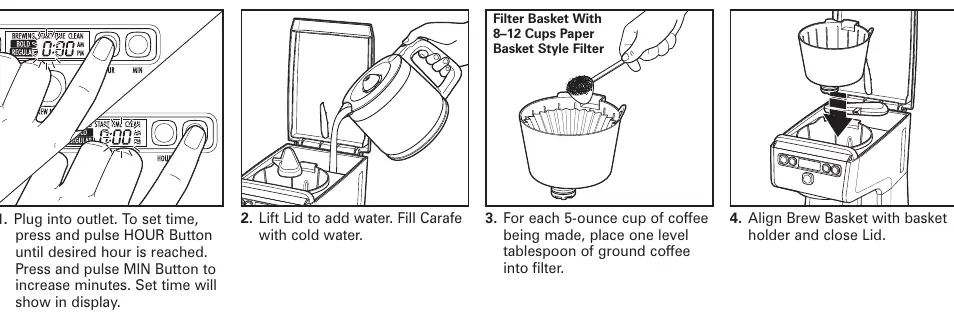
- Plug the unit into an outlet.
- Set the time by pressing the HOUR and MIN buttons.
- Lift the lid and fill the carafe with cold water, then pour into the reservoir.
- Place a level tablespoon of ground coffee into an 8-12 cup paper basket-style filter inside the filter basket.
- Align the brew basket with the holder and close the lid.
- Press the BREW STRENGTH button to select BOLD or REGULAR.
- Press the BREW NOW button to start brewing. The button will illuminate red.
- When finished, press the BREW NOW/Power button to turn off and unplug the unit.
Programming Delay Brew
- Press and hold the DELAY BREW button.
- Press the HOUR button to set the desired brewing hour (AM/PM).
- Press the MIN button to set the minutes.
- Release the DELAY BREW button.
- Press and release the DELAY BREW button again to activate the program. The button will illuminate green until the brew cycle begins.
Care and Cleaning
Unplug the coffee maker before cleaning. The carafe, carafe lid, and filter basket are top-rack dishwasher safe. Wipe the exterior of the coffee maker with a soft, damp cloth. Do not use abrasive cleaners. The unit features a 'CLEAN' notification that illuminates after 30 cycles; follow the cleaning instructions when this appears.
Troubleshooting
- Filter basket overflows: Reduce the amount of coffee, ensure the paper filter is properly positioned, or clean the unit.
- Coffee brews slowly: The unit may need cleaning.
- Unit will not turn on: Check if the unit is plugged in or if there was a power outage requiring the clock to be reset.
Manufacturer information
Hamilton Beach
Practical help
Common problems
Filter basket overflows
Reduce the amount of coffee, ensure the paper filter is properly opened and positioned, or clean the unit.
Coffee brews slowly
The coffee maker needs cleaning.
Unit will not turn on
Check if the unit is plugged in. If there was a power surge, unplug and plug back in, then reset the clock.
Before use
- Wash all removable parts in hot, soapy water.
- Rinse and dry all parts.
- Run one brew cycle with water only and discard the water.
Specs in practice
- Bold/Regular
- Brew strength settings; Bold increases brewing time.
Images and diagrams
- The control panel includes buttons for Delay Brew, Brew Strength, Hour, Min, and the main Power/Brew Now button.
- The water window indicates the water level in the reservoir.
Model compatibility
- Use 8-12 cup paper basket-style filters.
- Optional water filter available (recommended replacement every 60 cycles).

Manual page author
Michael Turner
Technical manual editor
Reviews PDF manuals for structure, safety notes, and practical product details so readers can find the right information quickly.