Power / USB Chargers
User Manual for HAMMER RapidCharge 100W Charger
Quick guide and user manual for the HAMMER RapidCharge 100W charger (HRC4). Learn how to use the ports, understand power distribution, and troubleshoot common charging issues.
Table of contents
Manual images
Click an image to enlargeQuick guide from the manual
The HAMMER RapidCharge 100W is a multi-port wall charger designed for efficient charging of multiple electronic devices. Before use, ensure the device is not damaged and that you are using a compatible cable. The charger is not intended for use by children or persons with reduced motor or mental abilities without supervision.
Device Layout
The charger features multiple output ports and an LED indicator. Refer to the diagram for the specific location of each port:
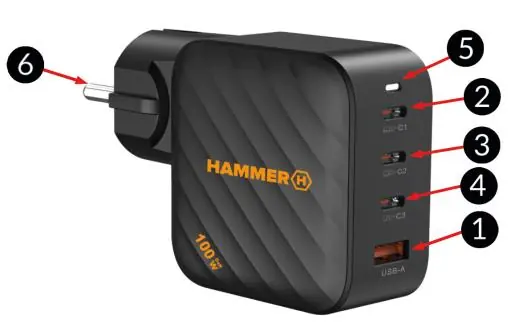
- 1. USB-A QC3.0 18W port
- 2. USB-C1 PD 100W port
- 3. USB-C2 PD 100W port
- 4. USB-C3 PD 20W port
- 5. LED indicator
- 6. AC Pins
Operation
Follow these steps to use the charger:
- Plug the charger into a wall socket.
- Connect your device(s) to the appropriate port(s) using a compatible USB cable.
- Do not use excessive force when inserting cables to avoid damaging the ports or the charger.
- Once charging is complete, disconnect the device or cable, then unplug the charger from the wall socket.
- Always disconnect the charger from the power grid when not in use.
Power Distribution
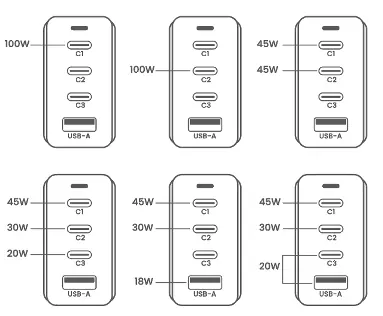
The charger intelligently allocates power based on the number and type of devices connected. Using different combinations of ports will result in customized power output. Please refer to the power distribution diagrams to understand the wattage available for each port configuration.
Troubleshooting
If you encounter issues, check the following:
- Charger not charging: Ensure the wall socket is functional and the fuse is not blown. If using an extension cord, ensure it is powered on. Check that the USB cable is not damaged and is certified by the equipment manufacturer. Verify that the device being charged is not damaged.
- Charger heats up: It is normal for the charger to warm up during operation. If it becomes excessively hot, stop using it and contact the service center.
Technical Specifications
- Model: HRC4
- Input: 100-240V~ 50/60Hz 2.5A Max
- Compatibility: PPS, PD3.0, QC4+, QC3.0, QC2.0, SCP, FCP, AFC
- Dimensions: 105 x 65 x 36.6 mm
- Weight: 247 g
Manufacturer information
HAMMER
Practical help
Common problems
Charger does not charge the device
Check if the wall socket is damaged or if the fuse is blown. Ensure the extension cord (if used) is on. Verify the USB cable is not damaged and is certified. Check if the device being charged is functional.
Charger heats up
It is normal for the charger to heat up during operation. If it reaches a very high temperature, stop using it and contact the service center.
Before use
- Ensure the wall socket is functional.
- Check that the USB cable is not damaged.
- Verify the device is compatible with the charger's output.
- Do not use excessive force when connecting cables.
Specs in practice
- Compatibility
- Supports fast charging protocols including PPS, PD3.0, QC4+, QC3.0, QC2.0, SCP, FCP, and AFC.
Images and diagrams
- USB-A port provides up to 18W (QC3.0).
- USB-C1 and USB-C2 ports provide up to 100W (PD).
- USB-C3 port provides up to 20W (PD).
Model compatibility
- The charger supports multiple fast charging standards (PPS, PD3.0, QC4+, etc.).
- Power output is shared when multiple devices are connected simultaneously.

Manual page author
Michael Turner
Technical manual editor
Reviews PDF manuals for structure, safety notes, and practical product details so readers can find the right information quickly.