Computers / Tablets
StarTech.com 7-Port USB Charging Station User Guide
Quick guide for the StarTech.com 7-port USB charging station (ST7C51224EU). Includes setup instructions, port specifications, mounting details, and technical parameters.
Table of contents
Quick guide from the manual
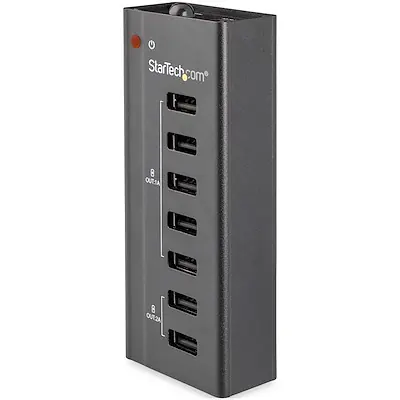
The StarTech.com 7-port USB charging station (ST7C51224EU) is designed to charge up to seven mobile devices simultaneously. It features five 1A ports and two 2A ports, supporting smart charging protocols including USB Battery Charging Specification 1.2, Apple, and Samsung standards. The device includes an integrated power switch and a wall-mounting bracket for flexible installation on desks or walls.
Device Overview
The charging station is a compact, aluminum-housed unit. It features a power LED indicator and a dedicated power switch to turn off all ports when not in use. The unit is powered by an included AC adapter.
Installation and Mounting
The device is designed for standalone use or fixed installation. Use the included wall-mounting bracket and screws to secure the charging station to a desk, workbench, or wall for easier access to the ports. Four rubber feet are provided to prevent sliding on flat surfaces.
Operation
Connect the provided AC adapter to the charging station and a power outlet. Use the integrated power switch to activate the charging ports. The station automatically detects the connected device to provide the appropriate charging current (up to 1A or 2A per port depending on the slot).
Technical Specifications
- Ports: 7 x USB 2.0 Type-A (480 Mbps)
- Power Input: 100-240V AC, 1.5A
- Power Output: 12V DC, 5A total
- Operating Temperature: 5°C to 35°C
- Dimensions: 11.0 cm x 4.5 cm x 2.4 cm
- Weight: 118.0 g
Official resources from the manual
Practical help
Common problems
Device not charging
Ensure the power switch on the charging station is turned on and the AC adapter is securely connected to both the station and a wall outlet.
Before use
- Verify all items are in the box: charging station, AC adapter, wall-mounting bracket, screws, and rubber feet.
- Ensure the power source is between 100-240V AC.
- Check that the device is placed in an environment with a temperature between 5°C and 35°C.
Specs in practice
- 1A vs 2A Ports
- The station has five 1A ports and two 2A ports; use the 2A ports for devices requiring faster charging like tablets.
- USB Battery Charging Spec 1.2
- Ensures compatibility with a wide range of mobile devices including Apple and Samsung products.
Model compatibility
- Compatible with Apple iPhone/iPad, Samsung Galaxy Tab, and general Android devices.
- Supports USB 2.0 Type-A connections.

Manual page author
David Miller
Documentation analyst
Organizes user manual content into clear summaries, with attention to model details, product context, and everyday usability.