General / Other Manuals
User Manual for SIIG 04-1416C Industrial USB-C Charging Station
Quick guide for the SIIG 04-1416C Industrial USB-C Charging Station. Learn about setup, port configuration, data/PD modes, and technical specifications.
Table of contents
Manual images
Jump to the sectionQuick guide from the manual
The SIIG 04-1416C is an industrial-grade USB-C charging station and hub. To ensure optimal performance, verify that your power source is 110V AC and that you are using certified USB-C cables. The device features a slide switch to toggle between Data/PD modes, which determines whether ports support simultaneous data sync and charging or dedicated power delivery. The unit includes an active cooling system that automatically engages when internal temperatures exceed 55°C.
Introduction
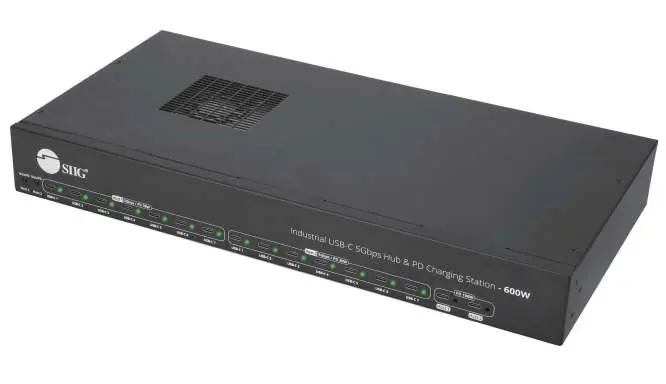
This industrial USB-C 5Gbps Hub & PD Charging Station provides 16 USB-C charging ports. It features 2 ports capable of 100W output and 14 ports capable of 30W output. The device supports data transfer speeds up to 5Gbps and is compatible with Power Delivery (PD) 2.0 and 3.0 standards.
Package Contents
- 1x Industrial USB-C 5Gbps Hub & PD Charging Station - 600W
- 2x USB-C to C cables
- 1x C13 US power cord
- 2x Mounting brackets
- 1x User Manual
Setup Requirements
- Power Source: Requires a 110V AC power supply.
- Power Socket: Compatible with a US 3-pin Type-B power socket.
- Device Compatibility: Supports charging and data sync for USB-C devices, including MacBook Air/Pro, Chromebooks, Tablets, and iPhone 15/16 series.
Layout and Connections
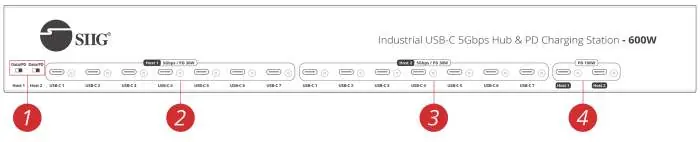
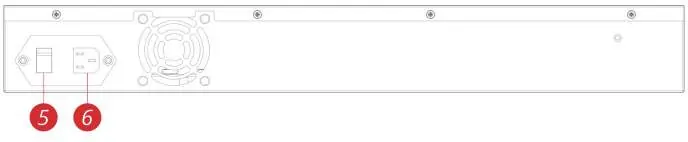
The front panel contains the slide switches and USB-C ports. The slide switch allows you to select between Data/PD charging modes. The back panel houses the power switch and the C14 power jack for the AC input.
Operation
Slide Switch Settings:
- Data Mode: Allows for simultaneous charging and data synchronization for connected devices (e.g., iPhone 15/16, iPad Mini/Air/Pro).
- PD Mode: Prioritizes power delivery, supporting up to 30W charging per port.
LED Indicators:
- Red: Device is connected and charging.
- Green: No device is connected.
Safety Guidelines
- Do not attempt to service the unit yourself.
- Ensure proper ventilation and air circulation; do not use near water.
- Place the unit on a stable surface.
- Use only the power adapter and cables designed for this unit.
- Always unplug the power before cleaning.
- Do not use liquid or aerosol cleaners.
Specifications
- Total Power: 600W internal power supply.
- Data Speed: Up to 5Gbps.
- Operating Temperature: -10 to 55°C (14 to 131°F).
- Dimensions: 17.32" (W) x 2.24" (H) x 8.07" (D).
- Weight: 2.89kg (6.38 lbs).
- Certifications: FCC, CE, RoHS, UL.
Manufacturer information
SIIG, Inc.
Practical help
Common problems
Fans are not running
This is normal behavior. The fans activate automatically only when the power adapter temperature exceeds 55°C and turn off when it drops below this threshold.
Device not charging or syncing data
Ensure you are using the original or a certified USB-C cable. Check the slide switch position; if set to 'PD', data synchronization may be disabled.
Before use
- Verify that a 110V AC power source is available.
- Ensure the unit is placed on a stable, flat surface.
- Confirm that the installation area provides proper ventilation.
- Use only original or certified USB-C cables for your devices.
- Check that the power switch is in the correct position.
Images and diagrams
- The front panel features the slide switches for mode selection and the 16 USB-C ports.
- The back panel contains the main power switch and the C14 power input jack.
Model compatibility
- Supports Apple iPhone 15/16 series, iPad Mini/Air/Pro.
- Compatible with MacBook Air/Pro and various Chromebooks.
- Supports Samsung Galaxy Note 8, S8, S8 plus and other USB-C devices.
- All ports support BC1.2_DCP, PD2.0, PD3.0, and Qualcomm QC 2.0/3.0/4.0 protocols.

Manual page author
Michael Turner
Technical manual editor
Reviews PDF manuals for structure, safety notes, and practical product details so readers can find the right information quickly.