Lighting / Fixtures
User Manual for Hampton Bay 11-Inch Flushmount with Motion Sensor
Quick guide for the Hampton Bay 11-Inch Flushmount with Motion Sensor. Includes installation steps, wiring instructions, motion sensor settings, and troubleshooting.
Table of contents
Manual images
Click an image to enlargeQuick guide from the manual
This document provides installation and configuration instructions for the Hampton Bay 11-Inch Flushmount with Motion Sensor. Before installation, ensure the power is turned off at the circuit breaker. The fixture features adjustable color temperature and three operational modes: Dusk-to-Dawn, Motion, and Disable.
Installation
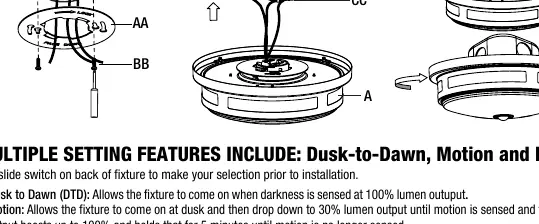
- Select a suitable location that can support the weight of the fixture.
- Pass the hot (black) and neutral (white) wires from the electrical outlet box through the center hole of the mounting bracket (AA).
- Secure the mounting bracket (AA) to the electrical box using the provided mounting screws (BB).
- Connect the wires: black to black, white to white, and ground to the green wire. Secure connections with wire connectors (CC) and electrical tape.
- Tuck the wires back into the electrical box.
- Align the side slots on the fixture body (A) with the mounting bracket (AA) and rotate clockwise to lock it in place.
- Restore power at the electrical panel.
Settings and Configuration
Use the slide switch on the back of the fixture to select the operating mode before installation:
- Dusk-to-Dawn (DTD): The fixture turns on at 100% brightness when darkness is sensed.
- Motion: The fixture turns on at dusk, stays at 30% brightness, and boosts to 100% when motion is detected (holds for 5 minutes).
- Disable: Switch-controlled only. Toggling the wall switch within 3 seconds allows the user to set the light level to 30% or 100%.
Note: The motion detection range is 15ft.
Adjusting Color Temperature
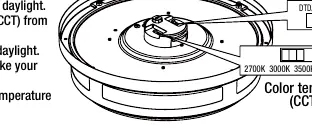
The fixture allows you to customize the color temperature (CCT) using a toggle switch on the fixture body (A) before installation. Options include 2700K (warm white), 3000K (soft white), 3500K (neutral white), 4000K (bright white), or 5000K (daylight). The factory default is 2700K.
Care and Cleaning
Disconnect power before cleaning. Use a soft, dry cloth. Do not use chemical cleaners, solvents, or harsh abrasives. Avoid using liquid cleaners on LEDs, the LED driver, or wiring.
Troubleshooting
If the fixture will not light, ensure the power supply is on, the circuit breaker is in the 'on' position, and wire connections are secure. If the breaker trips when the light is turned on, check for crossed wires or grounding issues. If problems persist, contact a qualified electrician or Hampton Bay customer service at 1-855-HD-HAMPTON.
Manufacturer information
Hampton Bay
Practical help
Common problems
The fixture will not light
Ensure power is on, circuit breaker is on, and wire connections are secure.
Fuse blows or breaker trips when light is turned on
Check for crossed wires or power wire grounding out. Contact a qualified electrician.
Before use
- Turn off power at the circuit breaker before starting.
- Verify the ceiling can support the weight of the fixture.
- Select the desired color temperature (CCT) using the switch on the fixture body.
- Select the desired operating mode (Dusk-to-Dawn, Motion, or Disable) using the slide switch.
- Ensure you have wire connectors and electrical tape for secure connections.
Specs in practice
- Detection Range
- The motion sensor detects movement within a 15ft radius.
- Color Temperature (CCT)
- Adjustable between 2700K, 3000K, 3500K, 4000K, and 5000K.
Images and diagrams
- Step 1: Mounting bracket installation.
- Step 2: Wiring connections (Black to Black, White to White, Ground to Green).
- Step 3: Locking the fixture body into the mounting bracket.
Model compatibility
- Not compatible with external dimmers unless using the 'Disable' mode and wall switch toggling.

Manual page author
Michael Turner
Technical manual editor
Reviews PDF manuals for structure, safety notes, and practical product details so readers can find the right information quickly.