Home Appliances / Vacuum Cleaners
User Manual for Harper HMW-20ST02 Microwave Oven
Quick guide for the Harper HMW-20ST02 microwave oven. Learn how to operate the control panel, use auto-cooking programs, defrost food, and maintain your appliance safely.
Quick answers from the manual
Quick answer
- The Harper HMW-20ST02 is a 20L microwave oven with 700W output power. It features 5 power levels, 8 auto-cooking programs, a defrost function, and a child lock. p. 18, 37
Key actions
- Setting the clock p. 9, 29
- Using Child Lock p. 15, 33
First start
- Initial setup p. 6, 24
Show 4 more answers Show less
Problems and fixes
Oven lamp does not light
Check if the door is closed properly or if the fuse/power supply is faulty.
p. 17, 36Maintenance and reset
- Cleaning the oven p. 7, 26
Technical specifications
| Parameter | Value | Meaning | Pages |
|---|---|---|---|
| Output Power | 700 W | Microwave cooking power | p. 18, 37 |
| Volume | 20 L | Internal capacity | p. 18, 37 |
Where to find it in the PDF
- Safety Instructions p. 3, 4, 5
- Installation p. 6
- Control Panel Operation p. 9, 10
Table of contents
Manual images
Click an image to enlargeQuick guide from the manual
The Harper HMW-20ST02 is a 20L microwave oven designed for household use. Before using the appliance, ensure it is placed on a flat, stable surface with at least 10 cm of space behind it, 5 cm on the sides, and 20 cm above. Always ensure the turntable and roller ring are correctly installed before operation.
Safety Precautions
- Do not operate the oven empty.
- Do not use metal containers, foil, or utensils with metal trim, as they may cause sparks.
- Do not heat sealed containers or baby bottles with screw caps, as they may explode.
- Always pierce the skin of potatoes, sausages, and chestnuts before cooking.
- If smoke is emitted, keep the door closed and disconnect the power supply.
- The oven door and outer surfaces may become hot during operation.
Installation
Ensure the appliance is placed in a dry, non-corrosive environment away from heat sources like gas burners or water tanks. The oven must be positioned so the plug is accessible and properly grounded. Do not place the oven in a cabinet; it is intended for freestanding use.
Operation
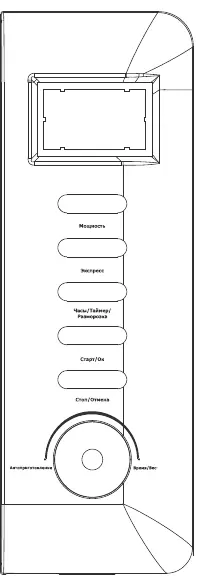
Control Panel
The control panel allows you to select power levels, set the clock, use the defrost function, and select auto-cooking programs. The LED display shows the time and cooking status.
Cooking Modes
- Microwave Cooking: Press the Micro Power button to cycle through power levels (100P to 20P), set the time using the knob, and press Instant/Start.
- Express Cooking: Press the Express button to quickly heat items for 30 seconds, 1 minute, or 1 minute 30 seconds.
- Defrost: Press the Preset/Defrost/Clock button to select the defrost mode (d.1 for meat, d.2 for poultry, d.3 for seafood), set the weight, and start.
- Auto Cooking: Use the Auto Cooking knob to select programs A.1 through A.8 for specific food types like popcorn, pizza, beverages, potatoes, and fish.
Child Lock
To lock the control panel, hold the Pause/Cancel button for about 3 seconds. Repeat the process to unlock.
Cleaning and Maintenance
Always unplug the oven before cleaning. Wipe the exterior, door, and interior walls with a damp, soft cloth. Do not use harsh abrasive cleaners or sharp metal scrapers on the door glass. Wash the turntable and roller ring in mild soapy water.
Practical help
Common problems
Oven does not start
Check if the power cord is plugged in, the fuse is intact, and the door is securely closed.
Food is not heating
Ensure the correct power level is selected and the cooking time is set.
Sparks in the oven
Remove any metal utensils, foil, or containers with metal trim.
Before use
- Remove all packaging materials from inside the oven.
- Check the oven for any damage, such as misaligned or bent door, damaged door seals, or broken hinges.
- Ensure the turntable and roller ring are properly positioned.
- Place the oven on a flat, stable surface with adequate ventilation space.
- Ensure the power supply matches the rating label.
Show more Show less
Specs in practice
- Output Power
- 700 W, determines the speed and intensity of cooking.
- Magnetron Frequency
- 2450 MHz, the standard frequency for microwave ovens.
Images and diagrams
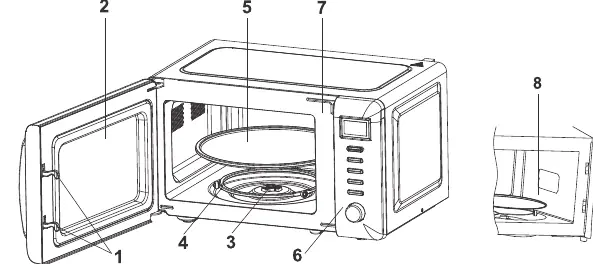
- 1. Door lock: Ensures the door is closed for operation.
- 2. Viewing window: Allows monitoring of cooking status.
- 3. Rotating axis: Drives the turntable.
- 4. Rotating ring: Supports the turntable.
- 5. Turntable: Rotates food for even cooking.
Model compatibility
- Use heat-resistant ceramic, glass, or plastic containers.
- Do not use metal containers or racks.
- Do not use bamboo, wood, or paper containers for high-temperature cooking.

Manual page author
Michael Turner
Technical manual editor