Home Appliances / Microwaves
User Manual for Harper HVC-VR02 2-in-1 Cordless Vacuum Cleaner
Quick guide for the Harper HVC-VR02 2-in-1 cordless vacuum cleaner. Learn how to assemble, charge, clean the dust bin, maintain filters, and troubleshoot common issues.
Quick answers from the manual
Quick answer
- The Harper HVC-VR02 is a 2-in-1 cordless vacuum cleaner. It can be used as a stick vacuum or a handheld unit. It features a 22.2V Li-ion battery, 0.8L dust bin, and HEPA filtration. p. 1, 2
Key actions
- Emptying the dust bin p. 4
- Cleaning filters p. 5
First start
- Charge the battery fully before first use. p. 4
Show 4 more answers Show less
Problems and fixes
Vacuum not cleaning well
Empty dust bin, check filter/bin fit, clean filter.
p. 6Maintenance and reset
- Clean filters every two weeks; replace HEPA filter every two months. p. 5
Technical specifications
| Parameter | Value | Meaning | Pages |
|---|---|---|---|
| Battery | 22.2 V, 2000 mAh | Li-ion battery specifications | p. 6 |
| Dust bin volume | 0.8 L | Capacity of the dust container | p. 6 |
Where to find it in the PDF
- Introduction and Components p. 2
- Assembly and Charging p. 3, 4
- Maintenance p. 5
- Technical Specifications p. 6
Table of contents
Manual images
Click an image to enlargeQuick guide from the manual
The Harper HVC-VR02 is a 2-in-1 cordless vacuum cleaner designed for dry cleaning of rooms and furniture. It features a detachable battery, motorized brush, and HEPA filtration. Important: Do not use this device to pick up liquids, wet surfaces, or flammable/burning materials. Do not use on concrete or rough surfaces.
Components
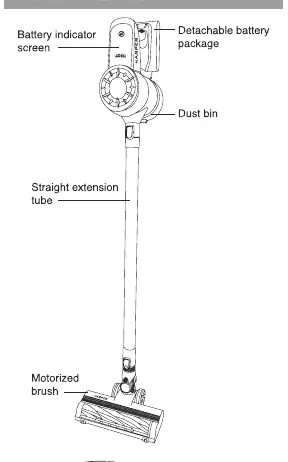
- Vacuum cleaner main body
- Straight extension tube
- Motorized brush
- 2-in-1 nozzle and long crevice nozzle
- Power adapter and wall hanger
Assembly
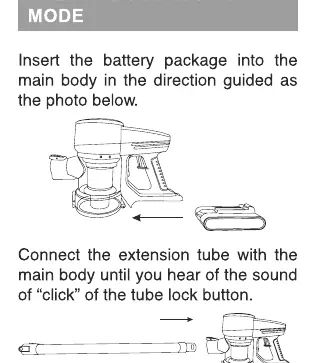
Stick Mode
Insert the battery into the main body. Connect the extension tube to the main body until you hear a click. Attach the motorized brush to the extension tube until it clicks into place.
Handy Mode
Insert the long crevice nozzle or the 2-in-1 nozzle directly into the main body intake.
Charging
The battery indicator displays the charge level from 1-100%. When the indicator is under 20% and flashes red, the device needs charging.
- Method 1: Charge while the vacuum is mounted on the wall hanger.
- Method 2: Remove the battery pack and charge it separately. The indicator flashes red while charging and turns blue when fully charged.
Emptying the Dust Bin
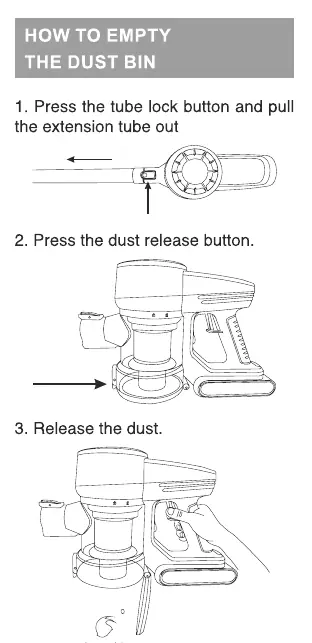
- Press the tube lock button to remove the extension tube.
- Press the dust release button on the dust bin.
- Empty the contents into a waste container.
Maintenance
Regular maintenance is required to keep the vacuum performing well.
- Dust Bin & Filters: Press the dust bin lock and turn clockwise to remove. Take out the coarse filter housing and HEPA filter.
- Cleaning: Rinse the coarse filter and HEPA filter under running water. Dry them completely under the sun before reinstalling.
- Replacement: Clean filters every two weeks. Replace the HEPA filter every two months depending on usage.
Troubleshooting
If the vacuum is not cleaning well, empty the dust bin, check if the bin and filters are fitted correctly, and clean the filters. If the device stops or won't work, charge the battery and clean the motorized brush of debris. If the battery will not charge, check the connections and the wall socket.
Technical Specifications
- Power: 240 W
- Battery: Li-ion, 22.2 V, 2000 mAh
- Suction Power: ≥ 80 W
- Dust Bin Volume: 0.8 L
- Working Time: Up to 40 min (min power), up to 20 min (max power)
- Full Charge Time: Up to 5 hours
Practical help
Common problems
Vacuum not cleaning well
Empty the dust bin, ensure the bin and filters are correctly fitted, and clean the filters.
Vacuum stops or won't work
Charge the battery and check the motorized brush for debris.
Battery will not charge
Check the power connections and the wall socket.
Before use
- Ensure the battery is charged.
- Check that the dust bin is empty.
- Verify that filters are installed correctly.
- Ensure the motorized brush is free of debris.
- Check that the device is not being used on wet surfaces.
Show more Show less
Specs in practice
- Suction power: ≥ 80 W
- Indicates the cleaning performance capability of the vacuum.
- Continuous working time
- Up to 40 minutes on minimum power; up to 20 minutes on maximum power.
- Full charge time
- The device takes up to 5 hours to reach a full charge.
Images and diagrams
- The battery indicator screen shows the charge percentage (1-100%).
- The dust release button is located on the side of the dust bin.
- The speed control button allows switching between Eco and High speed modes.
Model compatibility
- Use only the manufacturer-supplied battery and charger.
- Not suitable for wet surfaces or liquids.
- Do not use on concrete or rough surfaces.

Manual page author
Michael Turner
Technical manual editor