Tools / Saws
User Manual for Batavia FIXXPACK 12V Cordless Polisher/Sander BT-CP002
Quick guide for the Batavia FIXXPACK 12V Cordless Polisher/Sander (BT-CP002). Includes setup, operation, maintenance, and safety instructions.
Table of contents
Quick guide from the manual
This manual provides instructions for the Batavia FIXXPACK 12V Cordless Polisher/Sander (Model BT-CP002). This tool is intended for polishing and sanding applications. It is not suitable for cutting, roughing, or wire brushing. Always ensure the battery is charged before first use and inspect the tool for damage.
Device Overview
The tool features the following components:
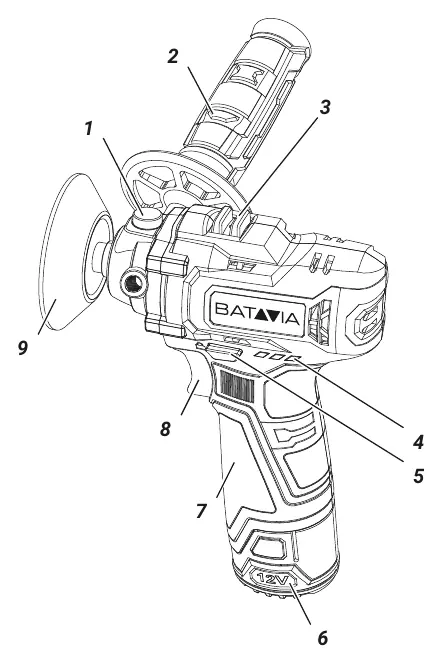
- Spindle lock (1): Used to prevent spindle rotation when changing accessories.
- Side handle (2): Provides stability during operation.
- 2-gear speed switch (3): Allows selection between high (0-7800/min) and low (0-2600/min) speeds.
- Lock button (5): Used to unlock/lock the ON/OFF switch.
- On-off switch (8): Trigger to start and control the speed of the machine.
- Polish disc (9): The working attachment.
Safety Instructions
- Always wear personal protective equipment, including safety glasses, ear protection, and dust masks.
- Do not use damaged accessories; inspect before every use.
- Keep bystanders at a safe distance.
- Do not operate near flammable materials.
- The tool is not designed for wet sanding; do not use liquid coolants.
- Remove the battery before performing any maintenance or cleaning.
Operation
Spindle Lock: Press the spindle lock (1) to hold the spindle stationary while installing or removing accessories.
Speed Adjustment: Use the 2-gear speed switch (3) to toggle between high and low speed ranges.
Switching On/Off: Before use, press the lock button (5) to unlock the trigger. Press the On/Off trigger (8) to start the machine. The speed is variable based on how hard you press the trigger. Release the trigger to stop the machine. After use, press the lock button again to lock the switch.
Maintenance and Cleaning
There are no user-serviceable parts inside the tool. Keep ventilation openings and the motor housing free from dirt and dust. Clean the tool immediately after use with a damp cloth and mild soap. Do not use solvents or abrasive cleaners. Ensure no water enters the tool.
Technical Data
- Speed: 0-2600 / 0-7800 min-1
- Pad size: Ø 75mm
- Weight: 0.67 kg
- Drive spindle thread: M6
Manufacturer information
Batavia
Practical help
Common problems
Tool vibrates excessively
Check that the accessory is correctly mounted and not damaged. Run the tool at maximum no-load speed for one minute to test.
Battery life is significantly reduced
The battery may be worn out and requires replacement. Ensure it is fully charged before use.
Tool will not start
Ensure the lock button (5) has been pressed to unlock the trigger (8) and that the battery is charged.
Before use
- Remove all packaging and loose parts.
- Inspect the tool and accessories for transport damage.
- Charge the battery fully if the machine is new.
- Ensure the correct accessory is mounted and compatible.
- Verify the sanding paper is correctly attached.
Images and diagrams
- 1: Spindle lock button
- 2: Side handle for grip
- 3: 2-gear speed selector
- 8: Variable speed trigger
- 9: Polish disc attachment
Model compatibility
- Use only accessories with an allowable speed matching at least the highest no-load speed of the tool.
- Do not use accessories not specifically provided or recommended by the manufacturer.

Manual page author
Emily Carter
User documentation editor
Prepares concise manual descriptions and highlights the most useful setup, operation, and maintenance information for readers.