Tools / Drills
Instruction Manual for HiKOKI DS 18DBL2 and DV 18DBL2 Cordless Driver Drill / Impact Driver Drill
Quick guide for HiKOKI DS 18DBL2 and DV 18DBL2 cordless drills. Includes setup, battery charging, operation modes, safety warnings, and troubleshooting steps.
Table of contents
Manual images
Jump to the sectionQuick guide from the manual
This manual provides essential operating instructions for the HiKOKI DS 18DBL2 (Driver Drill) and DV 18DBL2 (Impact Driver Drill). Key procedures include battery installation, charging, bit mounting, and selecting appropriate torque and speed settings for different materials.
Battery removal and installation
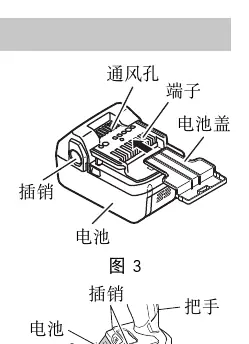
To remove the battery, hold the handle firmly and push the battery latches. To install, insert the battery while observing the correct polarity until it clicks into place.
Charging
Connect the charger to a power outlet. The pilot lamp will blink in red. Insert the battery firmly into the charger. The pilot lamp will light continuously in red during charging and blink when charging is complete. If the lamp flickers, check for foreign objects in the connector.
How to use
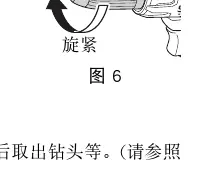
Mounting bits: Loosen the sleeve by turning it counterclockwise to open the keyless chuck. Insert the bit and tighten the sleeve clockwise.
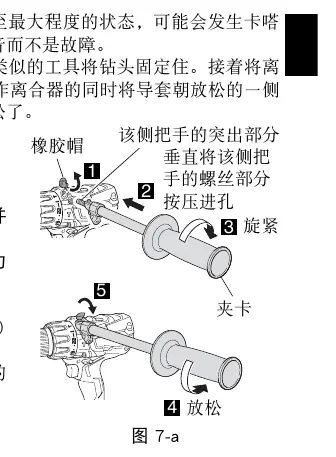
Side handle: Remove the rubber cap and attach the side handle. Ensure it is firmly secured before use.
Rotation and speed: Use the selector button to set the rotation direction (R for clockwise, L for counterclockwise). Use the shift knob to select speed (LOW for high torque, HIGH for high speed).
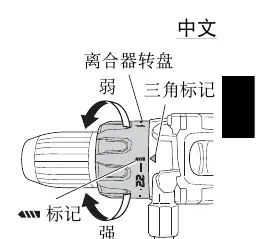
Clutch dial: Adjust the tightening torque by aligning the numbers (1-22) or the drill/hammer marks with the triangle mark on the tool body.
Safety and maintenance
Always wear eye protection. When impact drilling (DV18DBL2), wear ear protectors. Keep the tool clean and inspect mounting screws regularly. Store the tool in a place with a temperature below 40°C and out of reach of children.
Troubleshooting
If the tool stops suddenly, it may be due to overloading or the activation of the Reactive Force Control (RFC). Release the switch and remove the cause of the overload. If the tool fails to run, check the battery charge and ensure it is securely attached.
Manufacturer information
HiKOKI
Practical help
Common problems
Tool suddenly stops
Tool was overburdened or Reactive Force Control (RFC) activated. Release the switch and remove the cause of the overload.
Tool doesn't run
Check battery charge or ensure the battery is securely attached until a click is heard.
Bit falls off or cannot be attached
Ensure the bit diameter is within the 1.5 mm to 13 mm range. If the chuck lock is worn, contact an authorized service center.
Screw head slips or comes loose
Ensure the bit size matches the screw size and replace worn bits.
Before use
- Ensure the work area is clean, well-lit, and free of debris.
- Check that the battery is fully charged and correctly installed.
- Verify the rotation direction is set correctly.
- Ensure the side handle is securely attached if required.
- Confirm the clutch dial is set to the appropriate mode (Drill/Impact/Torque setting).
Specs in practice
- No-load speed (Low/High)
- 0-500 /min (Low) for high torque tasks; 0-2100 /min (High) for fast drilling.
- Impact rate (DV18DBL2)
- 0-7500 /min (Low) or 0-31500 /min (High) for masonry drilling.
- Drill chuck capacity
- Accepts bits with a diameter between 1.5 mm and 13 mm.
Images and diagrams
- Fig 3/4: Battery removal and installation procedure.
- Fig 5: Battery charging setup.
- Fig 6: Keyless chuck operation (loosen/tighten).
- Fig 7-a: Side handle installation.
- Fig 15: Remaining battery indicator check.
Model compatibility
- Use only genuine HiKOKI batteries.
- DV18DBL2 is suitable for brick/concrete drilling; DS18DBL2 is not.
- Do not use the impact setting if the material can be bored by rotation only.

Manual page author
David Miller
Documentation analyst
Organizes user manual content into clear summaries, with attention to model details, product context, and everyday usability.