Tools / Drills
HiKOKI DV 18DGAL Cordless Combi Drill Instruction Manual
A comprehensive guide for the HiKOKI DV 18DGAL cordless combi drill, covering safety procedures, battery charging, operation, maintenance, and troubleshooting.
Table of contents
Manual images
Jump to the sectionQuick guide from the manual
This document provides essential operating and safety instructions for the HiKOKI DV 18DGAL cordless combi drill. Key procedures include proper battery charging, bit installation, and selecting the correct operating mode (drilling or impact drilling). Always ensure the tool is switched off before changing settings or batteries to prevent accidental startup.
Battery charging
Before using the tool, ensure the battery is fully charged. Connect the charger to a power source; the pilot lamp will blink in red. Insert the battery firmly into the charger. The lamp will light continuously while charging and blink when complete. If the lamp flickers rapidly, check for foreign objects in the connector or potential malfunctions.
Operation
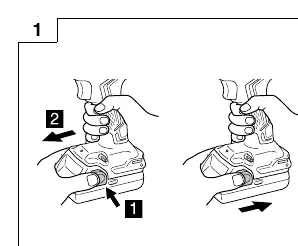
- Removing/Inserting Battery: Slide the battery into the tool until it clicks.
- Torque Adjustment: Use the clutch dial to set the desired torque. Do not set the dial between numbers or between the drill mark and the last number.
- Selecting Mode: Use the mode selector to switch between drilling and impact drilling.
- Speed Selection: Use the shift knob to select high or low speed. Only change speed when the motor is stopped.
- Bit Mounting: Insert the bit into the keyless chuck and tighten the sleeve securely.
Maintenance and inspection
Regularly inspect the tool for dull bits, loose mounting screws, and motor cleanliness. Keep the exterior clean by wiping with a soft, dry cloth or soapy water; avoid solvents like gasoline or paint thinner. Store the tool and battery in a dry place below 40°C, out of reach of children. Ensure batteries are fully charged before long-term storage.
Troubleshooting
If the tool fails to operate, check the battery charge and ensure it is securely inserted. If the motor stops suddenly, it may be overloaded; release the switch and remove the cause of the overload. If the drill bit slips, ensure the chuck is tightened properly and the bit size is within the 1.5 mm to 13 mm range.
Manufacturer information
HiKOKI
Practical help
Common problems
Tool does not run
Check battery charge and ensure it is fully inserted until a click is heard.
Tool suddenly stops
The tool is likely overloaded. Release the switch and remove the cause of the overload.
Drill bit slips or falls out
Ensure the keyless chuck sleeve is tightened adequately and the bit diameter is between 1.5 mm and 13 mm.
Battery charging does not begin
Check for foreign matter in the battery terminal or charger. Ensure the battery is inserted firmly.
Before use
- Ensure the work area is clean and well-lit.
- Check that the battery is fully charged.
- Verify the drill bit is correctly mounted and the chuck is tight.
- Confirm the rotation direction is set correctly.
- Ensure the speed setting (High/Low) matches the material.
Specs in practice
- No-load speed (Ls/Hs)
- Low speed (0-400 min-1) for high torque tasks; High speed (0-1500 min-1) for fast drilling.
- Impact rate (Bpm)
- Determines the hammering frequency for impact drilling in concrete/brick.
- Drill chuck capacity
- The range of bit shank diameters the chuck can securely hold (1.5 mm to 13 mm).
Images and diagrams
- Figure 1: Battery removal and insertion.
- Figure 2: Charger connection and battery placement.
- Figure 3: Adjusting the tightening torque.
- Figure 6: Changing rotation speed (High/Low).
- Figure 8: Mounting a drill bit into the keyless chuck.
Model compatibility
- Use only genuine HiKOKI designated battery packs.
- Chargers are compatible with 14.4V-18V Li-ion batteries.
- Do not use bits longer than the standard 65mm driver bit in the tool's storage location.

Manual page author
David Miller
Documentation analyst
Organizes user manual content into clear summaries, with attention to model details, product context, and everyday usability.