General / Service Manuals
HIKOKI US 18DA Cordless Speaker User Guide
Quick guide for the HIKOKI US 18DA cordless speaker, covering battery installation, Bluetooth pairing, AUX playback, USB charging, and maintenance instructions.
Table of contents
Quick guide from the manual
The HIKOKI US 18DA is a cordless speaker compatible with HiKOKI slide-type batteries (14.4V or 18V) and household AC power. It supports Bluetooth audio streaming, AUX input for external devices, and USB charging for mobile devices.
Power and Battery Installation
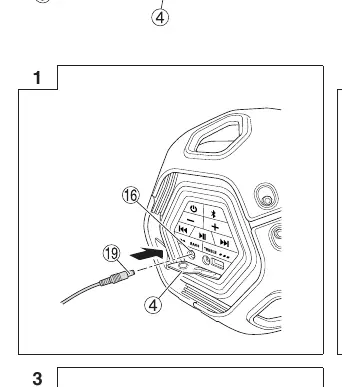
The speaker can be powered by the included AC adapter or a compatible HiKOKI slide battery. To install the battery, open the rear cover, align the battery with the grooves, and slide it in until it locks. Note that the AC adapter does not charge the battery; it only powers the unit.
Bluetooth Connection
To pair a device: 1. Press the power button to turn on the speaker. 2. Set your Bluetooth device to pairing mode. 3. Select US18DA from your device's list. If prompted for a pass key, enter 0000. The effective range is approximately 10 meters.
External Device Playback
You can connect external devices like smartphones or portable music players using a 3.5mm stereo mini-plug cable connected to the AUX input port. The AUX connection takes priority over Bluetooth.
USB Charging
The speaker features a USB charging port. Connect your device using a standard USB cable to charge it while playing music via Bluetooth or AUX.
EQ Settings
Sound quality can be adjusted to six levels for both Bass and Treble by pressing the respective buttons on the control panel.
Maintenance and Safety
Regularly inspect mounting screws for tightness. Clean the exterior with a soft, dry cloth or a cloth moistened with soapy water. Avoid using solvents like gasoline or paint thinner. Do not store the speaker in humid, dusty, or extreme temperature environments.
Manufacturer information
HiKOKI
Practical help
Common problems
Bluetooth pairing fails or audio is unstable
Unregister the US18DA from your device's Bluetooth list and attempt to pair again.
Volume is too low even when adjusted on the speaker
Check the volume level on the connected external device and increase it if necessary.
Bluetooth button is blinking
This indicates the device is currently unable to pair; ensure the device is in pairing mode.
Before use
- Ensure the AC adapter or battery is correctly installed.
- Lower the volume on both the speaker and the external device before starting playback.
- Check that the rear cover is closed when no battery is loaded.
- Verify the Bluetooth device is within the 10m effective range.
- Ensure the power plug is free of dust or dirt.
Specs in practice
- Power Supply
- Compatible with 14.4V/18V slide batteries or household AC adapter.
- Bluetooth Version
- Ver. 4.0, supports A2DP, AVRCP, and SCMS-T profiles.
- Max Power Output
- 10W x 2 speakers.
Images and diagrams
- Fig 1: Connecting the AC adapter to the port.
- Fig 2: Inserting the slide-type battery into the rear compartment.
- Fig 3: Connecting an external device via AUX cable.
- Fig 4: Connecting a smartphone to the USB charging port.
Model compatibility
- Only use HiKOKI 14.4V or 18V slide-type batteries.
- AUX input requires a standard 3.5mm stereo mini-plug cable.
- Bluetooth connection is not guaranteed for all devices.

Manual page author
David Miller
Documentation analyst
Organizes user manual content into clear summaries, with attention to model details, product context, and everyday usability.