Tools / Power Tools
Hilti AG 125-13S Angle Grinder User Manual
Quick guide for the Hilti AG 125-13S angle grinder. Includes safety instructions, setup, disc installation, operation, maintenance, and troubleshooting.
Table of contents
Manual images
Click an image to enlargeQuick guide from the manual
This document provides essential information for the safe and efficient operation of the Hilti AG 125-13S angle grinder. Always read the full safety instructions before use. Ensure the tool is in technically faultless condition before operation.
Product Overview
The angle grinder features a spindle lock button, on/off switch, air vents, vibration-absorbing side handle, and a guard. Optional accessories include a Kwik lock clamping nut for tool-free disc changes.
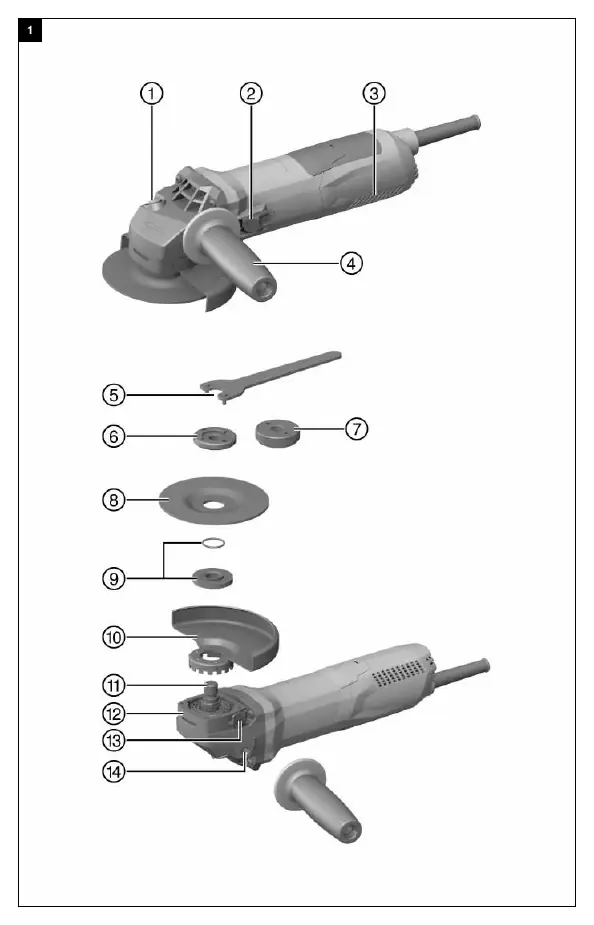
Safety Instructions
Always wear eye protection, a hard hat, ear protection, protective gloves, and light respiratory protection. Ensure the workplace is well-ventilated. Before starting work, check for concealed electric cables, gas, or water pipes. Do not operate the tool in explosive atmospheres.
Setup and Installation
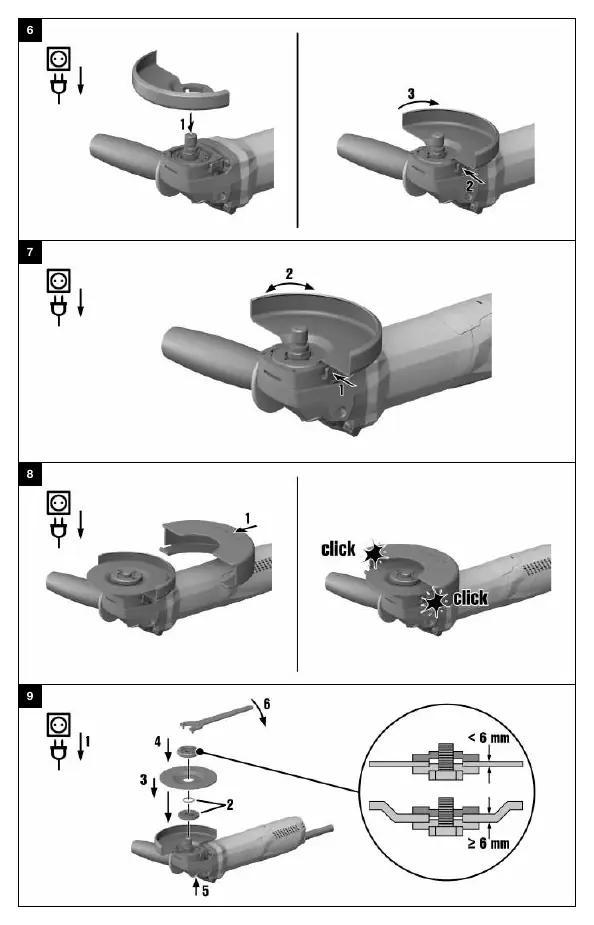
Fitting the side handle: Screw the side handle into one of the threaded bushings provided. Installing the guard: Fit the guard onto the arbor collar, aligning the triangular marks. Press the guard release button and turn until it engages. Fitting the front cover: Position the front cover on the standard guard and push until it engages.

Operation
Switching on: Plug in the tool, press the rear section of the on/off switch, and slide it forward to lock. Switching off: Press the rear section of the on/off switch to release it. Grinding/Cutting: Use the tool with the side handle fitted and hold with both hands. For cutting, apply moderate pressure and keep the disc at approx. 90° to the cutting plane. For rough grinding, maintain a 5° to 30° angle of attack.
Care and Maintenance
Always unplug the tool before maintenance. Carefully remove dirt and clean air vents with a dry brush. Use a slightly damp cloth for the casing; do not use silicone-based cleaning agents. Check all visible parts for damage regularly.
Troubleshooting
If the tool does not start, check the power supply, cord, plug, and carbon brushes. If the tool is overloaded, release the switch, press it again, and run no-load for 30 seconds. If the tool lacks power, check the extension cord cross-section.
Manufacturer information
Hilti Corporation
Practical help
Common problems
Product does not start
Check power supply, inspect cord/plug for defects, or check if carbon brushes are worn.
Product does not work
Product is overloaded; release the on/off switch, press it again, and run the tool under no load for approx. 30 seconds.
Product does not develop full power
The extension cord conductor cross-section is inadequate; use a cord with an adequate cross-section.
Elevated temperatures at the gear housing
Short braking interval; allow the device to run under no load until it has cooled down.
Before use
- Check voltage and frequency match the rating plate
- Ensure the side handle is securely fitted
- Verify the guard is correctly installed and adjusted
- Inspect the disc for chips, cracks, or damage
- Wear appropriate personal protective equipment (eye, ear, respiratory, gloves)
Specs in practice
- Maximum disc diameter
- 125 mm
Images and diagrams
- Overview of product components and controls
- Guard installation and adjustment sequence
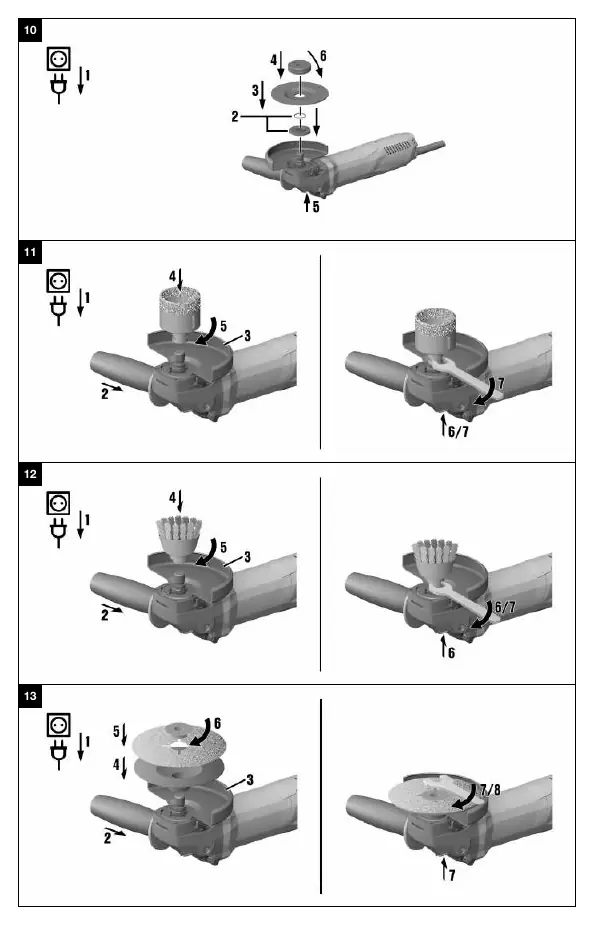
- Disc installation using standard nut vs Kwik lock nut
Model compatibility
- Use only synthetic-resin-bonded, fiber-reinforced discs
- Max grinding disc thickness: 6.4 mm
- Max cutting disc thickness: 3 mm

Manual page author
Michael Turner
Technical manual editor
Reviews PDF manuals for structure, safety notes, and practical product details so readers can find the right information quickly.