Tools / Power Tools
Operating Instructions for Hilti DD 150-U Diamond Core Drilling Machine
Quick guide for the Hilti DD 150-U diamond core drilling machine. Includes setup, operation, Bluetooth pairing, maintenance, and troubleshooting.
Table of contents
Manual images
Click an image to enlargeImportant Information
Read and understand all accompanying documentation, including safety warnings, illustrations, and specifications. This product is designed for professional users and must be operated, serviced, and maintained only by trained, authorized personnel. Always check the Hilti website for the latest version of the documentation.
Product Description
The Hilti DD 150-U is an electrically powered diamond core drilling machine designed for hand-guided wet and dry drilling, as well as wet drilling with a drilling rig for through-holes and blind holes in mineral substrates. It also supports dry drilling in wood with specific core bits.
Installation
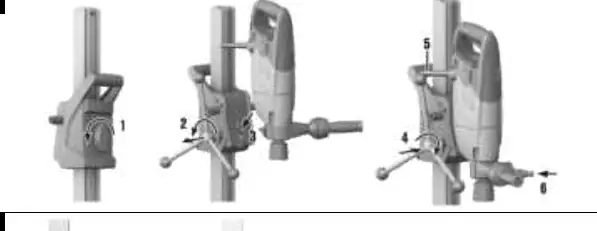
The drill stand must be securely fastened to the work surface using anchors, a vacuum base plate, or a threaded spindle. For horizontal drilling, the drill stand must be additionally secured. Ensure the drill stand is leveled using the leveling screws. Before drilling, check that the pressure gauge pointer remains in the green zone when using vacuum securing.


Operation
Bluetooth: The product features Bluetooth for service functions and data transmission via the Hilti ON!Track 3 app. Bluetooth is switched on automatically on first startup. To pair, press the Bluetooth buttons simultaneously.
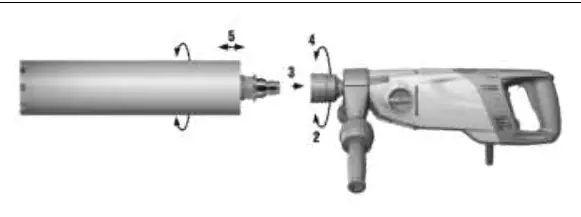
Core Bits: Ensure core bits are compatible with the tool-holder system. In stand-guided mode, lock the carriage before fitting or removing core bits. Always wear protective gloves when changing tools.
Drilling: Use the two-part hole-starting aid for large-diameter core bits to reduce vibration. For wet drilling, use the water collection system with a wet-type industrial vacuum extractor, especially for overhead drilling.
Maintenance
Always unplug the power cord before performing maintenance. Clean air vents with a dry brush. Regularly check the chuck and clamping segments, and lubricate with Hilti lubricant spray. Replace carbon brushes when the service display indicates it is necessary. After replacing brushes, run the machine under no load for at least one minute to complete the run-in process.
Troubleshooting
If the multifunction display is blank, check the PRCD and power supply. If the core bit is jammed, guide the machine straight or use a wrench to release it. If drilling progress decreases, check for correct gear selection, contact pressure, or water flow.
Manufacturer information
Hilti Corporation
Practical help
Common problems
Multifunction display is blank
Check if the PRCD is switched on, verify the power supply, or allow the motor to dry if water has entered.
Core bit is jammed
Guide the machine in a straight line. If using a stand, use the hand wheel to move the carriage up and down to release the bit.
Drilling progress decreases
Check if the core bit is worn, the wrong gear is selected, contact pressure is too low, or the water flow is incorrect.
Water escapes at the chuck
Ensure the core bit is securely tightened, or check/replace the seal at the chuck.
Before use
- Verify the PRCD is functioning and switched on.
- Ensure the drill stand is securely anchored or vacuum-secured.
- Check that the side handle is correctly fitted and tightened.
- Verify the water supply and hose connections are leak-free.
- Inspect the core bit for damage or heavy wear.
Specs in practice
- Permissible water supply pressure
- Must be ≤ 6 bar to prevent damage.
- Bluetooth frequency range
- 2,400 MHz to 2,483 MHz.
- Minimum vacuum
- 9.43 psi (0.65 bar) required for vacuum base plate operation.
Images and diagrams
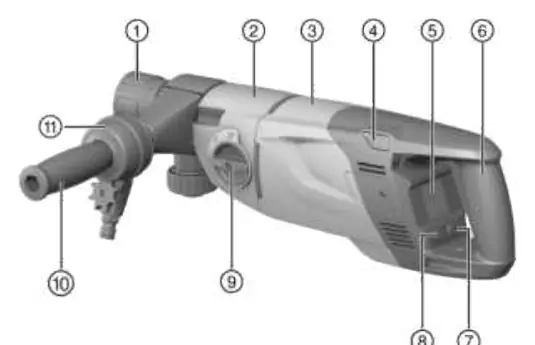
- Page 2: Overview of the diamond core drilling machine (1-21).
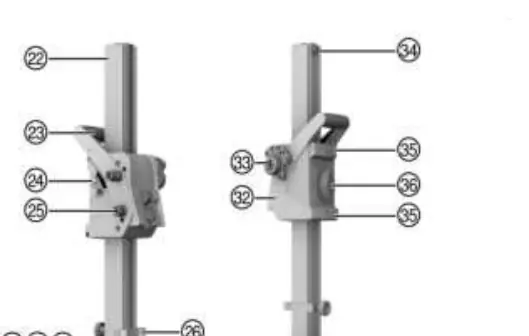
- Page 3: Overview of the drill stand (22-40) and optional accessories (41-55).
- Page 4: Securing the drill stand with an anchor.
- Page 5: Securing the drill stand by vacuum.
- Page 6: Fitting and removing the core bit.
Model compatibility
- Designed for hand-guided wet/dry drilling and stand-guided wet drilling.
- Dry drilling in wood requires specific core bits.
- Bluetooth compatible with iOS and Android platforms.

Manual page author
Michael Turner
Technical manual editor
Reviews PDF manuals for structure, safety notes, and practical product details so readers can find the right information quickly.