Home / Seasonal Decorations
User Manual for Home Accents Holiday 6ft Animated Singing Santa 21SV23099
Quick guide for the Home Accents Holiday 6ft Animated Singing Santa (21SV23099). Includes assembly instructions, operation modes, and troubleshooting tips.
Quick answers from the manual
Quick answer
- The 6ft Animated Singing Santa (21SV23099) is an indoor decoration. Assemble by connecting the base, support poles, and torso frame, then connect the internal wiring. It features three operation modes: IR Sensor, Try Me (requires external pad), and Continuous. p. 1, 2, 3
Key actions
- Assemble the frame and clothing p. 1, 2
- Connect wiring p. 2
- Select operation mode p. 3
First start
- Plug in the adapter p. 3
- Adjust settings p. 3
Show 3 more answers Show less
Problems and fixes
Item not functioning
Check cable connections, ensure nothing is blocking moving parts, and verify the adapter is plugged in.
p. 1, 3
No sound
Check the volume control dial on the control box.
p. 1, 3Technical specifications
| Parameter | Value | Meaning | Pages |
|---|---|---|---|
| Adapter Input | 100-240VAC 50/60Hz | Power input requirements | p. 1 |
| Adapter Output | 5.9V 2.0A | Power output requirements | p. 1 |
| Sensor Range | 2m / 6.5ft | Maximum detection distance | p. 3 |
Where to find it in the PDF
- Assembly p. 1, 2
- Operation p. 3
- Troubleshooting p. 1, 3
Table of contents
Manual images
Click an image to enlargeImportant Information
The Home Accents Holiday 6ft Animated Singing Santa is designed for indoor use only. Before assembly, ensure the floor is flat and level. Keep the adapter away from heat and moisture. If any parts are missing or broken, do not attempt assembly and contact customer service.
Parts List
Ensure all parts are present before beginning assembly:
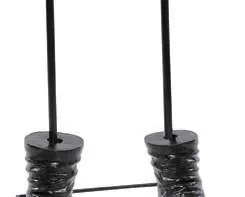
- Base
- Lower Support Poles (x2)
- Boots (x2)
- Pants
- Lower Torso Frame
- Hip Hoop
- Torso
- Head
- Adapter (Input: 100-240VAC 50/60Hz, Output: 5.9V 2.0A)
Assembly Instructions
Follow these steps to assemble your animated Santa:
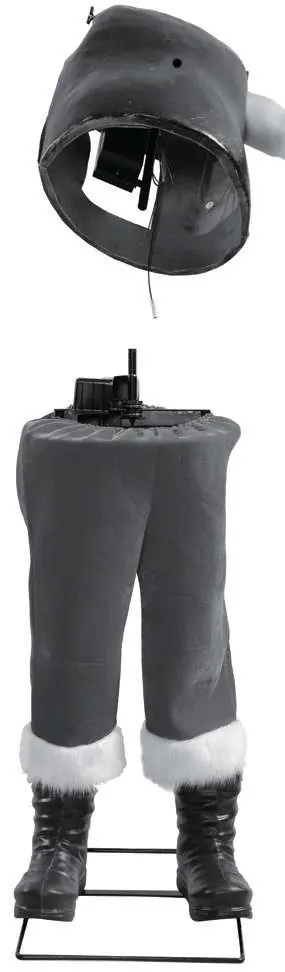
- Base and Legs: Attach the lower support poles to the base. Secure the boots onto the poles.
- Lower Body: Slide the pants over the support poles. Attach the lower torso frame to the poles.
- Torso and Head: Attach the hip hoop to the lower torso frame. Place the torso onto the frame. Connect the head to the torso.
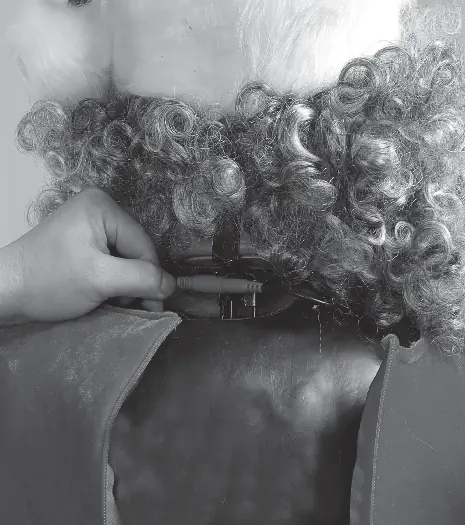
- Wiring: Connect the internal cables, specifically the mouth movement cable and the turning motor cable, to the function control box.
- Final Setup: Plug the adapter into the function control box and then into a standard wall outlet.
Operation Instructions
The function control box allows you to select between three operation modes:
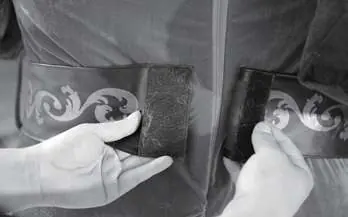
- IR Sensor: Activates sound and animation when the sensor detects movement. The sensor has a range of up to 2 meters (6.5 ft) and an 80-degree activation angle.
- Try Me: Allows activation only if triggered by a Step Here Try Me Activation Pad (not included).
- Continuous: Operates the sound and animation continuously.
Use the volume control dial on the control box to adjust the sound level. Turn the dial all the way down to mute the volume.
Troubleshooting
If the item is not functioning properly, check the following:
- Ensure the adapter is securely plugged into the control box and the wall outlet.
- Verify that the switch on the control box is set to the desired mode.
- Check that all internal cables are connected to their corresponding ports.
- Ensure nothing is blocking the IR sensor or the moving parts of the figure.
- Check that the volume is not turned all the way down.
Care and Storage
For best performance, operate the item indoors. When not in use, store the product in its original packaging to protect it from dust and damage. Keep away from heat and moisture.
Manufacturer information
Home Accents Holiday
Practical help
Common problems
Mouth or body not moving
Ensure all cables are connected to their corresponding ports and nothing is blocking the moving parts.
Item does not activate
Check that the adapter is plugged in and the switch on the control box is set to the correct mode.
No sound
Ensure the volume control dial is not turned all the way down.
Before use
- Ensure the floor surface is flat and level.
- Verify all parts are present according to the parts list.
- Connect all wires according to matching colors.
- Ensure the adapter is plugged into the function control box and the wall outlet.
- Check that the IR sensor is not blocked.
Show more Show less
Specs in practice
- IR Sensor Range
- Up to 2 meters (6.5 ft) with an 80-degree activation angle.
- Adapter Output
- 5.9V 2.0A.
Images and diagrams
- Assembly steps 1.1-6.4 illustrate the connection of the base, support poles, clothing, and internal frame.
- Wiring diagrams show how to connect the mouth movement cable and the turning motor cable to the control box.
Model compatibility
- For indoor use only.
- Step Here Try Me Activation Pad is not included.

Manual page author
Emily Carter
User documentation editor