Home / Seasonal Decorations
User Manual for Home Accents Holiday 21LE31009 Starry Light Fraser Fir Flocked Christmas Tree
Comprehensive user guide for the Home Accents Holiday 21LE31009 Christmas tree. Includes assembly instructions, remote and app setup, lighting function control, troubleshooting, and storage tips.
Quick answers from the manual
Quick answer
- The 21LE31009 is a pre-lit Christmas tree with 10 lighting functions controlled by a remote or the Ledup app. It uses Power Pole technology for automatic electrical connection between sections. p. 1
Key actions
- Activate Home Mode for remote control p. 1
- Assemble tree sections p. 1
First start
- Assemble stand and sections p. 1
Show 3 more answers Show less
Problems and fixes
Tree does not light up
Check foot pedal, replace remote batteries, or re-insert sections to ensure electrical connection.
p. 1Maintenance and reset
- Resetting to Home Mode p. 1
Where to find it in the PDF
- Assembly and Operation p. 1
Table of contents
Manual images
Click an image to enlargeQuick guide from the manual
The Home Accents Holiday 21LE31009 is a pre-lit Christmas tree featuring Power Pole technology for automatic electrical connection between sections. It offers 10 lighting functions controlled via the included remote or the Ledup app. Important: To enable manual remote operation, you must activate "Home Mode" by pressing the "Light Show" and "Steady Multi" buttons simultaneously until the tree flashes multi-color twice.
Assembly Instructions
Follow these steps to assemble your tree:
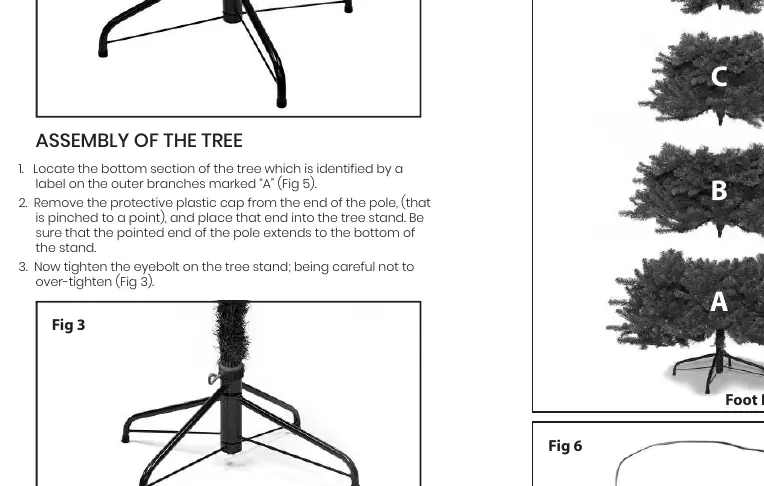
- Stand Setup: Remove the stand from the bag, loosen the eyebolt, and open it to form an 'X'. Insert the eyebolt and thread it clockwise a few turns, leaving space for the tree pole.
- Section Assembly: Locate the bottom section labeled 'A'. Remove the protective plastic cap from the pole and insert it into the stand. Tighten the eyebolt, ensuring it is not over-tightened.
- Power Pole Connection: Locate subsequent sections (B, C, D) labeled on the outer branches. Remove the protective cap from the pole of the upper section and insert it into the top of the section below. The tree sections will light up automatically upon firm insertion.
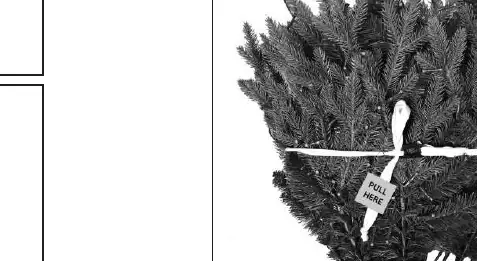
- Shaping: Untie the fabric strapping bounding the branches upright. Gently guide the branches downward into place.
Operation
The tree can be operated in three ways:
- Foot Pedal: Provides basic manual on/off functionality only.
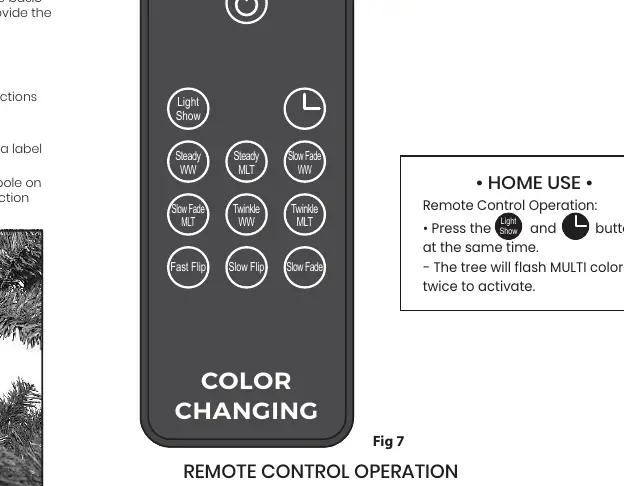
- Remote Control: Controls all 10 lighting functions. Requires 2x AAA batteries.
- Ledup App: Download the app via the QR code on the manual. Use Product ID: ctr010f to connect. Note: Bluetooth must be enabled on your device.
Troubleshooting
- Tree not lighting: Check if the foot pedal is in the "Off" position. Ensure all sections are firmly inserted to establish electrical connections.
- Remote not working: Ensure "Home Mode" is activated. If the remote is damaged, use the Ledup app until a replacement is provided.
- App connection: Ensure Bluetooth is enabled on your smartphone or tablet.
Disassembly and Storage
- Unplug the tree and bind the cord containing the foot pedal.
- Lift each section straight up from the section below, starting from the top.
- Fold branches upward toward the center and secure with fabric strapping.
- Store in a cool, dry location protected from heat and sunlight. Do not store in a plastic bag to prevent moisture and condensation.
Important Notes
- Flocking/Glitter: Some loose material is normal during unpacking. Simply sweep or vacuum it up.
- Safety: Indoor use only. Not a toy.
Manufacturer information
Home Accents Holiday
Practical help
Common problems
Tree does not illuminate
Check if the foot pedal is in the 'Off' position. Ensure all sections are firmly connected. If using the remote, check batteries (2x AAA).
Remote control not working
Activate 'Home Mode' by pressing 'Light Show' and 'Steady Multi' buttons simultaneously until the tree flashes multi-color twice.
App connection issues
Ensure Bluetooth is enabled on your smartphone or tablet. Use Product ID: ctr010f.
Before use
- Unpack all sections (A, B, C, D) and the stand.
- Ensure the stand is open and the eyebolt is ready.
- Have 2x AAA batteries ready for the remote.
- Check that the foot pedal is accessible.
- Prepare to vacuum loose flocking/glitter after assembly.
Show more Show less
Specs in practice
- Power Pole Technology
- Allows sections to light up automatically upon insertion without manual wiring.
Images and diagrams
- Fig 2/3: Stand assembly and eyebolt tightening.
- Fig 5: Section labeling (A, B, C, D) and Power Pole connection.
- Fig 6: Foot pedal location.
- Fig 7: Remote control button layout.
- Fig 8: Home Mode activation sequence.
Model compatibility
- Indoor use only.
- Requires 2.4 GHz frequency for app communication (Bluetooth protocol not used for tree communication).

Manual page author
Emily Carter
User documentation editor