Electronics / Sim Racing Equipment
User Manual for HORI 2050-58MKUSA Racing Wheel
Quick guide for the HORI 2050-58MKUSA Racing Wheel. Learn how to connect, mount, remap buttons, and use the Button Hold function.
Quick answers from the manual
Quick answer
- The HORI 2050-58MKUSA is a wired racing wheel for Nintendo Switch and PC. Connect the pedals to the steering unit, perform the calibration (full rotation and pedal press), and ensure your system is updated. p. 2
Key actions
- Remap buttons p. 5
First start
- Calibration p. 2
Show 4 more answers Show less
Problems and fixes
Button Hold function doesn't work
Ensure the Hold button has the Hold function assigned.
p. 4Maintenance and reset
- Reset all buttons to default p. 5
Technical specifications
| Parameter | Value | Meaning | Pages |
|---|---|---|---|
| Steering Unit Weight | 700g | Weight of the steering wheel unit | p. 6 |
Where to find it in the PDF
- Connection p. 2
- Assign Mode p. 5
Table of contents
Manual images
Click an image to enlargeQuick guide from the manual
The HORI 2050-58MKUSA is a wired racing wheel designed for Nintendo Switch and PC. Before using the device, ensure your Nintendo Switch system software is updated. The device requires a USB connection and does not support wireless operation or DirectInput.
How to connect
Follow these steps to set up your racing wheel:
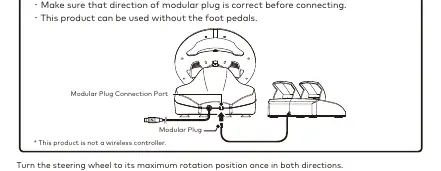
- Connect the modular plug from the foot pedals to the modular connection port on the steering unit.
- The steering wheel can be used without the foot pedals if desired.
- Turn the steering wheel to its maximum rotation position once in both directions.
- Press down fully into each of the L and R pedals once.
- Repeat this process whenever you re-connect the controller or restart your Nintendo Switch or PC.
Mounting
The steering unit can be mounted to furniture using the integrated clamp. Do not attach the unit to furniture made from glass or other fragile materials. Detach the unit carefully to avoid damaging the furniture or the product.
Control Toggle Switch
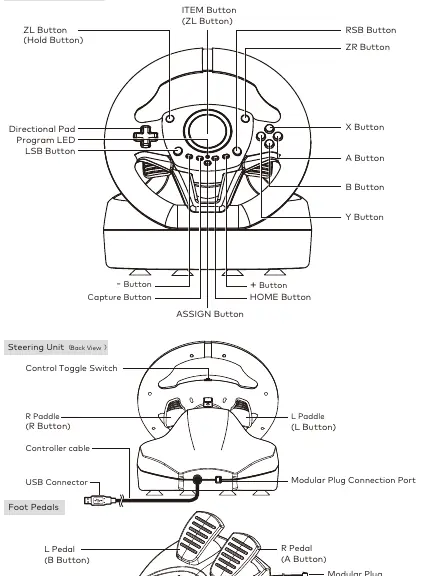
The directional pad controls can be toggled between directional pad, left stick, or right stick modes using the switch on the back of the steering unit. Note that this function may not work with all software; refer to the specific software's instruction manual.

Button Hold function
This function allows you to maintain a button press after releasing your finger.
- To Enable: Press and hold the Hold button for 1 second. The red LED will turn on.
- To Disable: Press the Hold button once. The red LED will turn off.
Note for Mario Kart: If the Button Hold function is enabled, you must press the ZL, ITEM, or L button once to disable the function before you can use an item you have picked up.
Assign Mode
You can remap button functions using the Assign Mode:
- Press and hold the ASSIGN button for 3 seconds until the green LED flashes slowly.
- Press the button you wish to remap. The green LED will flash quickly.
- Press the new function button (or direction) you wish to assign. The green LED will turn on.
To reset individual buttons, repeat step 3. To reset all buttons to default, press and hold the ASSIGN button for 3 seconds, then press the HOME button.
Safety and Maintenance
- Never disassemble, repair, or modify the product.
- Keep the controller away from dusty or humid areas.
- Do not apply strong impact or weight to the product.
- Do not pull or bend the controller cable.
- Clean only with a soft, dry cloth; do not use chemical agents like benzine or thinner.
- Keep out of reach of children under 3 years old.
Practical help
Common problems
Button Hold function does not work
Ensure the Hold button has the Hold function assigned.
Controller not recognized
Ensure the Nintendo Switch is updated to the latest system software or check the USB connection.
Before use
- Connect the modular plug from the pedals to the steering unit.
- Turn the steering wheel to its maximum rotation position once in both directions.
- Press down fully into each of the L and R pedals once.
- Ensure the Nintendo Switch is updated to the latest system software.
Show more Show less
Specs in practice
- Angle of Rotation
- 180 degrees
- Steering Unit Cable Length
- 3 meters
- Foot Pedals Cable Length
- 1.5 meters
Images and diagrams
- Steering Unit Front View: Shows button layout including ZL, ZR, LSB, RSB, D-pad, and ASSIGN button.
- Steering Unit Back View: Shows cable connection and toggle switch.
- Pedals: Shows L and R pedal connection.
Model compatibility
- Compatible with Nintendo Switch and PC (XInput).
- Does not support DirectInput.
- Not a wireless controller.

Manual page author
Michael Turner
Technical manual editor