Electronics / Gaming Peripherals
User Manual for HORI Racing Wheel APEX Driving Machine
Quick guide for the HORI Racing Wheel APEX Driving Machine. Includes system wiring diagrams, button controls, sensitivity adjustments for steering and pedals, and troubleshooting steps for arcade cabinet hardware.
Table of contents
Quick Guide
This manual provides instructions for the HORI Racing Wheel APEX when integrated into a driving machine arcade cabinet. It covers system wiring, button controls, sensitivity adjustments, and troubleshooting for the underlying PC hardware.
System Layout
The system requires proper connection between the computer, amplifier, speakers, I/O board, coin acceptor, and the steering wheel. Ensure all USB and power cables are securely connected to the I/O board and the computer unit.
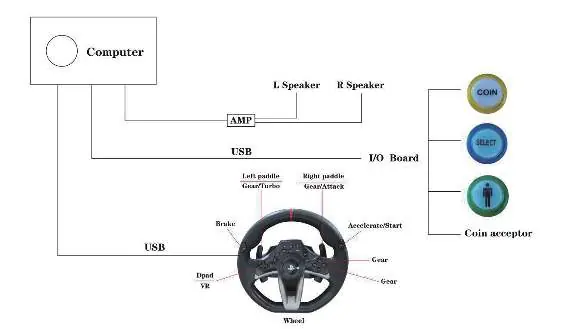
Button Layout
The steering wheel controls are mapped as follows:
- Steering: Turn left or right to select games.
- Launch/Start: Use the designated buttons to launch and start games.
- Exit: Long press the designated button to exit a game.
- Paddles: Left paddle shifts gears up/down; right paddle is for fire/attack.
- D-Pad: Cross button changes the view.
- Gears: Use the D-Pad buttons (Square, Triangle, Circle) to switch gears in manual mode.
- Pedals: L2 is the brake; R2 is the accelerator.
Adjustable Sensitivity
You can adjust the sensitivity for both the steering unit and the foot pedals to seven different levels.
Steering Unit Sensitivity
- Press the ASSIGN button for 3 seconds until the Program LED (Right) turns on.
- Press the OPTIONS button.
- Press the Directional Pad to increase or decrease sensitivity.
- Press the ASSIGN button to save settings.
Foot Pedal Sensitivity
- Press the ASSIGN button for 3 seconds until the Program LED (Right) turns on.
- Press the ASSIGN button again for 3 seconds until the Program LED (Left) flashes.
- Press the Directional Pad to adjust sensitivity.
- Press the ASSIGN button to save settings.
Troubleshooting
If you encounter issues with the driving machine, check the following:
- No video/picture but CPU fan is working: Turn off power, remove the power wire, reinstall the DDR2 RAM, and reconnect power. If the issue persists, the DDR2 RAM may need replacement.
- Reboot and Select proper boot device error: Turn off power, check that the hard disk data and power cables are connected securely. If the issue persists, the hard disk may need replacement.
- No video/picture and CPU fan is not working: Check the power supply fan and all cable connections. Check the fuse. If the issue persists, the motherboard CR2032 battery may be dead; replace it and trigger the PWR ON pins.
- Cannot enter game system: Turn off power, restart, or replace the SSD.
Compatibility
The system supports a wide range of Mame games, including titles such as Out Run, Pole Position, Super Sprint, and many others. Adjust the dial sensitivity according to your preference for each specific game.
Practical help
Common problems
No video/picture but CPU fan is working
Turn off power, remove power wire, reinstall DDR2 RAM, and reconnect. If it fails, replace the DDR2 RAM.
Reboot and Select proper boot device error
Turn off power, check hard disk data and power cable connections. If it fails, replace the hard disk.
No video/picture and CPU fan is not working
Check power supply fan, cable connections, and fuse. If it fails, replace the CR2032 motherboard battery.
Cannot enter game system
Turn off power, restart, or replace the SSD.
Before use
- Ensure the computer is connected to the I/O board via USB.
- Verify the amplifier and speakers are connected to the I/O board.
- Confirm the coin acceptor is properly wired.
- Check that the steering wheel is securely mounted.
- Ensure all power cables are firmly seated.
Specs in practice
- Steering Sensitivity
- Adjustable in 7 levels via the steering unit; indicated by LED color.
- Pedal Sensitivity
- Adjustable in 7 levels via the foot pedals; indicated by LED color.
Images and diagrams
- System Layout: Illustrates the wiring connections between the computer, amplifier, speakers, I/O board, coin acceptor, and the steering wheel.
- Button Layout: Shows the specific inputs on the steering wheel, including paddles, D-pad, and gear buttons.
Model compatibility
- Compatible with various Mame games including Out Run, Pole Position, Super Sprint, and others.
- Sensitivity settings can be customized per game.

Manual page author
David Miller
Documentation analyst
Organizes user manual content into clear summaries, with attention to model details, product context, and everyday usability.