General / Other Manuals
HP 12c Financial Calculator User Guide
Quick start guide for the HP 12c financial calculator, covering key operations, RPN mode, financial calculations, and battery replacement.
Table of contents
Quick guide from the manual
This document serves as a quick reference for the HP 12c financial calculator. It covers essential setup, key functions, RPN (Reverse Polish Notation) operation, and basic financial calculations. For advanced programming and detailed statistical functions, please refer to the full user manual.
Key operations and settings
- Power: Press ON to turn on. Pressing the ON key while holding the minus key turns the calculator off. It features an automatic power-off after 8-17 minutes of inactivity.
- Number format: Press f followed by a digit (0-9) to set the number of decimal places.
- Decimal separator: To toggle between comma and point, turn the calculator off, then hold the decimal point key while pressing ON.
- Date format: Use g 5 (M.DY) or g 4 (D.MY) to set the preferred date format.
- RPN Mode: Numbers are entered first, separated by the ENTER key, followed by the operation.
Battery replacement
The calculator requires two CR2032 3V lithium batteries. When the battery symbol (*) appears, replace them:
- Turn off the calculator and remove the back cover.
- Remove old batteries one by one.
- Insert new batteries with the positive pole facing outward.
- Replace the cover.
Warning: Risk of explosion if batteries are incorrectly replaced. Use only recommended types.
Financial calculations
The calculator uses specific registers for financial data (n, i, PV, PMT, FV). Use the FIN function (f FIN) to clear financial registers before starting a new calculation. The device supports complex calculations like net present value (NPV), internal rate of return (IRR), and depreciation (SL, SOYD, DB).
Official resources from the manual
Manufacturer information
HP Inc.
Practical help
Common problems
Calculator does not turn on or shows battery symbol
Replace both CR2032 batteries.
Pr Error appears on display
Press any key to return to the standard display.
Incorrect decimal separator
Turn off, hold the decimal point key, and press ON to toggle.
Before use
- Check battery status (look for * symbol)
- Verify desired decimal separator (comma or point)
- Set preferred date format (M.DY or D.MY)
- Clear financial registers using f FIN before new calculations
Specs in practice
- RPN (Reverse Polish Notation)
- Input method where numbers are entered before the operator.
- Continuous Memory
- Data in registers is retained even when the calculator is turned off.
- Stack registers (X, Y, Z, T)
- Internal memory used for storing intermediate results during calculations.
Images and diagrams
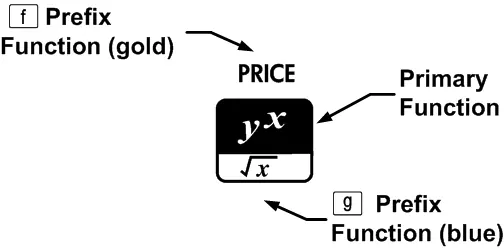
- Primary function: White letters on the key.
- Gold prefix function: Accessed by pressing the f key first.
- Blue prefix function: Accessed by pressing the g key first.
Model compatibility
- Designed for financial and mathematical calculations.
- Complies with FCC Class B digital device limits.
- Not intended for use with rechargeable batteries.

Manual page author
David Miller
Documentation analyst
Organizes user manual content into clear summaries, with attention to model details, product context, and everyday usability.