General / Other Manuals
User Guide for HP Latex 126-inch Free-Fall Roll Kit
Quick guide for the HP Latex 126-inch Free-Fall Roll Kit, covering substrate loading configurations, maintenance procedures for rollers, and system error troubleshooting.
Table of contents
Manual images
Jump to the sectionQuick guide from the manual
This document provides operational procedures for the HP Latex 126-inch (320 cm) Free-Fall Roll Kit. This accessory is designed for short-run or low-volume jobs, allowing users to cut and remove prints immediately as they exit the printer. It is compatible with HP Latex 1500 and HP Latex 2700/FS50/FS60 series printers.
Substrate configurations
Before loading, access the Internal Print Server and select the appropriate substrate loading/unloading configuration. The free-fall configuration maintains tension between the input roll and the tension roller, allowing for easy cutting after the tension roller.
Loading a roll (Free-fall configuration)
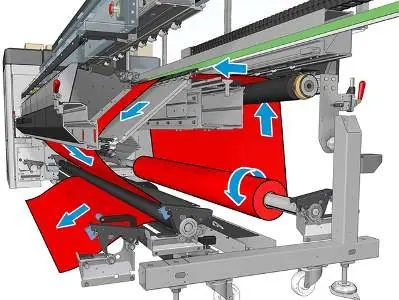
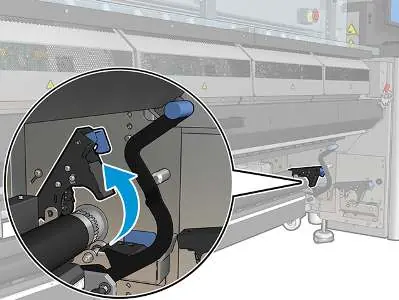
- Ensure the tension roller lever is raised.
- Unlock the tension roller at both ends.
- Move the roll forward to create space for feeding the substrate behind the roll.
- Feed the substrate, then push the roll back, ensuring fingers are clear of the black substrate guide.
- Close the latches on both sides.
- Align the substrate edge using the rulers on the output spool and tension roller.
- Ensure the support is evenly tensioned and flat, then close the tension roller lever.
- Click Finish on the Internal Print Server.
Loading a roll (Roll-to-collector configuration)
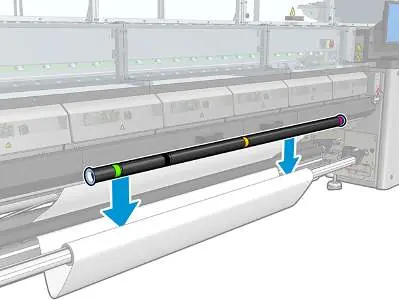
This setup adds a collector roll and tension bar. Choose a tension bar length matching the substrate width using the provided tubes and end collars. Follow the free-fall loading procedure, then attach the substrate to the collector core with tape, ensuring no wrinkles. Use the Internal Print Server to advance the substrate until a loop forms, then place the tension bar in the loop and activate the collector.
Maintenance
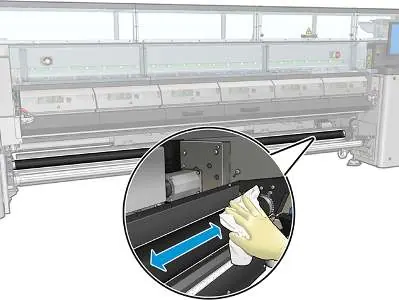
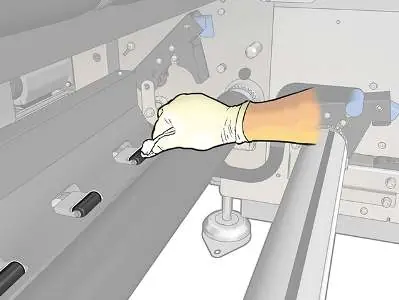
Clean the free-fall roller whenever it is visibly dirty or if substrate feeding becomes inconsistent. Ensure the printer is not printing and the substrate is unloaded before starting. Use a clean cloth dampened with water or isopropyl alcohol (do not use petroleum-based cleaners). Rotate the roller manually to clean the entire surface. For pressure rollers, open the latches, move the roller forward, and lower the pressure roller lever to access the drive wheels for cleaning.
Diagnostics and troubleshooting
The Internal Print Server provides specific diagnostic tests for the kit, including electronic connectivity checks, sensor verification, and motor tests. If system errors occur (e.g., 10.04.12:10, 41.05.00:51), follow the recommended actions such as checking fuses, verifying sensor connections, or clearing potential jams. If problems persist, contact your maintenance service representative.
Manufacturer information
HP Inc.
Practical help
Common problems
Substrate feeding is not smooth or roller slips
Clean the free-fall roller and drive wheels with water or isopropyl alcohol.
Error 41.05.01:51 (Tension roller latch open)
Ensure the tension roller latches are fully closed at both ends and verify sensor connectivity.
Error 41.10.01:08 (Possible collector jam)
Check the substrate collector sensor for obstructions and ensure it is functioning correctly.
Error 10.04.12:10 (MF fuse blown)
The 42V substrate motor fuse (F11/F12) has blown. Install a new fuse; if it blows again, contact maintenance.
Before use
- Ensure the printer is not currently printing.
- Access the Internal Print Server to select the correct loading configuration.
- Verify the tension roller lever is in the correct position.
- Ensure the tension bar length matches the substrate width (for collector configuration).
- Check that the substrate is flat and free of wrinkles.
Specs in practice
- Winding direction: Outward
- Recommended for larger output rolls; allows for larger diameter capacity.
- Winding direction: Inward
- Limits output roll diameter to 200mm to prevent the tension bar from touching the roll.
Images and diagrams
- Substrate path: Input mandrel -> Main roller -> Platen -> Front diverter -> Tension roller -> Floor.
- Tension bar assembly: Use provided tubes and end collars to match substrate width.
- Loop formation: Substrate must form a loop between the tension roller and the collector.
Model compatibility
- Compatible with HP Latex 1500.
- Compatible with HP Latex 2700/FS50/FS60 series.

Manual page author
Emily Carter
User documentation editor
Prepares concise manual descriptions and highlights the most useful setup, operation, and maintenance information for readers.