General / Other Manuals
HP 12c Platinum Financial Calculator User Manual
Quick guide for the HP 12c Platinum financial calculator, covering basic operations, financial calculations, programming, and battery replacement.
Table of contents
Quick guide from the manual
This document provides essential instructions for using the HP 12c Platinum financial calculator. It covers basic arithmetic, financial functions, programming, and maintenance. Always refer to the full manual for complex scenarios.
Device Overview
The HP 12c Platinum is a programmable financial calculator. It supports both RPN (Reverse Polish Notation) and ALG (Algebraic) modes. The keyboard features primary, secondary (yellow), and tertiary (blue) functions accessed via prefix keys.
Getting Started
To turn the calculator on, press the ON key. It will turn off automatically after 12 minutes of inactivity. You can adjust display contrast by holding the f key and pressing + or -.
Basic Operations
You can choose between RPN and ALG modes by pressing f followed by the respective mode key. In RPN mode, intermediate results are stored automatically. In ALG mode, standard algebraic order of operations is used.
Financial Functions
The calculator features dedicated keys for financial calculations: n, i, PV, PMT, and FV. Always clear the financial registers before starting a new calculation by pressing f CLEAR FIN.
Programming
You can store sequences of keystrokes as programs. Press f P/R to enter program mode. Programs are stored in the program memory and can be executed in Run mode by pressing R/S.
Maintenance
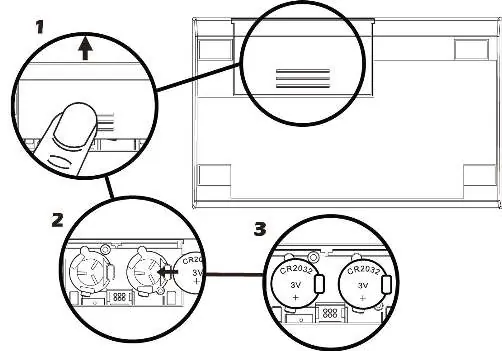
If a battery symbol appears on the display, the battery power is low. Replace the two CR2032 lithium batteries one at a time to avoid losing data.
Troubleshooting
If the calculator displays 'Error', press any key to clear it. If 'Pr Error' appears, the continuous memory has been reset, and you may need to re-enter data or programs.
Manufacturer information
HP Inc.
Practical help
Common problems
Calculator displays 'Error'
Press any key to clear the error message.
Calculator displays 'Pr Error'
The continuous memory has been reset. Re-enter data or programs as needed.
Low battery symbol appears
Replace the two CR2032 lithium batteries immediately to avoid data loss.
Before use
- Ensure batteries are installed correctly.
- Clear financial registers using f CLEAR FIN.
- Select the desired mode (RPN or ALG).
- Set the desired date format if using calendar functions.
Images and diagrams
- The battery replacement diagram shows the three-step process: 1. Remove the battery cover, 2. Remove the old battery, 3. Insert the new CR2032 battery with the + side facing up.
Model compatibility
- Financial calculations may differ slightly in the UK compared to the US; refer to Appendix G for details.

Manual page author
Michael Turner
Technical manual editor
Reviews PDF manuals for structure, safety notes, and practical product details so readers can find the right information quickly.