Computers / Laptops
User Guide for HP OMEN MAX 16 Gaming Laptop PC 16-ak0023dx
Get to know your HP OMEN MAX 16 Gaming Laptop PC 16-ak0023dx. This guide covers key specifications, performance features, display details, battery life, and support resources to help you get the most out of your gaming laptop.
Table of contents
Quick Guide and Overview
The HP OMEN MAX 16 Gaming Laptop PC 16-ak0023dx is a high-performance gaming device featuring the latest AMD Ryzen AI processor and NVIDIA GeForce RTX graphics. This document outlines the key specifications, thermal management features, and support resources available for your device.
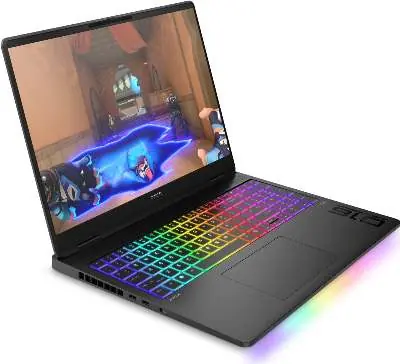
Key Specifications
- Processor: AMD Ryzen AI 9 HX 375 with integrated NPU (55 NPU TOPS).
- Graphics: NVIDIA GeForce RTX 5070 Ti Laptop GPU (12 GB GDDR7 dedicated).
- Memory: 32 GB DDR5-5600 MT/s (2 x 16 GB).
- Storage: 1 TB PCIe Gen4 NVMe M.2 SSD.
- Display: 16-inch diagonal, WQXGA (2560 x 1600), 60-240 Hz, 3 ms response time, IPS, anti-glare, Low Blue Light.
- Operating System: Windows 11 Home.
Performance and Cooling
The laptop utilizes the OMEN Tempest Cooling Pro thermal architecture. This system includes a vapor chamber and liquid metal coating on both the CPU and GPU to ensure maximum performance during intense gaming sessions. Users can utilize the OMEN Gaming Hub to access personalized settings, manage performance, and customize the RGB per-key keyboard lighting.
Connectivity and Ports
- Wireless: Wi-Fi 7 (2x2) and Bluetooth 5.4 wireless card.
- Ports: Includes 2 USB Type-C (40Gbps, Power Delivery, DisplayPort 2.1, HP Sleep and Charge), 2 USB Type-A (10Gbps), 1 RJ-45, 1 Headphone/microphone combo, 1 AC Smart pin, and 1 HDMI 2.1.
Battery and Charging
The device is equipped with a 6-cell, 83 Wh Li-ion polymer battery. HP Fast Charge technology allows the battery to charge from 0% to 50% in approximately 30 minutes when the system is shut down. Battery life varies based on usage, with up to 7 hours and 45 minutes for mixed usage.
Support and Warranty
HP provides several support options for this product:
- HP Support Assistant (HPSA): Pre-installed tool to help with PC and printer maintenance.
- Online Support: Visit support.hp.com for technical assistance.
- Social Media Support: Connect via community.hp.com, Twitter @HPSupport, or Facebook.com/HPSupport.
- Warranty: Includes a 1-year limited hardware warranty and 1-year limited technical support for software and initial setup.
Official resources from the manual
Manufacturer information
HP Inc.
Practical help
Common problems
Battery charging speed
Use the provided HP 330W adapter for optimal performance. Charging to 50% takes approximately 30 minutes when the system is off.
Wi-Fi 7 connectivity issues
Wi-Fi 7 functionality requires a compatible Wi-Fi 7 router and Windows 11 OS to function at full speed.
Performance throttling
Ensure the OMEN Tempest Cooling Pro vents are not obstructed. Use OMEN Gaming Hub to manage performance settings and overclocking.
Before use
- Ensure the laptop is charged using the included 330W AC adapter.
- Check for Windows 11 updates upon initial setup.
- Register your product for warranty and support access.
- Install OMEN Gaming Hub to customize lighting and performance.
Specs in practice
- WQXGA (2560 x 1600)
- High-resolution display providing sharp visuals with a 16:10 aspect ratio.
- NPU (55 NPU TOPS)
- Neural Processing Unit dedicated to AI tasks for enhanced productivity and gaming.
- OMEN Tempest Cooling Pro
- Advanced thermal architecture using vapor chamber and liquid metal for heat dissipation.
Model compatibility
- Wi-Fi 7 functionality requires a compatible router and Windows 11.
- Copilot key availability varies by market and is not available in all regions.

Manual page author
David Miller
Documentation analyst
Organizes user manual content into clear summaries, with attention to model details, product context, and everyday usability.