Computers / Laptops
Datasheet for HP Victus Gaming Laptop 16-s0000sa
Quick guide and technical specifications for the HP Victus Gaming Laptop 16-s0000sa. Learn about performance features, display capabilities, connectivity options, and hardware details.
Table of contents
Key Features and Overview
The HP Victus Gaming Laptop 16-s0000sa is designed for high-performance gaming. It features a next-generation AMD processor, modern graphics, and optimized thermal management. The laptop includes an upgraded keyboard and optimization features via the OMEN Gaming Hub to enhance your gaming experience.
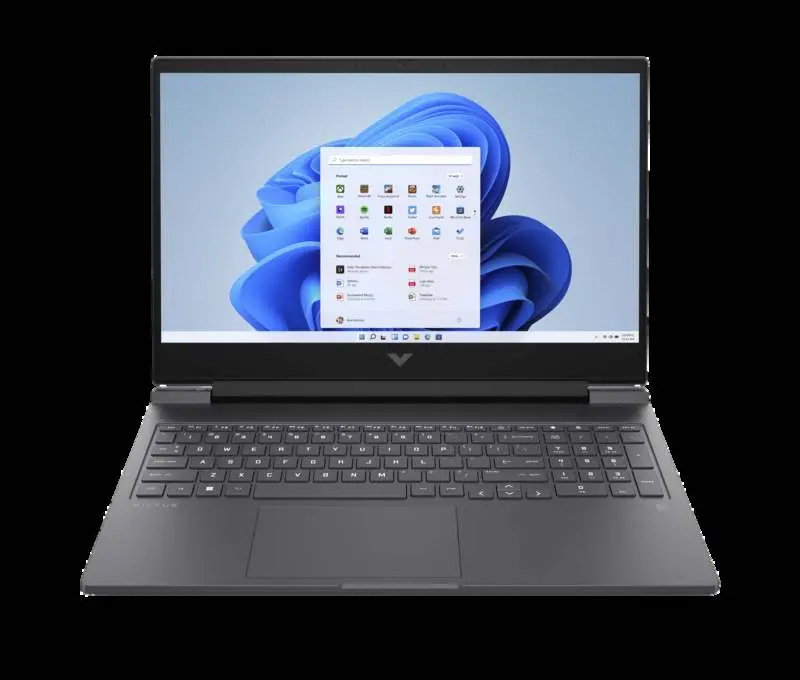
Display and Visuals
- 144Hz FHD Anti-glare Display: Reduces lag and ghosting for smooth gameplay.
- IPS Panel: Provides clear, vivid images with 178-degree wide-viewing angles.
- Flicker-free Technology: Uses DC Dimming to eliminate screen flickering for more comfortable viewing.
Performance and Hardware
- Processor: AMD Ryzen 5 7640HS (up to 5.0 GHz max boost clock, 6 cores, 12 threads).
- Graphics: NVIDIA GeForce RTX 3050 Laptop GPU (6 GB GDDR6 dedicated).
- Memory: 16 GB DDR5-5600 MHz RAM (2 x 8 GB).
- Storage: 512 GB PCIe Gen4 NVMe TLC M.2 SSD.
- Battery: 4-cell, 70 Wh Li-ion polymer battery with HP Fast Charge (0-50% in approx. 30 minutes).
Connectivity and Ports
The laptop is equipped with modern connectivity options to support gaming and peripherals:
- Wireless: MediaTek Wi-Fi 6 MT7921 (2x2) and Bluetooth 5.3.
- Ports: 1x USB Type-A (5Gbps, HP Sleep and Charge), 1x USB Type-C (5Gbps, Power Delivery, DisplayPort 1.4a, HP Sleep and Charge), 2x USB Type-A (5Gbps), 1x HDMI 2.1, 1x RJ-45, 1x AC smart pin, 1x headphone/microphone combo.
- Network: Integrated 10/100/1000 GbE LAN.
Software and Sustainability
- Software: Includes OMEN Gaming Hub, HP Support Assistant, and various trial offers (ExpressVPN, LastPass, Microsoft 365, McAfee).
- Sustainability: Features ocean-bound plastic in the bezel and recycled plastic in keyboard keycaps and scissors. EPEAT Gold registered and ENERGY STAR certified.
Manufacturer information
HP Inc.
Practical help
Common problems
Battery charging speed
Use the provided 200W HP adapter for optimal performance. Charging speed may vary if using a lower-capacity charger.
Wi-Fi 6 connectivity issues
Wi-Fi 6 (802.11ax) is not supported in Belarus; settings will be optimized to local regulatory requirements (802.11ac).
McAfee installation
McAfee is not compatible with Windows 11 in S mode. You must switch out of S mode to use it.
Before use
- Ensure the laptop is charged using the included 200W Smart AC power adapter.
- Check for Windows 11 updates upon initial setup.
- Register for the included 25 GB Dropbox storage promotion.
- Activate trial software (McAfee, Microsoft 365) if required.
- Ensure the laptop is placed on a stable surface for proper thermal management.
Specs in practice
- 144Hz Refresh Rate
- Updates the screen 144 times per second for smoother motion in games.
- USB-C Power Delivery
- Allows the laptop to be charged and connect to external displays using a single USB-C cable.
- PCIe Gen4 NVMe SSD
- High-speed storage interface that significantly reduces boot and game load times.
- HP Fast Charge
- Capability to charge the battery from 0% to 50% in approximately 30 minutes when the system is shut down.
Model compatibility
- Wi-Fi 6 requires a compatible router supporting 80MHz and higher channels.
- Bluetooth 5.3 requires Microsoft OS/Chrome OS support; will function as 5.2 or lower until support is available.
- System-off charging is only supported on 20V Type-C adapters or power banks.

Manual page author
Emily Carter
User documentation editor
Prepares concise manual descriptions and highlights the most useful setup, operation, and maintenance information for readers.