Lighting / Fixtures
Installation Manual for Hunter Perch Point 1-Light Wall Sconce
Step-by-step installation guide for the Hunter Perch Point 1-Light Wall Sconce (models 19420 and 19421). Includes wiring diagrams, safety warnings, mounting instructions, and maintenance tips.
Table of contents
Manual images
Click an image to enlargeImportant Information
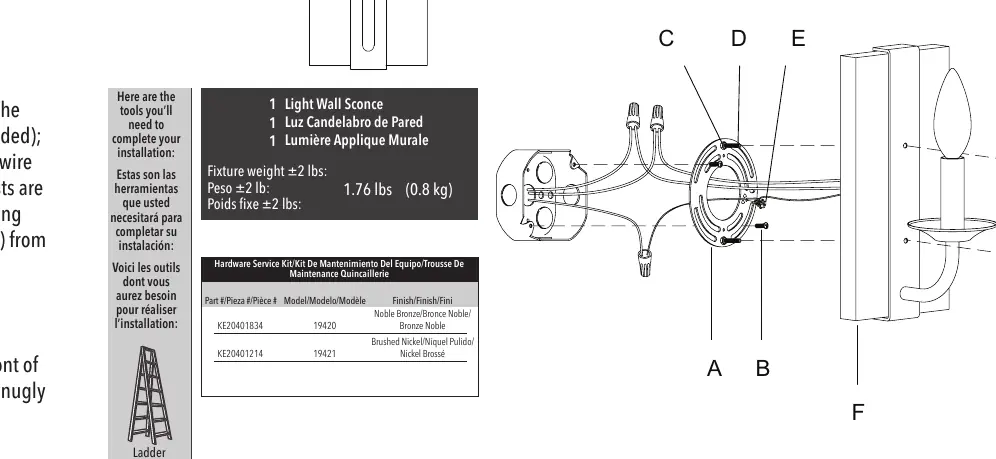
This document provides installation instructions for the Hunter Perch Point 1-Light Wall Sconce (Models 19420 and 19421). Before beginning, ensure you have the necessary tools: a ladder, pliers, and wire strippers. The fixture weighs approximately 1.76 lbs (0.8 kg). Always turn off the power at the circuit breaker before starting any electrical work.
Safety Warnings
- Electrical Shock Hazard: Disconnect power at the circuit breaker before installing the fixture.
- Grounding: The fixture must be grounded. If a ground wire (green or copper) is not present in your junction box, stop installation immediately and consult a qualified electrician.
- Compliance: All wiring must comply with national and local electrical codes (ANSI/NFPA 70).
Preparation
Carefully remove all contents from the carton. Shut off the power and remove the old fixture and mounting bracket from the wall. Remove the new mounting bracket assembly from the bag and remove the cap nuts (G) from the mounting screws (D). Place the mounting plate (A) over the junction box so the mounting screws (D) and nuts (C) extend outward. Adjust the screws (D) so they are exposed 5-6 mm after passing through the backplate (F). Once the position is confirmed, tighten the nuts (C) on the front of the mounting plate to secure the screws. Pull the house wires through the center of the mounting plate (A) and secure the plate to the junction box using the screws (B).
Connecting the Wires
Have a helper support the fixture's weight during wiring. Connect the fixture wires to the power supply wires from the junction box as follows:
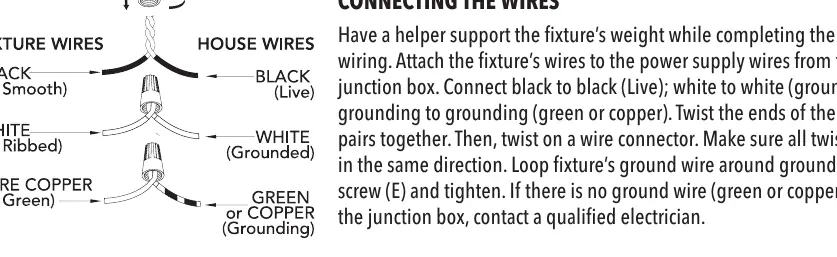
- Black to Black: Live wire.
- White to White: Grounded wire.
- Grounding to Grounding: Green or copper wire.
Twist the ends of the wire pairs together, then secure them with a wire connector, ensuring all twists are in the same direction. Loop the fixture's ground wire around the grounding screw (E) and tighten.
Finishing the Installation
Place the fixture's backplate (F) over the mounting screws (D) so the threads protrude through the holes on the front of the backplate. Tightly screw the cap nuts (G) onto the mounting screws (D) until the backplate is snugly against the wall. Install a light bulb (not included) according to the fixture's specifications, ensuring you do not exceed the recommended wattage. Turn on the power and test the fixture.
Cleaning Tips
Treat the fixture gently to maintain its finish. For regular cleaning, turn off the light and wipe the fixture with a clean, lint-free cotton or microfiber cloth. Never spray cleaner directly onto the fixture.
Practical help
Common problems
No ground wire present in the junction box
Stop installation immediately and contact a qualified electrician.
Fixture does not sit flush against the wall
Adjust the position of the mounting screws (D) by loosening or tightening the nuts (C) until the screws protrude 5-6 mm from the backplate.
Before use
- Turn off power at the circuit breaker.
- Verify the junction box is secure.
- Ensure you have a ladder, pliers, and wire strippers.
- Check for a ground wire (green or copper) in the junction box.
- Have a helper available to support the fixture weight during wiring.
Specs in practice
- Fixture Weight
- 1.76 lbs (0.8 kg). Ensure the junction box can support this weight.
- Wiring Colors
- Black (Live), White (Grounded), Green/Copper (Grounding).
Images and diagrams
- The wiring diagram illustrates the correct connection of house wires to fixture wires using wire connectors.
- The diagram shows the mounting plate (A) and the orientation of mounting screws (D) and nuts (C).
Model compatibility
- Requires a light bulb (not included).
- Do not exceed the recommended wattage for the bulb.

Manual page author
Emily Carter
User documentation editor
Prepares concise manual descriptions and highlights the most useful setup, operation, and maintenance information for readers.