Garden / Hedge Trimmers
Operator's Manual for Husqvarna 215iHD55 Battery Hedge Trimmer
Quick guide and user manual for the Husqvarna 215iHD55 battery hedge trimmer. Includes assembly, operation, maintenance, and troubleshooting instructions.
PDF source: polski · summary: English
Quick answers from the manual
Quick answer
- The Husqvarna 215iHD55 is a battery-powered hedge trimmer. To start it, press the start/stop button until the green LED comes on, then push the front handle trigger and the power trigger. p. 6, 13
Key actions
- To start the product p. 13
- To stop the product p. 14
- To charge the battery p. 13
Problems and fixes
The error LED flashes (Overload)
The cutting attachment cannot move freely. Release the cutting attachment.
p. 15
The product does not start
Push the power trigger and press the start button at the same time.
p. 15Show 2 more answers Show less
Technical specifications
| Parameter | Value | Meaning | Pages |
|---|---|---|---|
| Blade length | 550 mm | Length of the cutting blade | p. 17 |
| Weight | 3.6 kg | Weight without battery | p. 17 |
Where to find it in the PDF
- Product Overview p. 6
- Assembly p. 12
- Operation p. 13
- Maintenance p. 14
- Troubleshooting p. 15
- Technical Data p. 17
Table of contents
Manual images
Click an image to enlargeQuick guide from the manual
The Husqvarna 215iHD55 is a battery-powered hedge trimmer designed for cutting branches and twigs. This document provides essential information for safe and efficient operation.
Product Description
The Husqvarna 215iHD55 is a battery hedge trimmer with an electrical motor. It is intended for cutting branches and twigs.
Product Overview
Key components include:
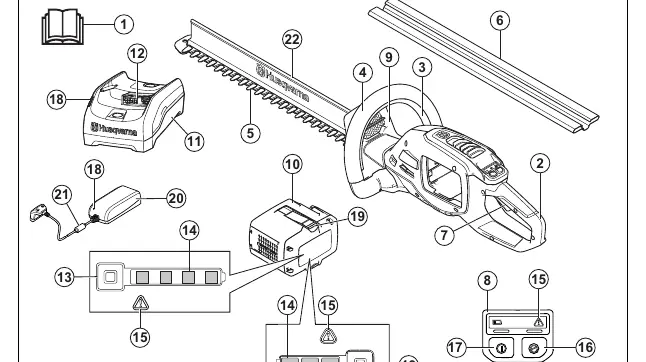
- Rear handle
- Front handle trigger
- Front handle
- Cutter
- Transport guard
- Power trigger
- Control panel
- Battery
- Battery charger (40-C80 or QC80)
Safety
WARNING: This product can be dangerous and cause serious injury or death if used incorrectly. Always read and understand the safety chapter before use.
- Keep the work area clean and well-lit.
- Do not operate in explosive atmospheres.
- Keep children and bystanders away.
- Use personal protective equipment (eye protection, hearing protection, gloves, non-slip boots).
- Remove the battery before maintenance or assembly.
- Do not use the product in bad weather conditions, especially if there is a risk of lightning.
Assembly
This section describes how to assemble and adjust the product.
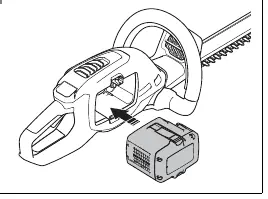
- Connecting the battery: Fully charge the battery, then push it into the battery holder until it clicks into position.
- Installing the battery charger (40-C80): Install the charger on the wall using two screws. Use wall plugs if necessary. Connect the power cord to the charger and a mains socket.
Operation
Before starting, examine the work area and remove objects that can be thrown out. Ensure the cutting attachment is sharp and undamaged.
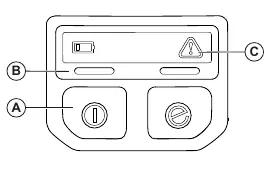
- Starting the product: Push the start/stop button until the green LED comes on. Push the front handle trigger, then push the power trigger.
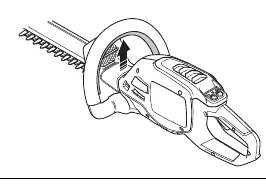
- Operating: Start near the ground and move the product up along the hedge when cutting the sides. Ensure the body of the product does not touch the hedge.
- SavE function: Push the SavE button on the keypad to activate the power-saving function.
- Stopping: Release the power trigger and front handle trigger. Push the start/stop button until the green LED goes off. Remove the battery.
Maintenance
Regular maintenance is required to ensure the product operates correctly. Refer to the maintenance schedule in the manual for daily, weekly, and monthly tasks.
- Clean the product with a dry cloth after use.
- Examine the battery and charger for damages.
- Clean and lubricate the blades before and after use.
- Lubricate the gear housing if it has been disassembled by an approved servicing dealer.
Troubleshooting
If the product does not start, push the power trigger and press the start button at the same time. If the error LED flashes, the cutting attachment may be overloaded or there may be a temperature deviation.
Technical Data
The product features a BLDC motor, a 550 mm blade length, and a weight of 3.6 kg (without battery).
Manufacturer information
Husqvarna
Practical help
Common problems
Product does not start
Push the power trigger and press the start button at the same time.
Error LED flashes (Overload)
The cutting attachment cannot move freely. Release the cutting attachment.
Error LED flashes (Temperature deviation)
Let the product cool down.
Error LED comes on with red light
It is necessary to do servicing on the product. Speak to your service dealer.
Before use
- Examine the work area and remove objects that can be thrown out.
- Examine the cutting attachment for sharpness, cracks, and damages.
- Ensure all nuts and screws are tight.
- Ensure handle and safety devices are not damaged and are attached correctly.
- Ensure covers are not damaged and are attached correctly.
Show more Show less
Specs in practice
- Blade length
- 550 mm
- Blade speed (SavE mode)
- 2400 cuts/min
- Blade speed (without SavE mode)
- 3000 cuts/min
- Weight (without battery)
- 3.6 kg
Images and diagrams
- Fig 1: Product overview with numbered parts.
- Fig 23: Keypad operation.
- Fig 24: Front handle trigger.
- Fig 25: Power trigger.
- Fig 27: Battery installation.
Model compatibility
- Only use BLi and 40-B batteries.
- Only use QC80 and 40-C80 chargers.

Manual page author
Michael Turner
Technical manual editor