Lighting / Fixtures
User Manual for Immax 09114L LED Alarm Clock
Quick start guide and user manual for the Immax 09114L LED Alarm Clock. Learn how to set the time, configure alarms, use the wireless charging feature, adjust the night light, and play white noise.
Table of contents
Manual images
Click an image to enlargeQuick Guide
The Immax 09114L is a multifunctional LED alarm clock featuring wireless charging, white noise playback, and a built-in night light. To ensure proper operation, always use the original power cable and a 20W/PD power adapter. The device is designed for indoor use on stable surfaces.
Product Overview
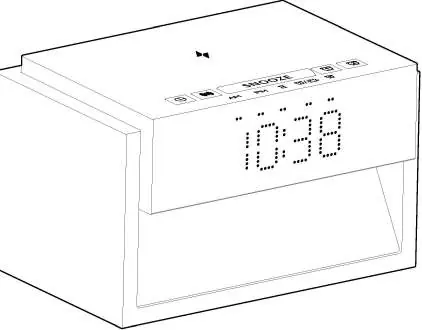
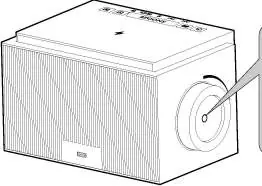
The device features a time display, wireless charging area on top, and control buttons for alarms, snooze, and white noise. A rotary knob on the right side of the lamp body is used to adjust brightness and control the night light.
Connecting Power
Connect the provided USB-C cable to the power input port on the back of the device. Ensure the power adapter used supports 20W/PD output. Warning: Do not open the device or attempt to repair internal components yourself.
Time Setting
To set the time, follow these steps:
- Long press the clock button to enter time setting mode.
- Adjust the hour, then the minutes.
- Confirm and save to exit. A prompt tone will sound upon completion.
- Use the rotary knob on the right side to increase or decrease values.
- Short press the clock button to toggle between 12-hour and 24-hour formats (when white noise is off).
Alarm Setting
The device supports two alarms:
- Short press the alarm button to enable or disable Alarm 1.
- Long press the alarm button to enter setting mode.
- Set the hour, minute, alarm ringtone (25 options), and volume (0-12).
- Settings are saved automatically.
- If the alarm is ringing, short press the alarm button to stop it for the day.
- Alarm 1 and Alarm 2 cannot be set to the same time. If attempted, the system defaults to 7:00 for Alarm 1 and 21:00 for Alarm 2.
White Noise and Timer
To use the white noise feature:
- Short press the white noise button in time display mode to activate.
- Continue pressing to cycle through 20 tracks.
- Long press the white noise button to exit the mode.
- Countdown Timer: While in white noise mode, short press the white noise button to cycle through 30, 60, 90, or 120 minutes.
Snooze and Night Light
Snooze Function: When the alarm rings, short press the SNOOZE button to activate snooze (10 minutes). Pressing the button a fourth time stops the alarm for the day.
Night Light: Rotate the knob on the right side of the device to turn on or adjust the night light brightness (High, Medium, Low, Off). Long press the knob to turn it off.
Wireless Charging
Place your compatible device on the wireless charging area on top of the clock. The indicator light will turn red during charging and turn off when complete. This feature requires a 20W/PD power adapter.
Technical Specifications
- Power Input: 9V/2.22A or 12V/1.67A (PD 20W)
- Wireless Charging Output: 10W MAX
- Light Temperature: 3000K ± 400K (Warm White)
- LEDs: 16 pieces
- Dimensions: 17.3 x 11 x 10 cm
- Weight: 570g
Safety and Care
- Use only the original power cable.
- Do not use an extension cable or splitter.
- Do not place on slopes greater than 6 degrees.
- Keep away from high temperatures and humidity.
- Clean the surface with a dry, soft cotton cloth. Do not use chemical cleaning agents.
- The light source is not replaceable.
Manufacturer information
Immax
Practical help
Common problems
Alarm does not ring
Check if the alarm is enabled (indicator light should be on).
Wireless charging not working
Ensure you are using a 20W/PD power adapter. Standard adapters may not provide sufficient power.
Lights flashing or noise
Replace the power supply unit immediately.
Before use
- Use only the original power cable.
- Ensure the power adapter supports 20W/PD output.
- Place the device on a stable, flat surface (max 6-degree slope).
- Do not cover the power supply with cloth or paper.
- Ensure the device is not exposed to high humidity.
Specs in practice
- Wireless Charging
- 10W output; requires 20W/PD adapter.
- Light Temperature
- 3000K provides a warm white light.
Images and diagrams
- The rotary knob on the right side controls both night light intensity and brightness settings.
- Top buttons are used for alarm configuration, snooze, and white noise selection.
Model compatibility
- Requires 20W/PD power adapter for full functionality.
- Alarm clock cannot be used on slopes greater than 6 degrees.

Manual page author
David Miller
Documentation analyst
Organizes user manual content into clear summaries, with attention to model details, product context, and everyday usability.