Lighting / Fixtures
User Manual for Immax IDEAL LED Table Lamp
Quick guide for the Immax IDEAL LED Table Lamp. Learn how to operate the light, set the clock and alarm, use the wireless charging features, and replace the backup battery.
Table of contents
Quick Guide
The Immax IDEAL LED Table Lamp is a multifunctional device featuring adjustable lighting, wireless charging for phones and headphones, a watch charging stand, and a built-in clock with alarm and calendar functions. The device comes fully assembled.
- Light Control: Use the touch switch (B) to turn the light on/off and adjust brightness. Press and hold for 3 seconds to change color temperature (5000K, 2700K, 4000K).
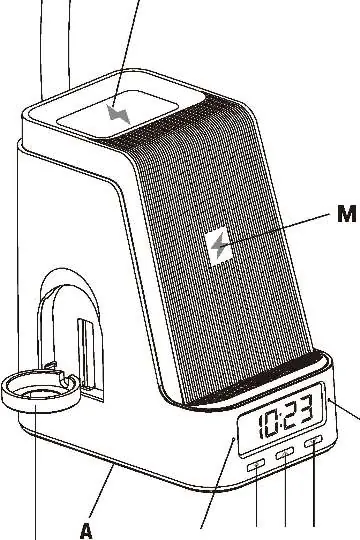
- Wireless Charging: Place Qi-certified devices on the charging area (M or N). A red indicator light (S or V) confirms charging.
- Watch Charging: Requires a separate wireless watch charger (not included). Insert the charger into the stand (P) and connect to the USB port (Q or R).
- Clock/Alarm: Use the 'Setting Button' (C) to adjust time, date, and alarm settings.
Setup & Installation
1. Remove the lamp from the packaging and place the base (A) on a flat surface.
2. Connect the power adapter (J) to the connector (K) at the rear of the lamp.
3. Plug the adapter (L) into a standard 120V socket. A beep and brief flash of green indicators (S and V) confirm power connection.
4. Adjust the lamp arm vertically (0° to 90°) as needed. Hold the base while adjusting to prevent tipping.
Light Operation
The touch switch (B) controls the main light:
- On/Brightness: Touch once for level 1, twice for level 2, three times for level 3, and four times to turn off.
- Color Temperature: Press and hold switch (B) for three seconds to cycle through 5000K, 2700K, and 4000K modes.
Clock, Calendar & Alarm Settings
Use the following buttons for settings:
- C (Setting Button): Enter/exit setting mode, confirm settings.
- D (Up Button): Increase value.
- E (Down Button): Decrease value.
Clock: In normal mode, press and hold C to enter settings. Sequence: 12/24h mode, hour, minutes.
Calendar: Press C to display date. Press and hold C to set (Year-Month-Day).
Alarm: Press C twice to display A1. Press and hold C to set time. Use D to turn the alarm on/off. When the alarm sounds, press any button to stop it. It will turn off automatically after 10 minutes if no button is pressed.
Wireless Charging
The lamp supports Qi-certified wireless charging.
- Phone/Headphones: Place the device face up in the center of the charging area (M or N).
- Indicator: A red light (S or V) indicates active charging.
- Note: The device may become warm during charging, which is normal.
Watch Charging Stand
To charge a smartwatch, you need a separate wireless watch charger (not included).
1. Remove the cover (T) and insert the watch charger cable into the hole on the stand (P).
2. If the charger does not fit securely, use one of the included silicone covers.
3. Connect the charger to the USB-A or USB-C port (Q or R) and replace the cover (T).
Battery Replacement
The lamp uses a CR2032 battery for clock memory.
1. Use a screwdriver to remove the battery compartment cover (U) at the base of the lamp.
2. Insert the CR2032 battery with the '+' side facing up.
Safety & Maintenance
- Safety: Do not touch the LED panel (G) directly after prolonged use as it may be hot. Use only the original power cord. Do not use if the cord is visibly damaged.
- Cleaning: Wipe the surface with a soft cloth or duster. Avoid abrasive or chemical agents.
- Storage: If not using for a long time, disconnect the power adapter and remove the battery to prevent leakage.
Manufacturer information
Immax
Practical help
Common problems
Light flashes or makes noise
Replace the power supply immediately.
Wireless charging not working
Ensure the device is Qi-certified and properly centered on the charging area (M or N).
Watch charger does not fit in stand
Use one of the two included silicone covers provided in the package.
Before use
- Place the lamp base on a flat, stable surface.
- Connect the power adapter to the lamp and a standard 120V socket.
- Verify the device is Qi-certified before attempting wireless charging.
- Ensure the watch charger (not included) is compatible with the stand.
Specs in practice
- Luminous flux
- 800 lm (Total brightness output).
- Color temperature
- Adjustable between 5000K (Cool), 2700K (Warm), and 4000K (Neutral).
Images and diagrams
- Diagram 1: Illustrates the vertical adjustment range of the lamp arm (0-90 degrees).
- Diagram 2: Identifies the wireless charging areas (M and N) and the watch stand (P).
Model compatibility
- Wireless charging requires a Qi-certified device.
- Watch charging requires a separate wireless watch charger (not included).
- USB ports (Q and R) provide 5V, 1A output for charging devices.

Manual page author
Emily Carter
User documentation editor
Prepares concise manual descriptions and highlights the most useful setup, operation, and maintenance information for readers.