Lighting / Smart Lighting
User Manual for Immax NEO Smart Reflektor 20W
Comprehensive user guide for the Immax NEO Smart Reflektor 20W. Includes detailed installation instructions, wiring diagrams, app setup procedures, and integration steps for Amazon Alexa and Google Home.
PDF source: CS · summary: English
Quick answers from the manual
Quick answer
- The Immax NEO Smart Reflektor 20W is a Wi-Fi connected LED floodlight. It is installed via hardwiring and controlled through the Immax NEO PRO app or voice assistants like Alexa and Google Home. p. 1, 2
Key actions
- Reset the device for pairing p. 2
- Connect wiring p. 1
First start
- Download Immax NEO PRO app, register, and add device. p. 1, 2
Show 4 more answers Show less
Problems and fixes
Device not pairing
Reset the device by switching it off and on 3 times. Ensure 2.4GHz Wi-Fi is active.
p. 2Maintenance and reset
- Reset by switching power off and on 3 times. p. 2
Technical specifications
| Parameter | Value | Meaning | Pages |
|---|---|---|---|
| Power | 20W | Power consumption | p. 1 |
| IP Rating | IP65 | Protection against dust and water | p. 1 |
Where to find it in the PDF
- Technical Specs and Installation p. 1
- App Setup and Smart Home p. 2
Table of contents
Manual images
Click an image to enlargeQuick Guide
The Immax NEO Smart Reflektor 20W is a Wi-Fi enabled LED floodlight designed for outdoor and indoor use. To get started, ensure the device is professionally installed according to local electrical regulations. Download the Immax NEO PRO app, register an account, and follow the in-app instructions to pair the device. The light supports voice control via Amazon Alexa and Google Home.
Installation
Warning: Installation must be performed by a qualified electrician. Ensure the power supply is disconnected before starting.
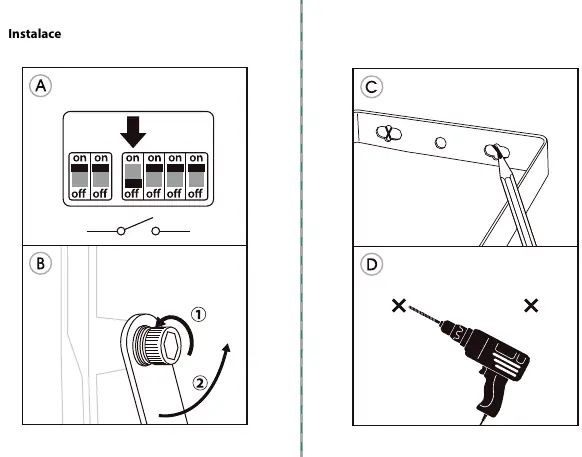
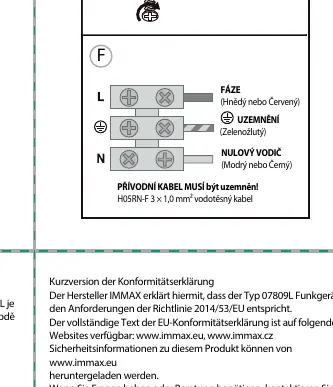
- Wiring: Connect the wires according to the diagram:
- Phase (L): Brown or Red wire.
- Ground: Green/Yellow wire.
- Neutral (N): Blue or Black wire.
- Use a waterproof cable (H05RN-F 3 x 1.0 mm²) for the connection.
- Ensure the device is properly grounded.
- Do not install near heat sources or in areas with excessive moisture.
App Setup
To control the floodlight, you must connect it to the Immax NEO PRO app:
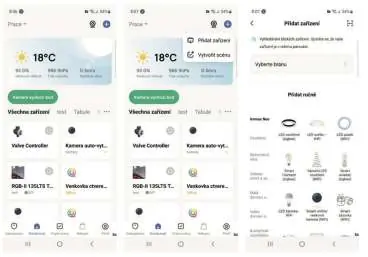
- Download and install the Immax NEO PRO app from the App Store or Google Play.
- Ensure your smartphone is connected to a 2.4GHz Wi-Fi network.
- Reset the device: Turn the light off and on 3 times using the wall switch. Wait 1-2 seconds between switching. The light will begin to flash, indicating it is in pairing mode.
- Open the app, select the option to add a new device, and follow the on-screen prompts to complete the pairing.
Smart Home Integration
Amazon Alexa
- In the Alexa app, go to Skills and search for "Immax Neo Pro".
- Enable the skill and link your Immax NEO PRO account.
- Once linked, discover devices to control the floodlight via voice commands.
Google Home
- In the Google Home app, go to Home Control.
- Add a new device and select "Immax Neo Pro".
- Log in with your Immax NEO PRO credentials to sync your devices.
Safety and Maintenance
- Do not disassemble or modify the device.
- If the device emits smoke or strange odors, disconnect power immediately and contact support.
- Clean only with a soft, dry cloth. Do not use solvents or aggressive cleaning agents.
- Keep out of reach of children.
Technical Specifications
- Power: 20W
- Voltage: AC 230V
- Color Temperature: 2700K-6500K (CCT + RGB)
- Luminous Flux: 1620lm
- Beam Angle: 120°
- IP Rating: IP65
- Connectivity: Wi-Fi IEEE 802.11b/g/n (2.4GHz)
Manufacturer information
Immax
Practical help
Common problems
Device not found in app
Ensure the device is in pairing mode (flashing) by resetting it (turn off/on 3 times). Check that your phone is on a 2.4GHz Wi-Fi network.
Connection drops
Verify the Wi-Fi signal strength at the installation location. Ensure the router is 2.4GHz compatible.
Before use
- Ensure power is disconnected at the circuit breaker.
- Verify you have a 2.4GHz Wi-Fi network available.
- Download the Immax NEO PRO app.
- Ensure the installation site is suitable for an IP65 rated device.
- Use a compatible waterproof cable (H05RN-F 3 x 1.0 mm²).
Show more Show less
Images and diagrams
- The wiring diagram illustrates the connection of Phase (Brown/Red), Ground (Green/Yellow), and Neutral (Blue/Black) wires to the terminal block.
Model compatibility
- Requires 2.4GHz Wi-Fi network.
- Compatible with Amazon Alexa and Google Home voice assistants.

Manual page author
Michael Turner
Technical manual editor