Lighting / Fixtures
Immax TIT LED Table Lamp User Guide
Quick guide for Immax TIT LED table lamp (08990L, 08991L). Learn how to use the touch controls, adjust brightness and color temperature, and use the integrated Qi wireless charger.
Table of contents
Manual images
Click an image to enlargeQuick Guide
The Immax TIT LED table lamp features adjustable brightness, three color temperature modes, and a built-in Qi wireless charger. Ensure the lamp is placed on a stable surface and connected to a power source before use. Use the push-button for power and color temperature, and the rotary switch for brightness.
Product Description
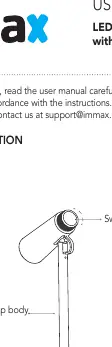
The lamp consists of a lamp body, a lamp head with adjustable angle, and a base containing the Qi wireless charging pad. The controls are located on the lamp head.
Controls
- Push-button switch: Press briefly to turn the lamp on or off. Press and hold to cycle through the CCT color temperatures: warm, natural, and cool.
- Rotary switch: Turn clockwise to increase brightness and counterclockwise to decrease brightness.
Qi Wireless Charging
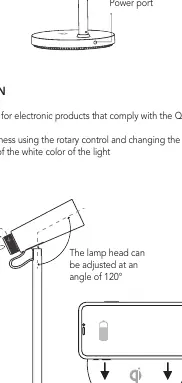
The base of the lamp includes a Qi wireless charger. Place a Qi-compatible electronic device on the designated area on the base to begin charging. An indicator light shows the charging status.
Adjustments
The lamp head can be adjusted at an angle of up to 120 degrees to direct light where needed.
Maintenance and Safety
- Clean the surface only with a dry, soft cotton cloth. Do not use cleaning agents.
- The light source is non-replaceable.
- Do not disassemble or repair the product yourself to avoid mechanical damage and loss of warranty.
- Use only the provided adapter.
Technical Specifications
- Material: ABS + metal
- LEDs: 18pcs (12 cold, 6 warm)
- Power Consumption: 12W
- Input: DC12V/1A (100-240V AC, 50/60Hz)
- Qi Charging Power: 5W
- Color Temperature: 3000K / 4200K / 5500K
- CRI: >85
- IP Rating: IP20
- Weight: 490g
Manufacturer information
Immax
Practical help
Common problems
Lamp does not turn on
Check if the power adapter is securely connected to the lamp and the wall outlet.
Qi charging not working
Ensure the device is Qi-compatible and placed correctly on the charging indicator area.
Brightness or color temperature not changing
Ensure you are using the correct control (rotary for brightness, push-button for CCT) and that the lamp is powered on.
Before use
- Verify the power adapter is connected to a 100-240V AC outlet.
- Place the lamp on a flat, stable surface.
- Ensure the device to be charged supports the Qi wireless protocol.
- Check that the lamp head is positioned correctly for your needs.
Images and diagrams
- The push-button and rotary switch are located on the lamp head for easy access.
- The wireless charging indicator is located on the base.
- The lamp head can be tilted up to 120 degrees.
Model compatibility
- Qi wireless charging is only compatible with devices that comply with the Qi protocol.

Manual page author
Michael Turner
Technical manual editor
Reviews PDF manuals for structure, safety notes, and practical product details so readers can find the right information quickly.