Lighting / Fixtures
Installation Manual for Immax NEO FINO Smart Pendant Light
Quick installation guide for Immax NEO FINO smart pendant lights. Includes wiring steps, technical specifications, and safety precautions for models 07246-80, 07246-120, 07290-120G, and 07291-80G.
Table of contents
Quick guide from the manual
This document provides essential installation and safety information for the Immax NEO FINO smart pendant light. Before beginning any installation, ensure the main power supply is switched off. This device is designed for indoor use only (IP20 rating) and must be installed at a safe distance from illuminated objects (minimum 0.5m).
Technical Specifications
- Protocol: Zigbee 3.0
- Input Voltage: AC 220-230V 50/60Hz
- Power Consumption: 55W / 72W (depending on model)
- Color Temperature: CCT 2700-6500K (adjustable)
- Dimmable: Yes
- Lifespan: 50,000 hours
- CRI (Ra): <86
- Warranty: 3 years
Installation Instructions
The installation process involves the following steps:
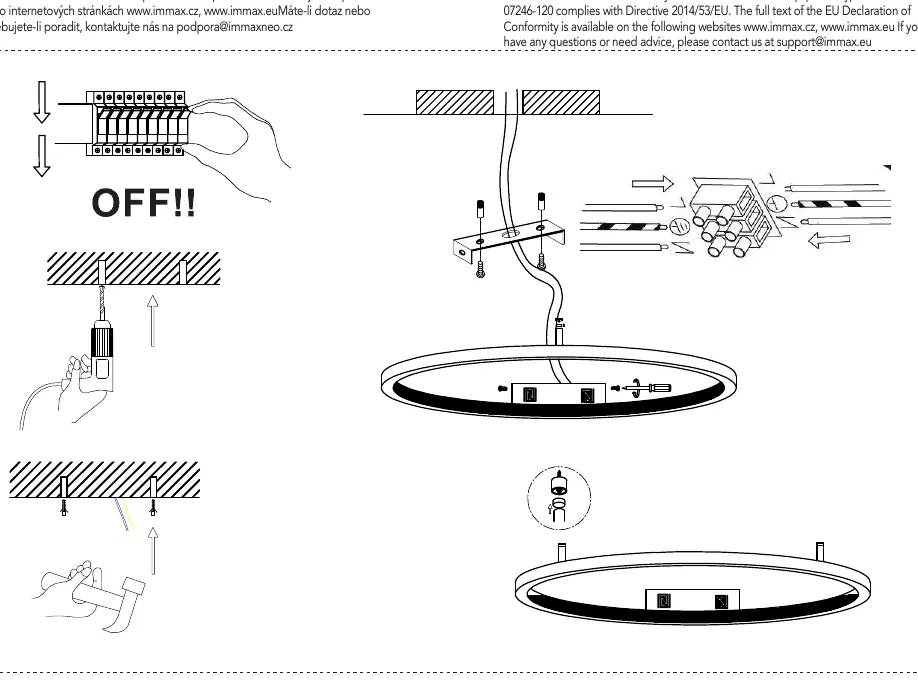
- Safety First: Turn off the main circuit breaker to prevent electric shock.
- Preparation: Mark the drilling points on the ceiling or wall based on the mounting bracket dimensions.
- Mounting: Drill the holes and secure the mounting bracket to the surface.
- Wiring: Connect the mains power supply wires to the terminal block on the light fixture, ensuring correct polarity and secure connections.
- Final Assembly: Attach the light fixture to the mounted bracket and ensure it is firmly fixed in place.
- Testing: Restore power and test the light using the included remote control or smart home application.
Support and Compliance
The manufacturer declares that this radio equipment complies with Directive 2014/53/EU. For technical support or questions, please contact [email protected] or visit www.immax.cz / www.immax.eu.
Official resources from the manual
Manufacturer information
Immax
Practical help
Common problems
Light does not turn on
Check if the main circuit breaker is on and verify that the wiring connections to the terminal block are secure.
Remote control not working
Ensure the light is properly paired with the Zigbee gateway and that the remote control has fresh batteries.
Before use
- Turn off the main power supply before starting installation
- Verify that the installation surface can support the weight of the fixture
- Ensure the input voltage matches the 220-230V requirement
- Check that the installation location is indoors and dry (IP20)
Specs in practice
- CCT 2700-6500K
- Adjustable color temperature ranging from warm white (2700K) to cool daylight (6500K).
Images and diagrams
- The diagram illustrates the necessity of turning off the power supply before installation.
- The wiring section shows the connection of mains power to the fixture's terminal block.
- The mounting section demonstrates the drilling and securing process for the base bracket.
Model compatibility
- Requires a Zigbee 3.0 compatible gateway for smart features.
- Suitable for ceiling or wall mounting.

Manual page author
Michael Turner
Technical manual editor
Reviews PDF manuals for structure, safety notes, and practical product details so readers can find the right information quickly.