Tools / Soldering Stations
JBC DDE 2-Tool Control Unit Instruction Manual
Comprehensive user guide for the JBC DDE 2-Tool Control Unit. Includes setup instructions, peripheral configuration, operation modes, maintenance, and technical specifications.
Quick answers from the manual
Quick answer
- The JBC DDE is a 2-tool control unit for simultaneous soldering and desoldering. It features advanced soldering profiles, real-time graphics, and support for various peripherals like pedals and fume extractors. p. 2, 5
Key actions
- Configure peripherals p. 7, 8
- Update firmware p. 6
First start
- Connect power and tools, then turn on the main switch. p. 2, 3
Show 4 more answers Show less
Problems and fixes
Station error or warning
Press INFO on the screen to see the failure description and how to proceed.
p. 6Maintenance and reset
- Restore station parameters to default values via the Reset menu option. p. 5
Technical specifications
| Parameter | Value | Meaning | Pages |
|---|---|---|---|
| Nominal Power | 370 W | Total power consumption | p. 15 |
| Selectable Temperature | 90 - 450 °C | Operating temperature range | p. 15 |
Where to find it in the PDF
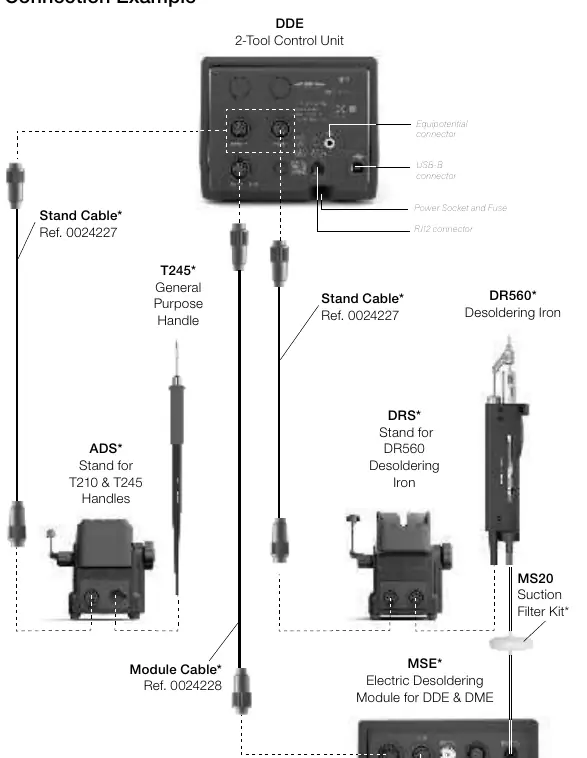
- Connection Example p. 3
- Specifications p. 15
Table of contents
Manual images
Click an image to enlargeQuick Guide
The JBC DDE is a 2-tool control unit designed for simultaneous soldering and desoldering. Before use, ensure the unit matches your local voltage (100V, 120V, or 230V). Connect your tools and stands using the appropriate cables. The unit features an intuitive interface with a default PIN of 0105. Always allow the equipment to cool before performing maintenance.
Features and Compatibility
The DDE supports up to 2 tools and 1 module plus 1 pedal for each tool. It is compatible with a wide range of JBC modular system components, including various stands, handles, and cartridges. Refer to the compatibility table in the manual to select the equipment that best suits your soldering or desoldering needs.
Interface and Operation
The Work Screen provides quick access to station parameters. Key modes include:
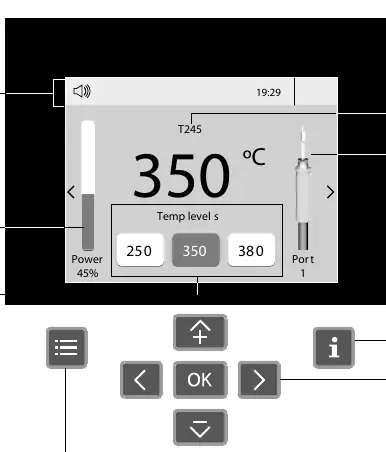
- Work: Tip heats to the selected temperature when lifted from the stand.
- Sleep: Temperature falls to a preset level when the tool is in the stand.
- Hibernation: Power is cut off after longer periods of inactivity.
You can adjust work temperature (90-450°C), sleep temperature, and hibernation delays through the Tool Settings menu.
Advanced Functionalities
The DDE includes advanced features such as:
- Graphics: Real-time tip temperature and power delivery analysis.
- Profiles: Up to 25 configurable soldering profiles to avoid thermal shock.
- Files: Export soldering process data to a USB flash drive in CSV format.
- Update: Firmware updates via USB flash drive.
Peripherals Setup
The unit supports modules, pedals, and fume extractors. Connect modules and pedals via the Peripherals menu. The system automatically detects connections (e.g., MS_a, PD_a). Fume extractors can be connected via RJ12 cable and configured through the Peripherals menu to start automatically when a tool is in use.
Maintenance
Regular maintenance ensures optimal performance:
- Clean the screen with a glass cleaner or damp cloth.
- Clean the casing and tool with a damp cloth (alcohol only for metal parts).
- Periodically check metal parts of the tool and stand.
- Keep the tip surface clean and tinned before storage.
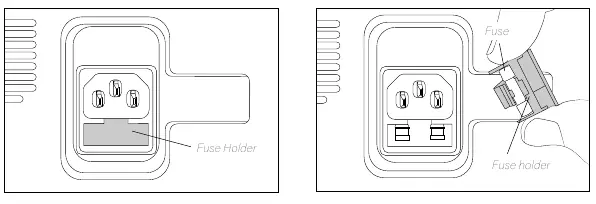
- Replace blown fuses by pulling out the fuse holder and inserting a new fuse.
Safety
Always follow safety guidelines to prevent electric shock, injury, fire, or explosion. Do not use the unit for purposes other than soldering or rework. Ensure the power cord is properly grounded. Do not cover ventilation grills. Keep the workplace clean and use appropriate protection.
Specifications
The DDE 2-Tool Control Unit has a nominal power of 370W and a peak power of 150W per tool. It operates within a temperature range of 90-450°C (190-840°F). The unit dimensions are 148 x 232 x 120 mm with a weight of 3.82 kg.
Practical help
Common problems
Station not detecting tool status
Periodically check that the metal parts of the tool and stand are clean.
Tip oxidation
Maintain the tip surface clean and tinned before storage.
Blown fuse
Pull out the fuse holder, remove the old fuse, and insert a new one.
Before use
- Verify the unit voltage matches your local power supply (100V, 120V, or 230V).
- Connect the power cord to a properly grounded outlet.
- Connect tools and stands using the correct cables.
- Ensure ventilation grills are not covered.
- Check that all cables and tubes are in good condition.
Show more Show less
Specs in practice
- Nominal Power
- 370W total power consumption.
- Selectable Temperature
- 90 - 450 °C / 190 - 840 °F range.
- Peak Power (Tool)
- 150W per tool.
Images and diagrams
- The connection diagram shows how to connect stands, handles, modules, and pedals to the DDE control unit.
- The work screen diagram illustrates the status bar, power indicator, and menu options.
- The fuse replacement diagram shows the location of the fuse holder on the back of the unit.
Model compatibility
- The DDE is compatible with various JBC stands, tools, and cartridges.
- Fume extractors require a minimum software version of 8886160 for DDE/HDE units.
- Up to 4 control units can be connected to a single fume extractor.

Manual page author
Michael Turner
Technical manual editor