Electronics / Speakers Soundbars
JBL 1300MK2 Soundbar System User Guide
Quick start guide for the JBL 1300MK2 soundbar system, covering setup, wall mounting, connections, sound calibration, and wireless pairing.
Table of contents
Manual images
Jump to the sectionQuick guide from the manual
This document provides essential setup and configuration instructions for the JBL 1300MK2 soundbar system. It covers physical installation, audio connections, and wireless pairing of the detachable surround speakers and subwoofer.
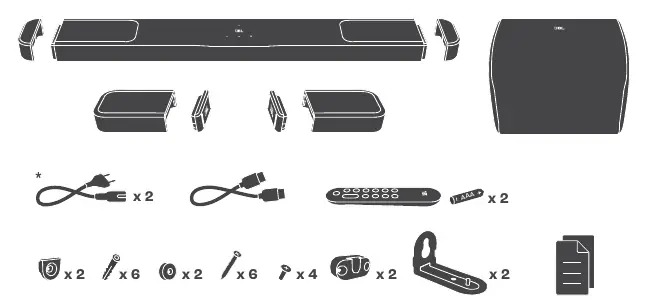
What's in the box
The package includes the main soundbar, detachable surround speakers, subwoofer, power cords (quantity/type varies by region), HDMI cable, remote control with batteries, wall mounting brackets, and screws.
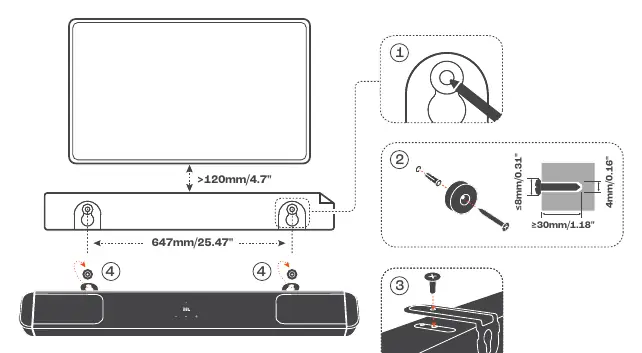
Wall mounting
For wall mounting, ensure a minimum distance of 120mm (4.7") from the TV. Use the provided brackets and screws. Ensure the wall surface can support the weight of the soundbar. Follow the specific drilling dimensions provided in the manual (647mm spacing for the main bar).
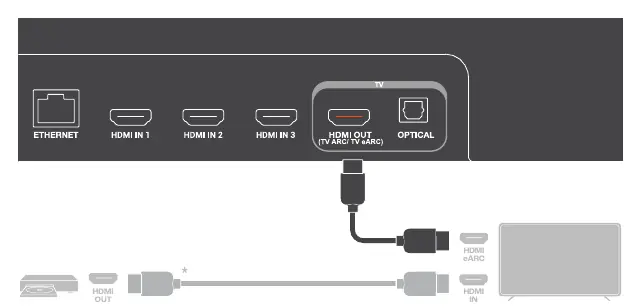
Connections
Connect the soundbar to your TV using the HDMI OUT (TV ARC/TV eARC) port. For eARC TVs, use the eARC-compatible HDMI port on your TV. For ARC-only TVs, use the ARC-compatible port. Additional HDMI IN ports are available for external devices.
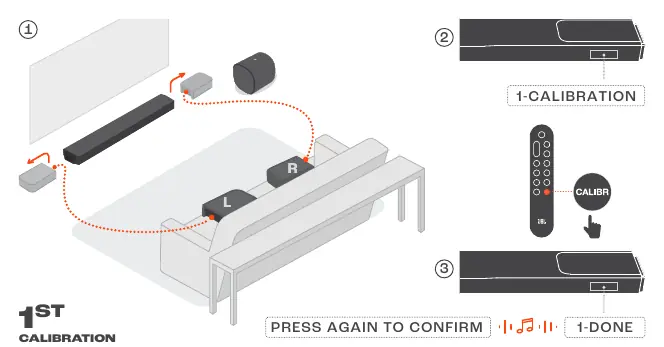
Sound calibration
Sound calibration optimizes audio performance for your room. 1. Place the detachable speakers in their positions. 2. Press the CALIBR button on the remote. 3. Follow the on-screen prompts to confirm calibration (1-DONE, 2-DONE).
Bluetooth and wireless pairing
The rear speakers can be paired via Bluetooth or used as a stereo pair. Use the JBL ONE app to complete the Wi-Fi setup and speaker configuration for optimal performance.
Technical specifications
The system features an 11.1.4 channel configuration with a total power output of 2470W. It supports HDR10+ and Dolby Vision pass-through. The detachable surround speakers have a battery life of up to 10 hours.
Manufacturer information
JBL
Practical help
Common problems
Surround speakers not connecting
Ensure they are charged and follow the Bluetooth pairing procedure described in the manual.
USB playback not working
USB playback is only available in US and APAC versions. In other regions, the USB port is for service only.
Calibration fails
Ensure the detachable speakers are placed correctly and the room is quiet during the calibration process.
Before use
- Check regional power cord compatibility.
- Ensure the TV supports eARC or ARC for optimal connection.
- Download the JBL ONE app for setup.
- Charge the detachable surround speakers.
- Verify wall mounting surface strength.
Specs in practice
- 11.1.4 channel
- The system configuration including main bar, subwoofer, and detachable surround speakers for immersive audio.
Images and diagrams
- Wall mounting diagram shows the 647mm spacing and required screw dimensions.
- Connection diagrams illustrate the difference between eARC and ARC TV setups.
- Sound calibration diagrams show the placement of detachable speakers relative to the seating area.
Model compatibility
- USB playback is restricted to US and APAC versions.
- 5.6-5.64 GHz band is disabled for Australia/New Zealand.

Manual page author
David Miller
Documentation analyst
Organizes user manual content into clear summaries, with attention to model details, product context, and everyday usability.