Electronics / Speakers Soundbars
JBL BAR 1300X Soundbar User Guide
Quick start guide for the JBL BAR 1300X soundbar, covering setup, wall mounting, sound calibration, Bluetooth and Wi-Fi connectivity, and technical specifications.
Table of contents
Quick guide from the manual
This document provides essential instructions for setting up and using the JBL BAR 1300X soundbar system. It covers physical installation, wireless connectivity, sound calibration, and technical specifications. Always read the included safety sheet before operating the device.
Device components
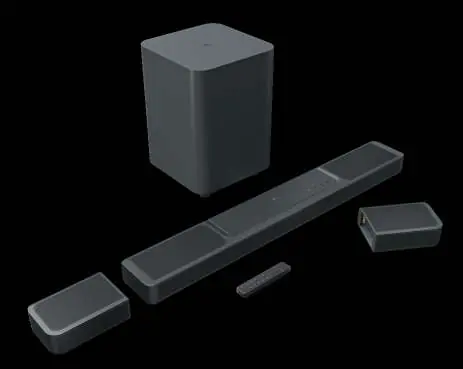
The system includes the main soundbar, a subwoofer, two detachable surround speakers, a remote control, and necessary mounting hardware. Ensure all components are present before beginning installation.
Installation and placement
For optimal performance, place the soundbar in front of your TV. Maintain a distance of at least 5cm from the TV. The detachable speakers should be placed 1-1.4m from the listening position. The subwoofer should be placed 1-6m from the soundbar. Ensure there is at least 10cm of clearance around the subwoofer.
Wall mounting
The soundbar can be wall-mounted. Use the provided template to mark the holes. Ensure the wall structure can support the weight. Use screws with a diameter of 4mm and a length of at least 30mm. The screw head should be no more than 8mm in diameter.
Connections
Connect the soundbar to your TV using HDMI ARC or eARC for the best audio quality. Use the HDMI IN ports to connect external devices like media players. Ensure the power cords are connected to a suitable power outlet.
Setup and calibration
Download the JBL One app on your Android or iOS device to complete the Wi-Fi setup. Once powered on, the soundbar will automatically pair with the detachable speakers and the subwoofer. Perform sound calibration using the remote control to optimize the 3D surround sound experience for your specific room environment.
Bluetooth and Wi-Fi
To use Bluetooth, select the Bluetooth mode on the soundbar. The detachable speakers can function as standalone Bluetooth speakers. Use the JBL One app to connect the soundbar to your home Wi-Fi network for streaming features.
Maintenance and battery
The detachable speakers have built-in batteries. When the battery is low, attach them to the main soundbar to charge. A full charge takes approximately 4 hours. You can also charge them via the USB-C port.
Technical specifications
The system features an 11.1.4 channel configuration with a total power output of 1170W. It supports HDR10 and Dolby Vision. Operating temperature is 0°C to 45°C. USB playback is available only on the US version; for other regions, the USB port is for service only.
Manufacturer information
JBL
Practical help
Common problems
Rear speakers low battery
Attach the detachable speakers to the main soundbar or use the USB-C port to charge them until they reach 100%.
Soundbar not connecting to Wi-Fi
Ensure you are using the JBL One app on your mobile device and follow the in-app instructions for network setup.
Subwoofer or speakers not pairing
The system is designed to pair automatically when powered on. Ensure all units are plugged into power and turned on.
Before use
- Read the safety sheet carefully.
- Check that all components (soundbar, subwoofer, detachable speakers, remote) are included.
- Ensure you have the necessary tools for wall mounting if required.
- Download the JBL One app on your smartphone.
- Verify your TV supports HDMI ARC or eARC.
Specs in practice
- Sound system
- 11.1.4 channel configuration for immersive audio.
- Total power output
- 1170W maximum power output at 1% THD.
- Operating temperature
- The device should be used in environments between 0°C and 45°C.
Images and diagrams
- The manual provides diagrams for wall mounting, showing the required screw dimensions (4mm diameter, 30mm length).
- Placement diagrams illustrate the recommended distances between the soundbar, subwoofer, and listening position.
- Connection diagrams show how to link the soundbar to a TV via HDMI ARC/eARC.
- Calibration diagrams guide the user through the two-step sound optimization process using the remote.
Model compatibility
- USB audio playback is restricted to the US version of the product.
- AirPlay 2 control requires iOS 13.4 or later.
- Some features in the JBL One app may require subscriptions or services not available in all countries.

Manual page author
Michael Turner
Technical manual editor
Reviews PDF manuals for structure, safety notes, and practical product details so readers can find the right information quickly.